So, here is the Documentation of the Project that I have been working on the past Months. I called it “Prototype” for no other reason as not having another name ^^’. But actually its just an plain and simple Kismet Server running on an LaFonera 2100 and using GPS for Positing and Time aswell as an SD Card for the Log Files. So… there were many things to do on that project, so that thing will get quite a bit longer and get some pics.
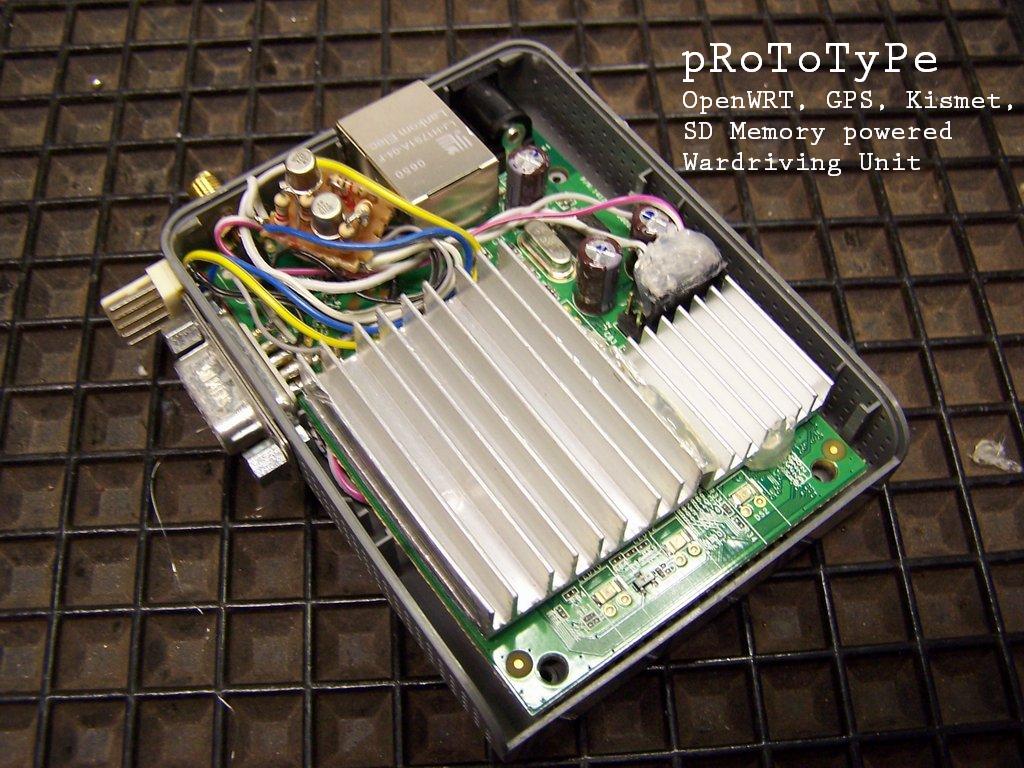
After the installation the use of this system is very easy: Just connect up power, wait about an minute for it to load, attach the GPS Mouse and as soon as the GPS System gots its log, pRoToTyPe will load Kismet and start logging your Wardrive to the SD Card. After you’re done, shutdown the System, grab the SD-Card, plug it into your PC and translate the Kismet Files with this Log Viewer: http://mindflip.org/klv/ or use this Script: http://www.perrygeo.net/wordpress/?p=55 to translate the File into an Google Earth File. Additionally you can look upon what your Kismet Client is doing with this Tool: http://www.d3tr.de/dkc/ (you need to allow your client ip in the /etc/kismet/kismet.conf to access Kismet!) or with cgps http://home.arcor.de/ulf.lamping/gpsd/gpsd.html#mozTocId950639 you can see the GPS Data from the pRoToTyPe Box.
Have fun!
Thanks a lot to:
Digininja, Darren Kittchen, lOrdnicO, beakmyn, tOOdy, lopez1364 and cptdondo !
Well we start with the first thing:
I. Modding the LaFonera Router (Hardware)
- Building an battery pack:
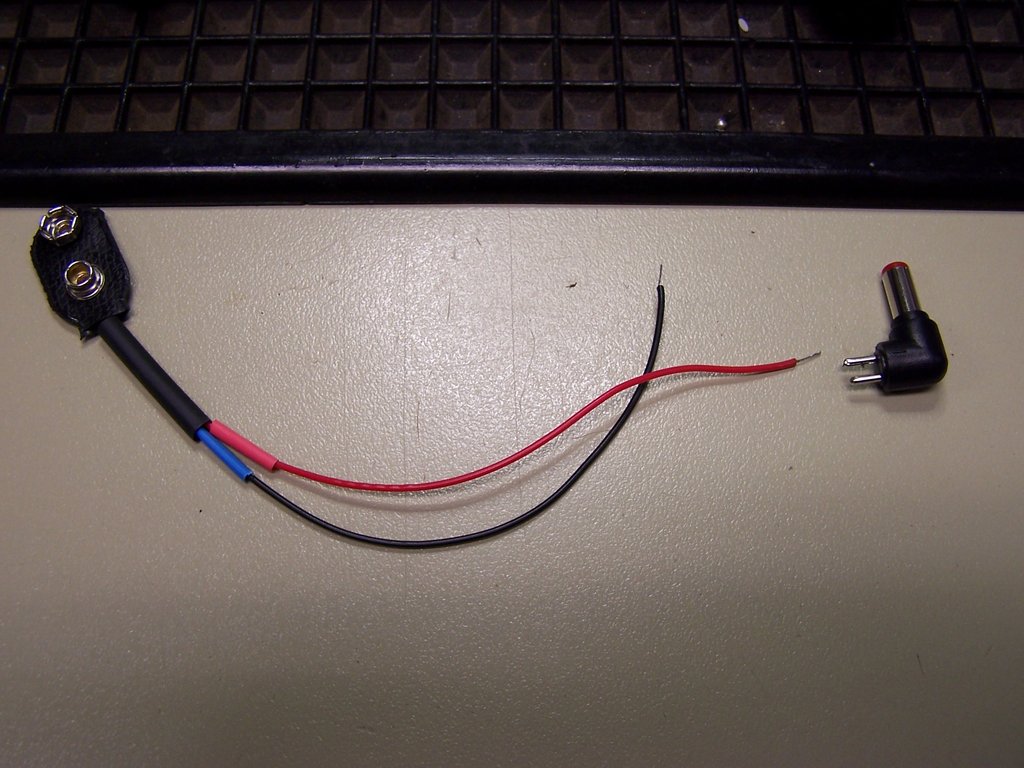
Thats an easy one. Just get an battery pack ( 4 * 1,5 AA Batterys Holder with 9V Clip ) and build the connector for this thing. I just used an 9V Battery Clip Connector and an suiting Connector to the original Fonera Power Port as I wanted an “Plug ’n Play” Solution which should be as easy as it should be reliable.
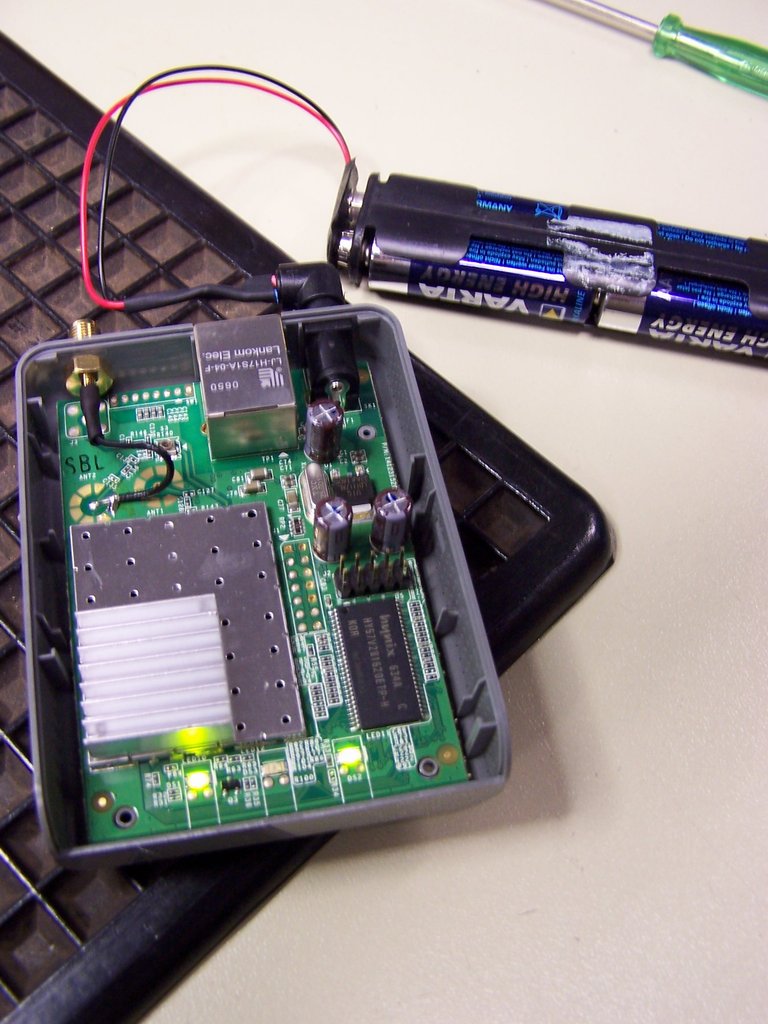
- Integrate an RS232 Port with V24 Standard Voltage
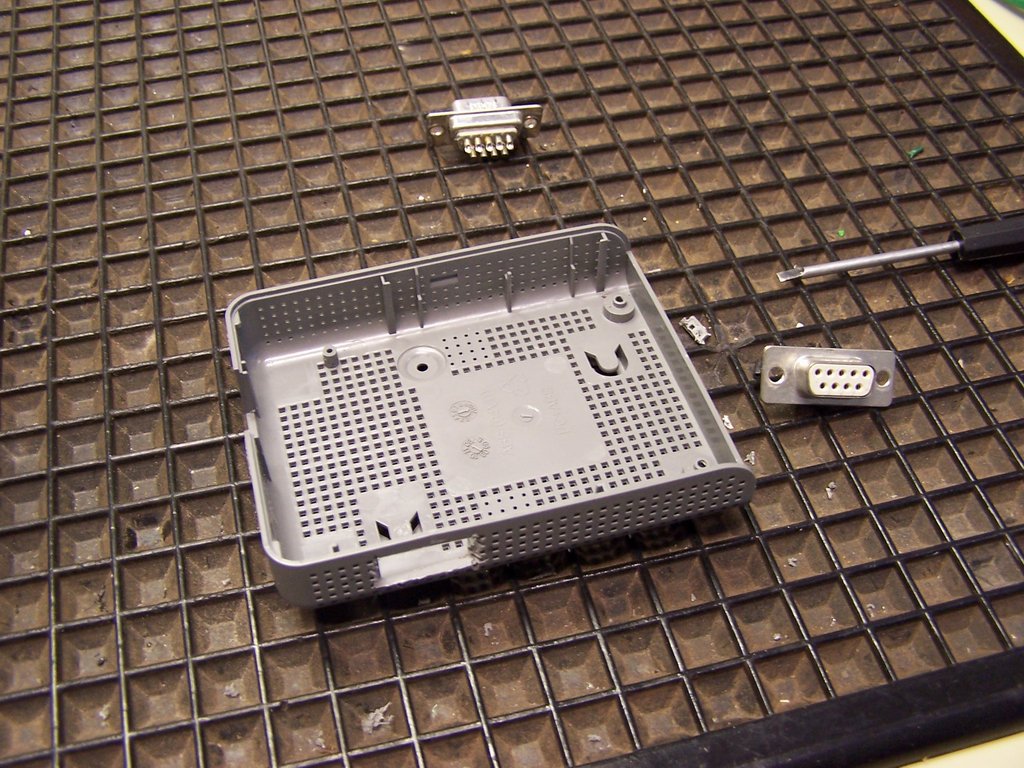
To do this, I used an Dremel and installed it on the outside of the Fonera. I also did shorten down one unused Pin and the Screws that secured the Port as there isn’t much space within the Fonera and I wanted to install an custom/big Heatsink (later!). For the Conversion I did use this simple Circuit: http://www.dd-wrt.com/wiki/index.php/LaFonera_Hardware_Serial-Cable-Port#Very_simple_console_adapter
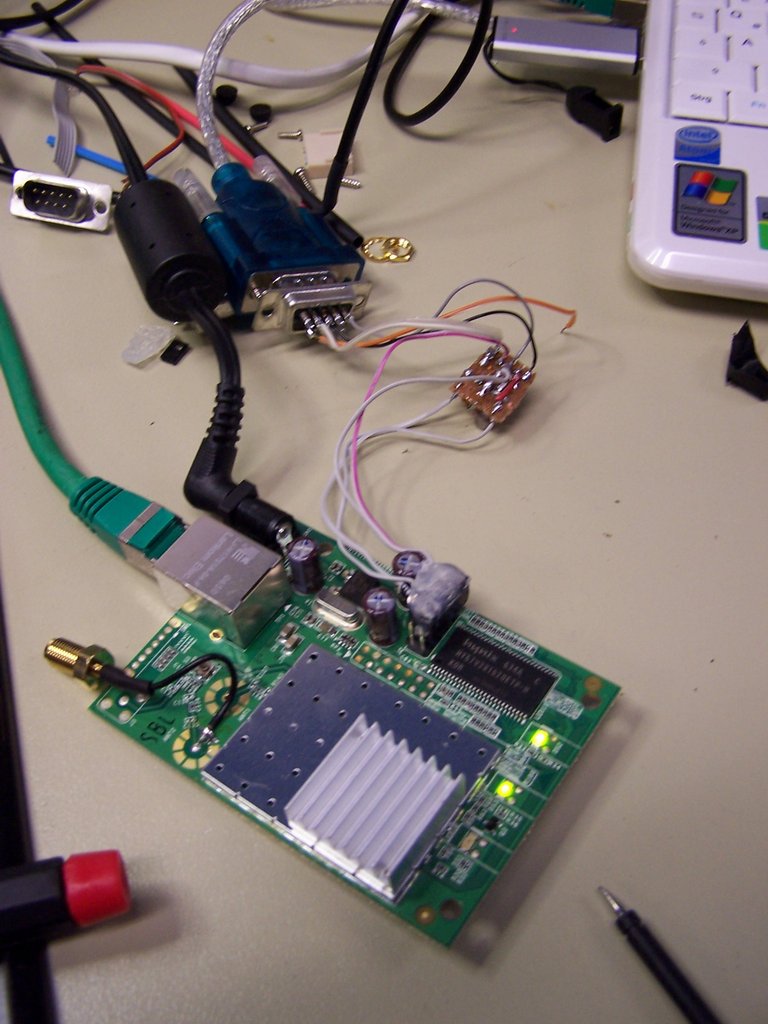
- SD-Card Mod
The SD-Card Mod is really important as you have not much memory on your Fon left after installing OpenWRT - and the Kismet Server uses up quite a lot of space if not configured correctly - or if you want to do longer Wardrives. So first thing is to accquire an SD-Card Slot - possibly from an old and damaged MultiCard Reader. I did it that way, just openend the Case and unsoldered the Slot, so I could use it. Then, I did drill an hole into the buttom of the Fonera and installed the SD Card Slot there. For more pictures: http://www.dd-wrt.com/wiki/index.php/LaFonera_Hardware_SD-Card/Reader_Position
Additional to the Instruction there I did install an “Touch Protection” with Hotglue and Plexi as I didn’t wanted the PCB to lay out unprotected to everything…
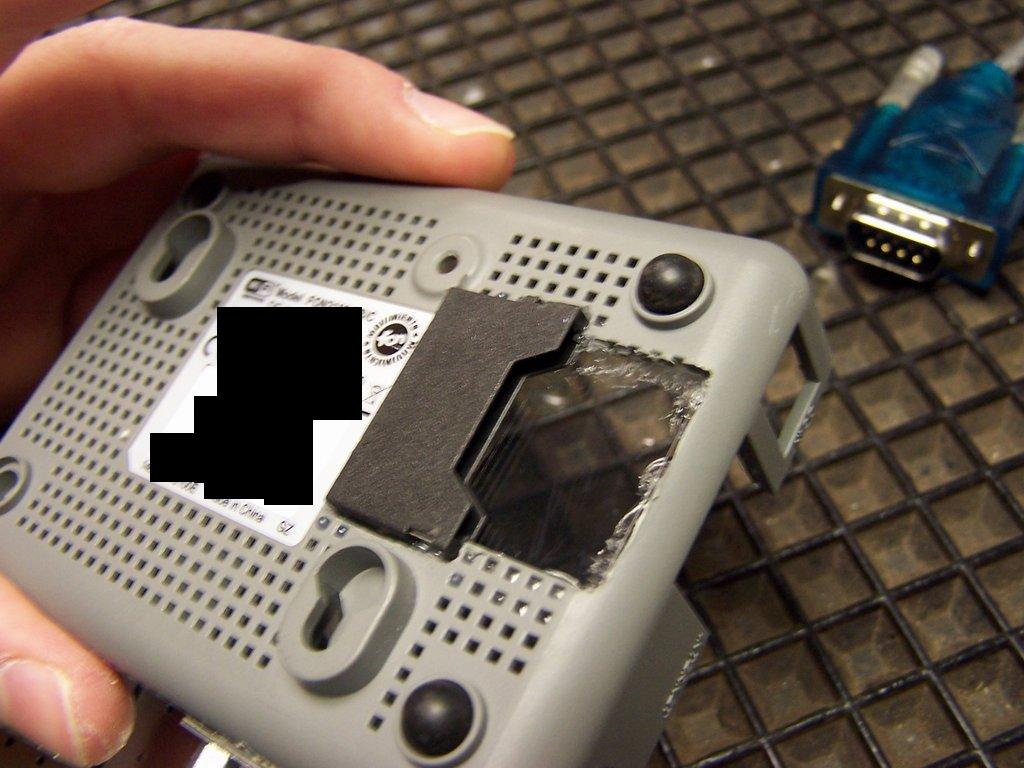
After installing the Card Reader Slot Physically, you need to wire it. That was quite an problem for me, as the pictures in the net seemed a bit problematic and “not saying” - so I try to provide you with a bit more information than the other How To.
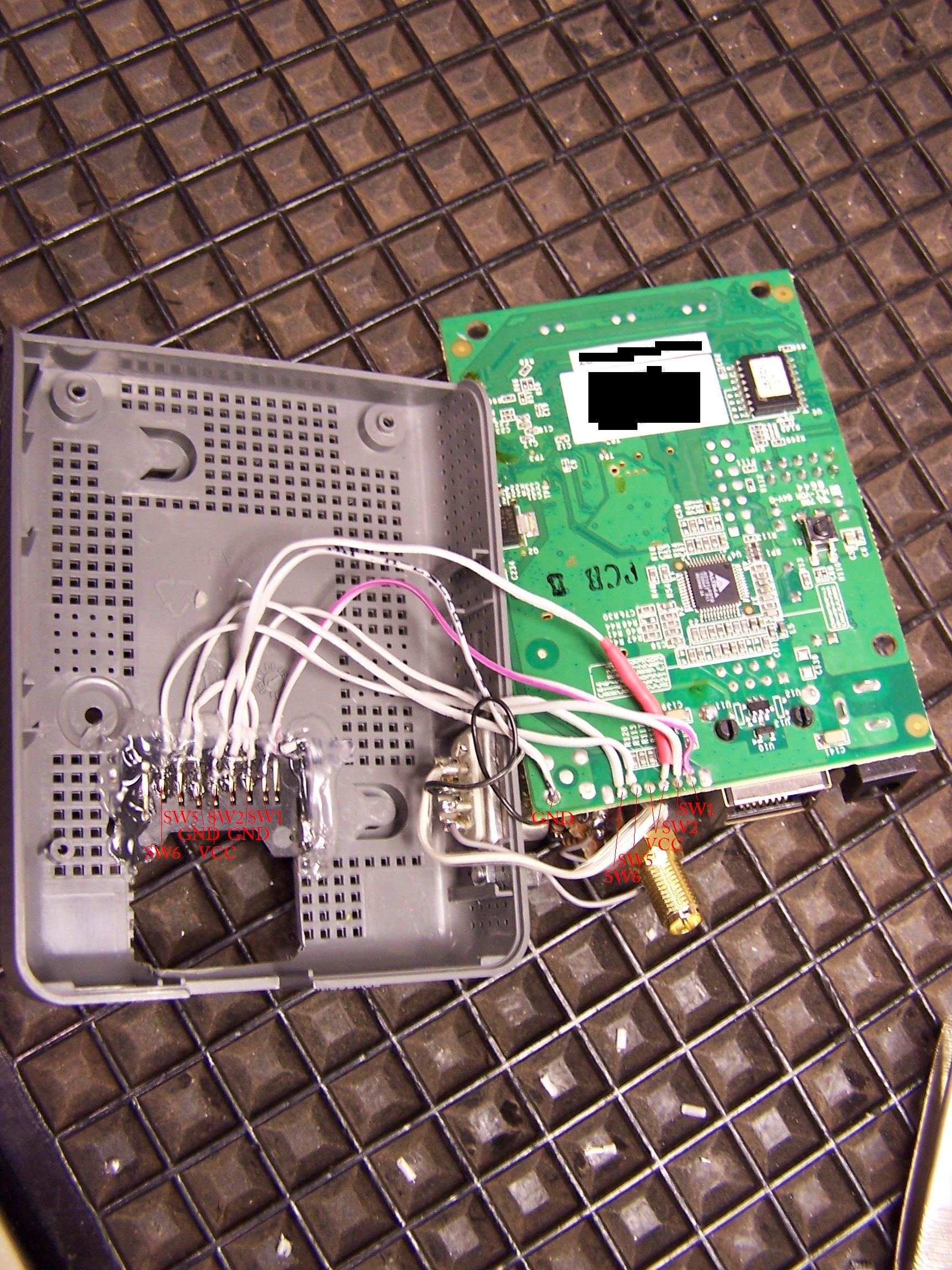
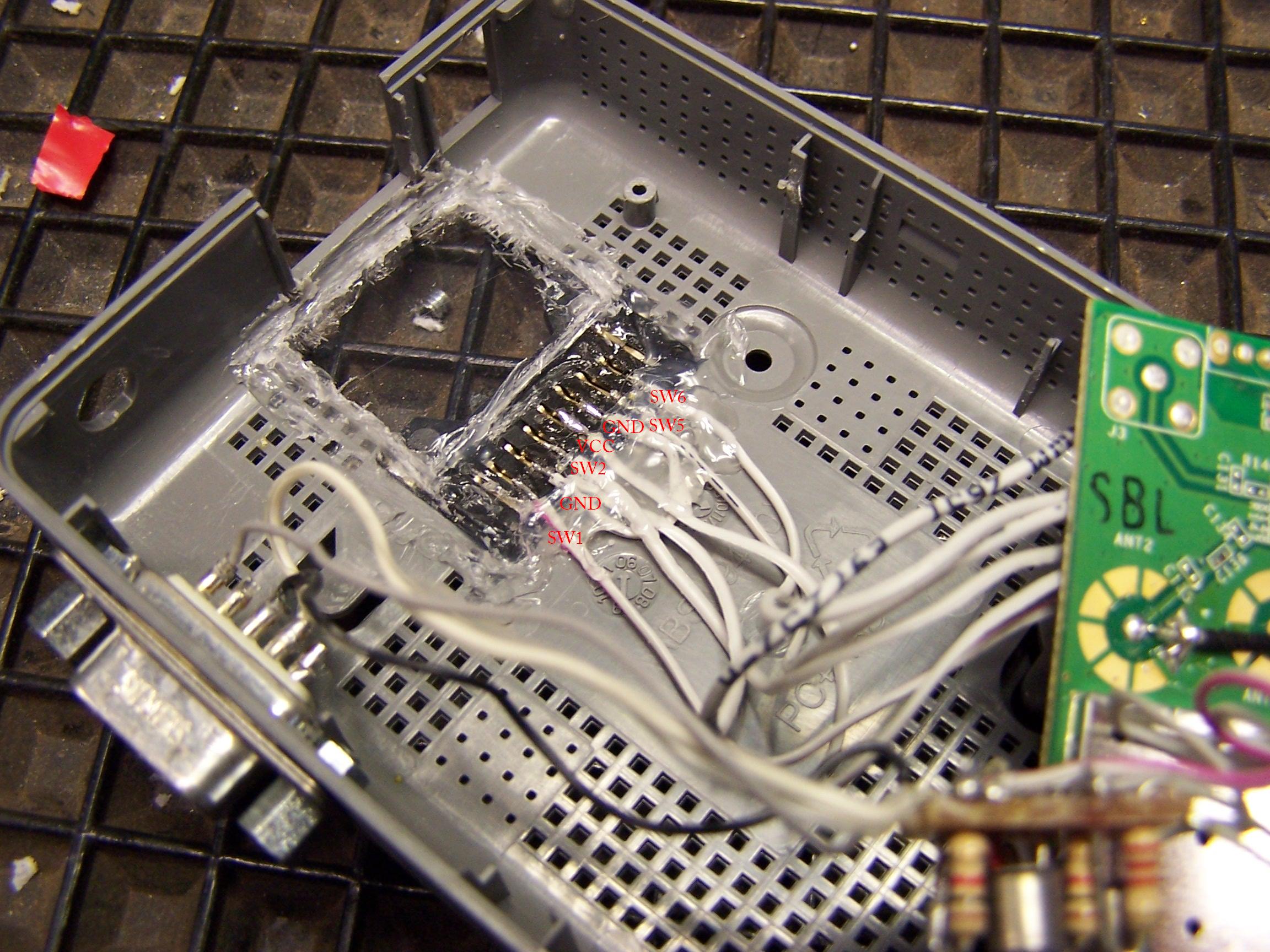
If you run the wires like this, this should be an easy step. I actually did solder on the wires “directly” to the connector pins of the sd card slot, as the reader had been damaged and i did not wanted to solder some points onto the really connectors and some onto the pins - so i run everything onto them and did isolate (and stablize) the whole thing with hot glue.
So, that should be it for the SD-Card Mod - with one exception: You need to desolder some smd capacitors (C142, C143, C144, C145). They’re found on the upper side of the Fonera Board directly next to the Ethernet Port, a little beneth the GPIO Ports we just soldered.
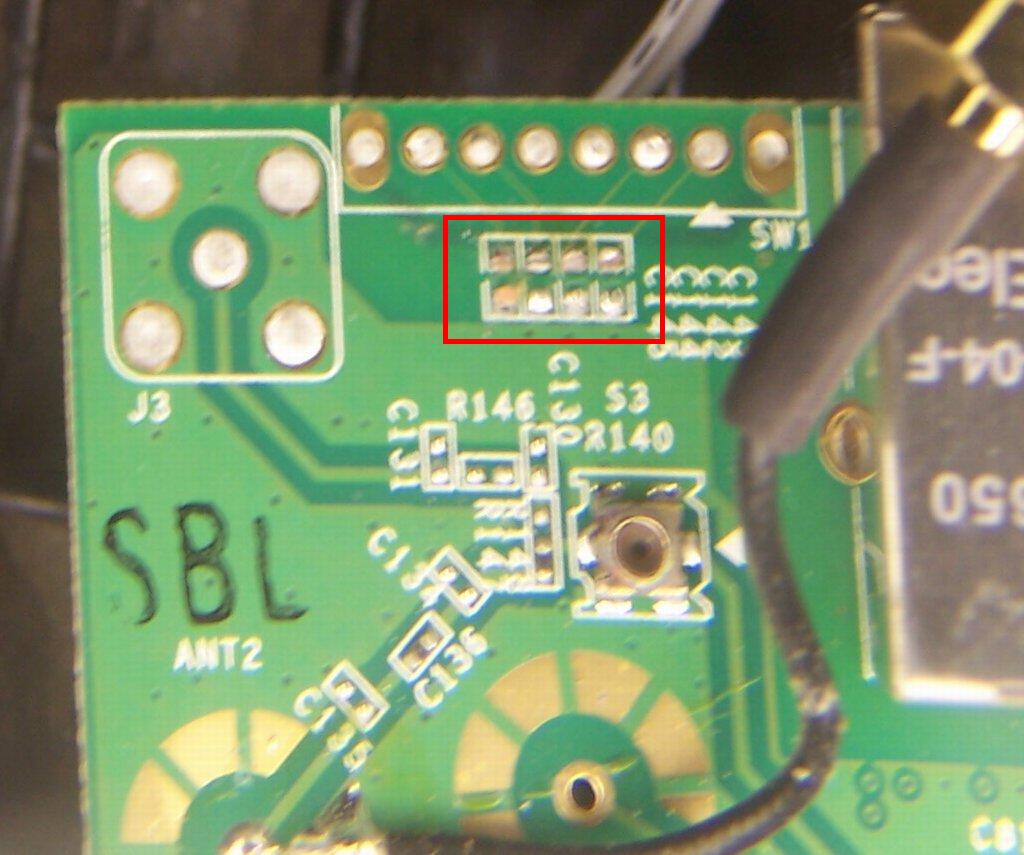
I marked the “earlier” place of the capacitors red, just use an soldering iron with an small head and quickly give the one side 1-2 seconds warmth, than directly the other one, and it should come off by itself - or stick to the soldering iron. Now, the SD-Card Mod is finished - in terms of hardware.
- Phantom Powered GPS TTL Inteface
So, for the GPS I did integrate and second Connector which does - unlike the Serial Port I added, does connect the Serial Port of the LaFonera directly (so on “TTL Level” without the Converter I did add for the serial port conversion) - and does add some phantom power aswell. But do only(!!!) do this if you know that your GPS Mouse works on TTL Level aswell. If you plug in an V24 (standard PC Level GPS Mouse) it will damage your LaFonera.
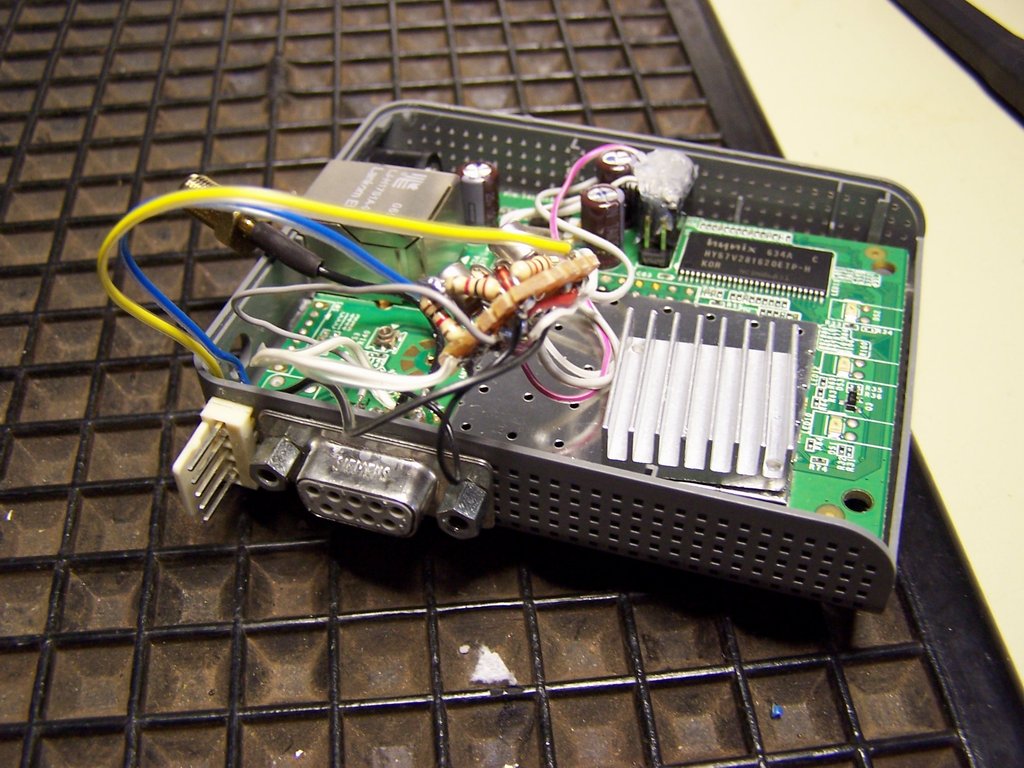
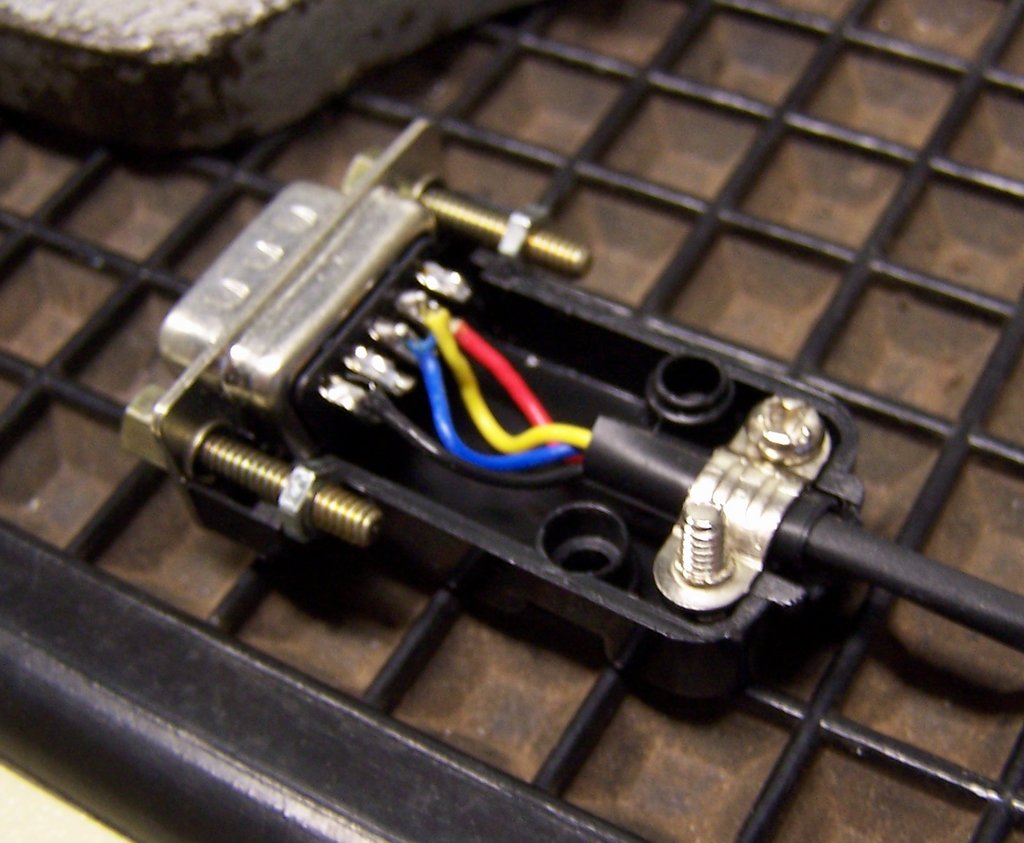
Wiring is following:
Black - Ground
Yellow - RX
Blue - TX
Red - 5V
Tx and Rx are directly wired to the Serial Port of the LaFonera Interface, the 5 V come from the Main Power Connector of the LaFonera.
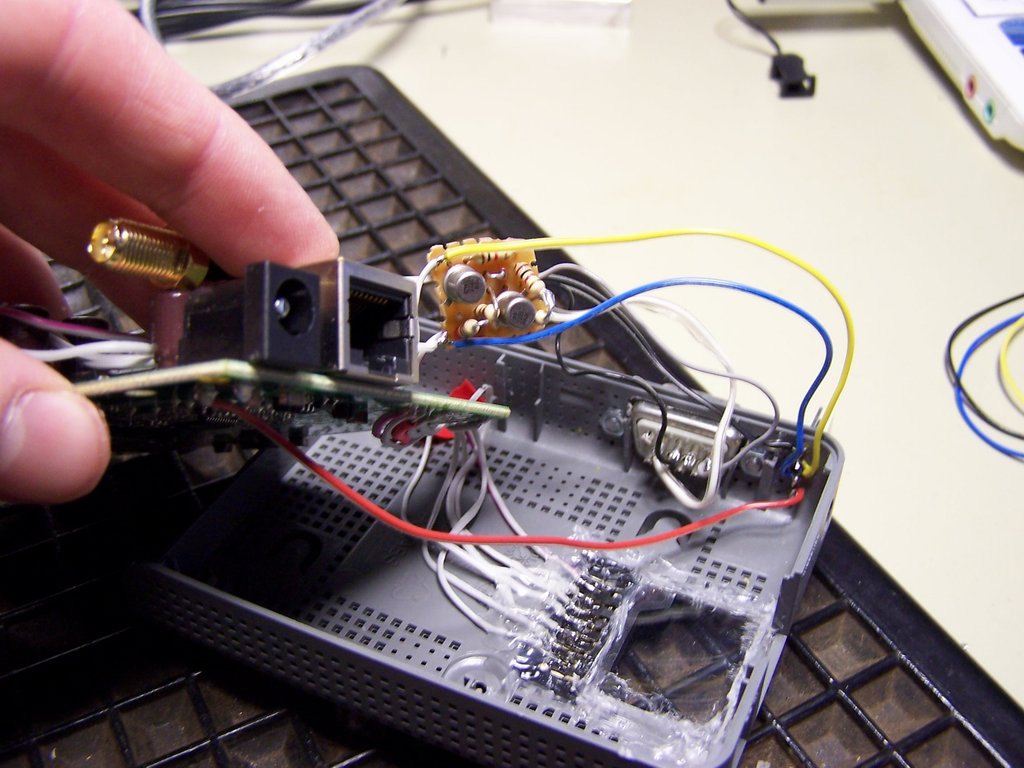
- Adding an Bigger Heatsink to the LaFonera
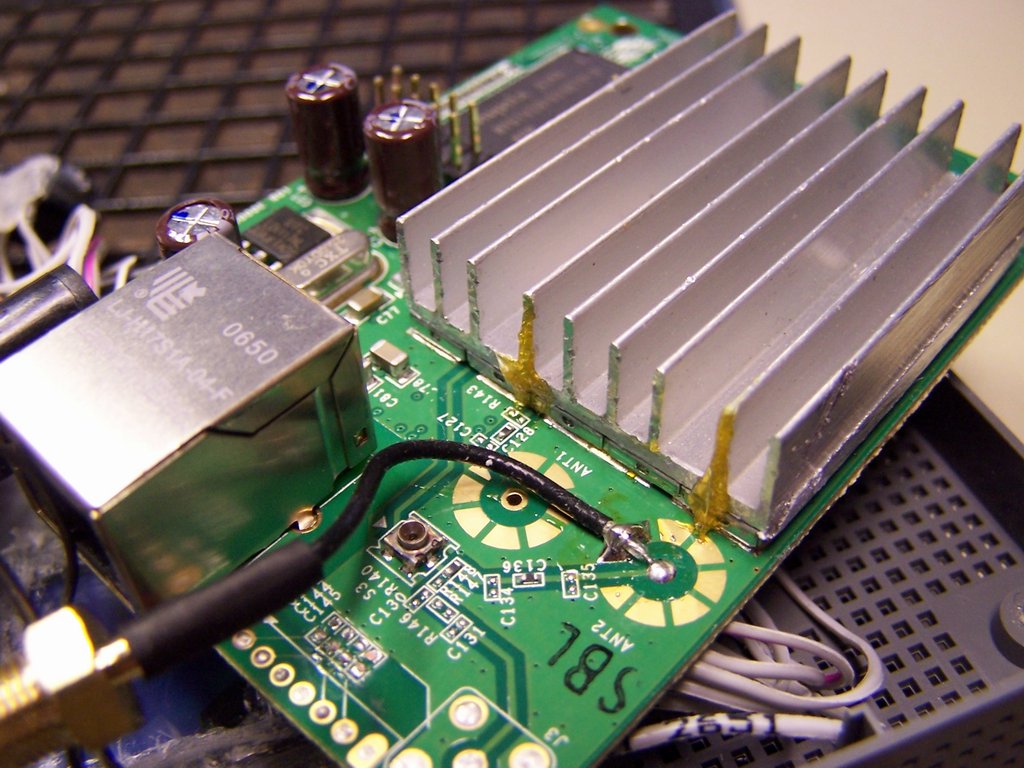
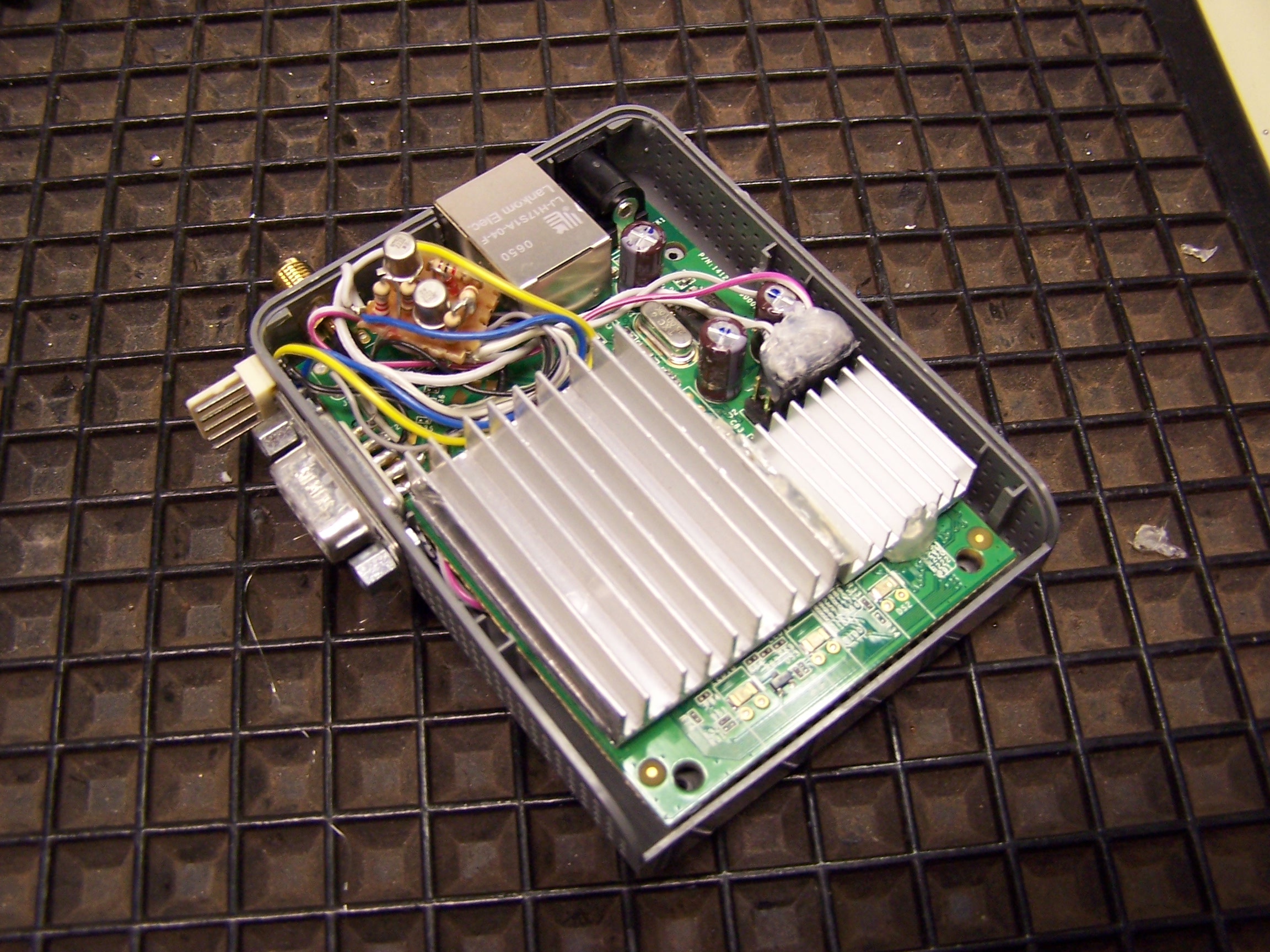
As the “old” LaFonera had serious Issues concering the CPU Temperature - and also was fitted only with an small stock heatsink, I decided to replace the “old” and small with an custom one which did cover the whole metal casing of the Atheros CPU. I did not remove this casing as I did not wanted to expose the SMD stuff to any possible damage through the bigger heatsink. And I could attach it quite more easily. To remove the old heatsink, turn around the PCB - you will see that it is not only “glued” onto the metal shield with an thermal pad - but also has two solder points onto the backside of the PCB - which led to two metal fingers - which are soldered or glued to the heatsink. So long story short: First unsolder the two big solder points on the back of the PCB, then lever off the old Heatsink with an flat sharp screwdriver - gently. Otherwise you could damage the PCB or the Chipset! The new Heatsink is made from aluminium and derieved from an old and dead ATI Graphics Card. I did only cut it down with an saw to the needed size and did rasp the cut edges smooth. Then I applied thermal grease to the metal shield and did install the heatsink onto that. With super glue I secured the heatsink so that it can’t fall off or move. The old heatsink went onto the memory and I did secure it there with hot glue (yeah, you should NOT do that on things that get REALLY hot… but its ok on that thing).
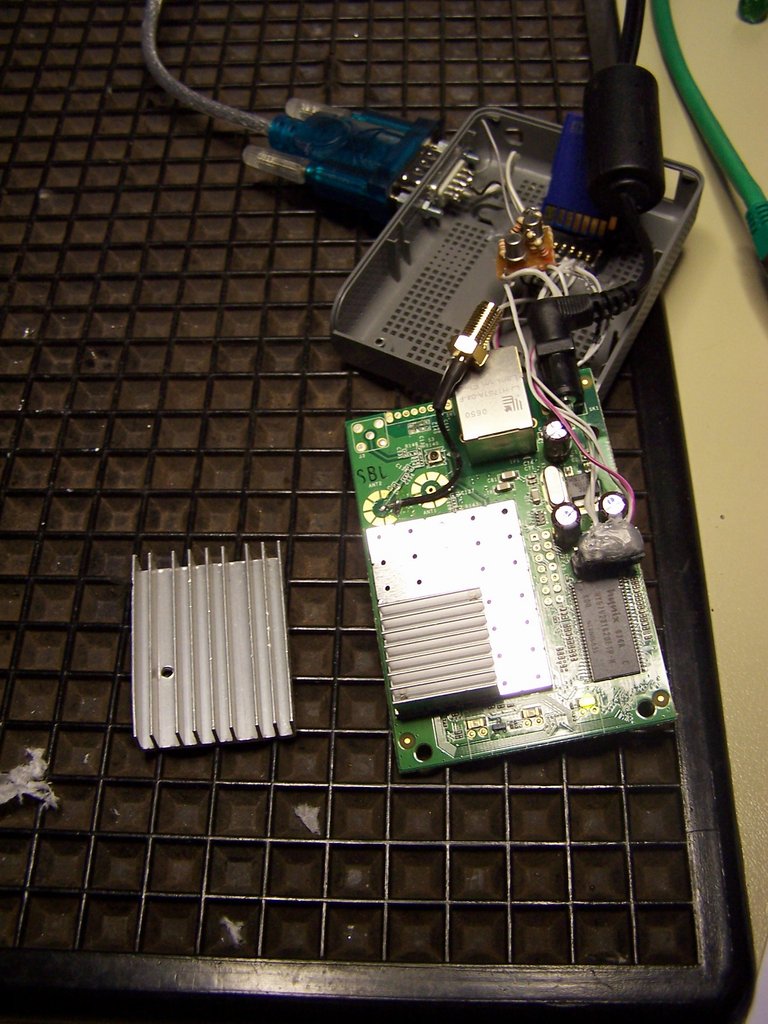
- Hardware on the LaFonera is done
So thats it, you’re done with the modifications on the LaFonera concerning the Hardware. One thing you should really look out is space - you can see you’re not going to have much space left after all these mods. In truth the most problematic thing was the perspex cover for the SD-Card Mod - and the cables that came from that. Always remind to keep all the cables only that long that you maybe can laydown the PCB flat onto an table an be able to work on it. The cable lengths for the SD-Mod onto its chapter is already correct. I had pictures with longer cables attached to it and other soldering points ( Earlier I did drain VCC and GND from the serial port - making it even worse.. ^^’ ) - but I did only use the “correct” ones in this how to, so you should go for these lengths - or even shorter ones. It really makes your life a lot easier ( I did retrim the cables and the perspex VERY often until I could quite easily close the case again).
II. Building Attachments and additional Adaptors (etc.)
- Building an GPS / Fonera Adaptor
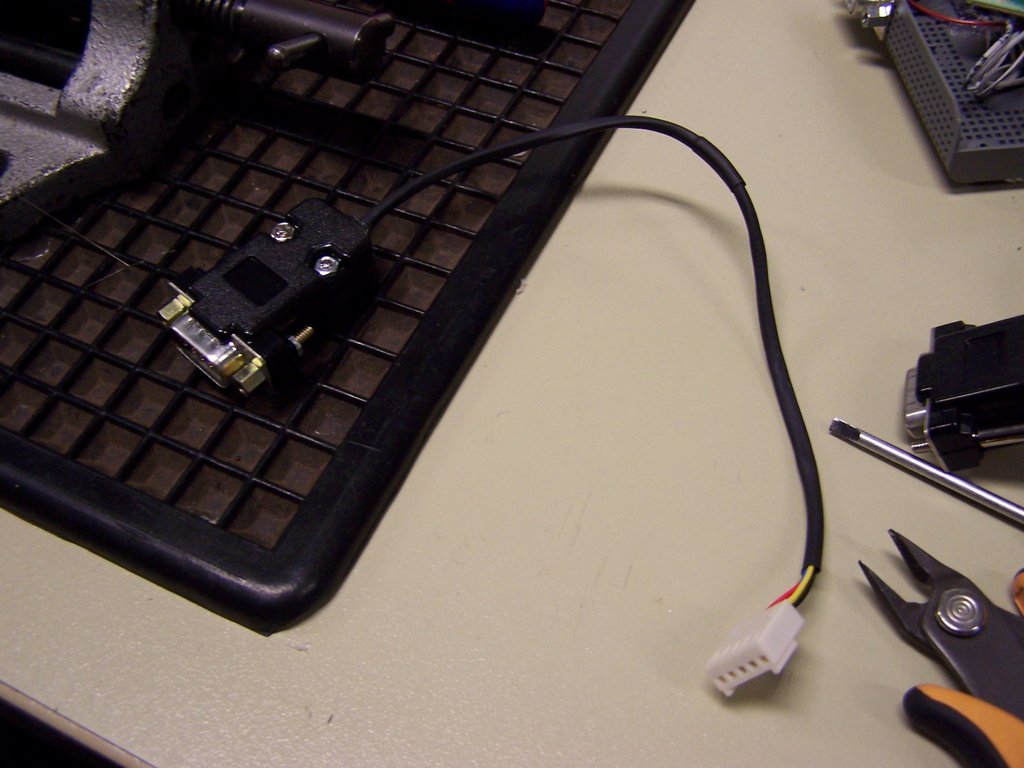
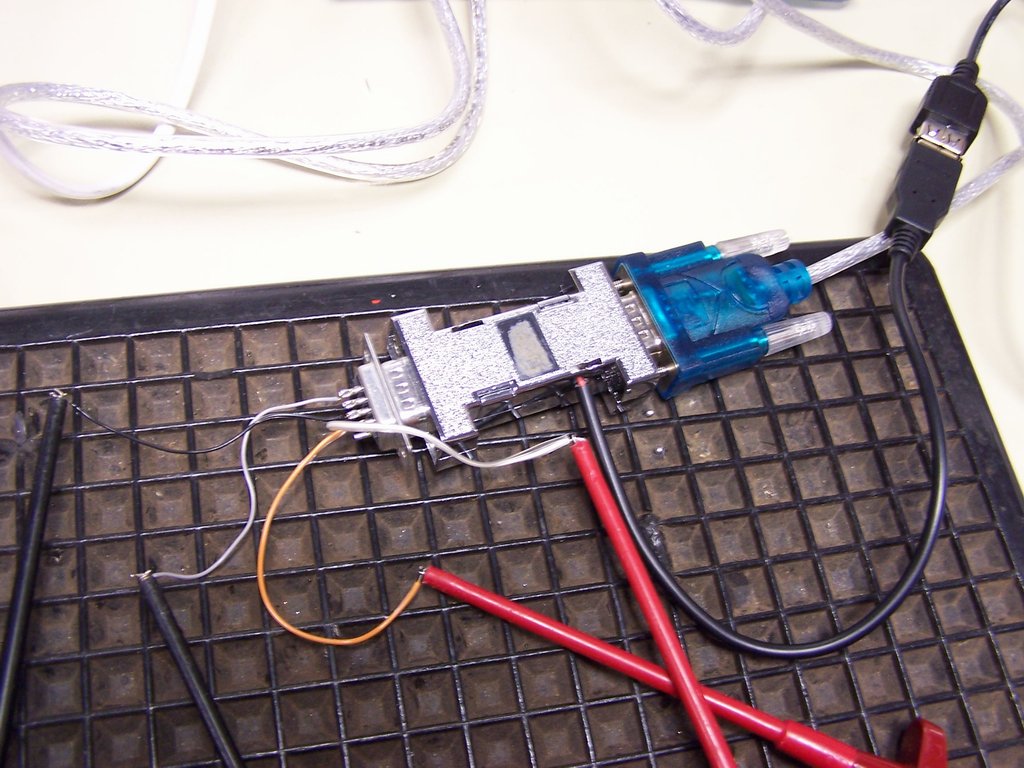
Building the Adaptor to connect the GPS Mouse to the Fonera is quite easy. I did even use the same colors in this Connector as within the Fonera: Black - Ground, Yellow - RX, Blue - TX, Red - 5. The 5V is the Phantom Power. You should NEVER connect an normal Serial GPS Mouse to this Connector, as the 5V Power are supplied over an Pin thats normally used for other Serial Data. So in the best case, this is not even connected in the Mouse. In the worst, you will kill your GPS Mouse. We’re going to modify an Serial GPS Mouse to our needs later. You may even forget about the Phantom Power, unplug it and use an normal serial GPS Mouse or build in an switch to enable or disable phantom power. But as I only wanted to use these particular Mouse… I did just leave it like that (simpler and easier Design - and I love the Phantom Power idea: So I only have to use one big battery for everything and not 2 or 3 for every part of the gadget - and if one is empty nothing will work anymore…). First picture does show the completed adaptor. I did use shrinkin tube to make the cable more robust in physical terms. I did also use hot glue and the installed strain relief to protect the cable and soldering points. The Pin Out for this Male RS232 plug is following: Pin 4 Rx (Yellow), Pin 3 Tx (Blue), Pin 1 GND (Black), Pin 9 5V (Red).
- Building an GPS / PC Adaptor
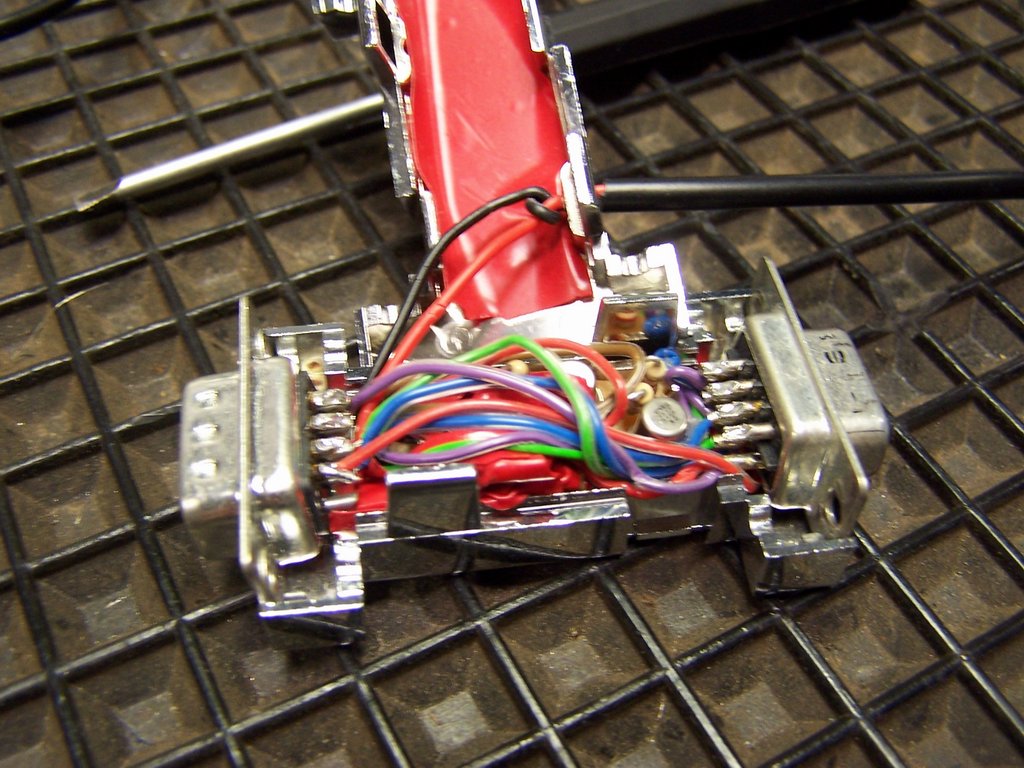
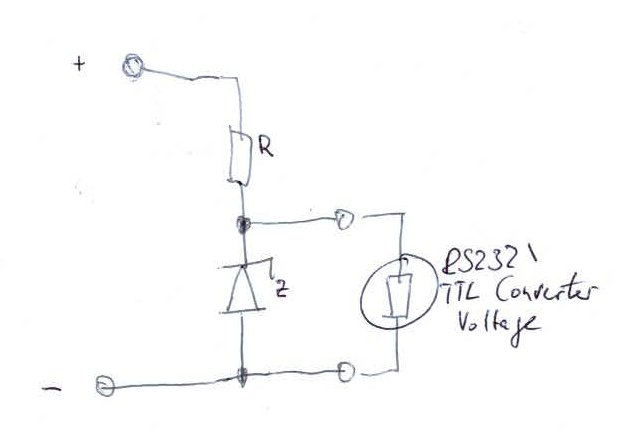
To use the (later) modified serial Mouse on an stock RS232 (V24) PC Interface, we would need three things: 1.) Power injection for the GPS, 2.) TTL to V24 Conversion, 3.) Not giving the Phantom Power to your PC. All in all thats quite easy to handle. Sadly I don’t have many pictures of the Adaptor, but I’ll try to explain as good as I can. Basically you need to pack within that Adaptor the same RS232 / TTL Logic as you build into the Fonera. Then you need to wire up an USB Connector to this thing. You wire GND from the USB Connector and RS232 together and the 5V to a) the Phantom Power Port and b) you need to build an simple 5V to 3,3V Converter for the TTL to V24 Converter. This Converter you can see in the third Picture. R (Resistor) is 120 Ohm, while the Zenner Diode (3,3V) is set to reverse-biasing. You grab the power for the TTL Converter between the R and Z and connect minus to the end of the Z Diode. You connect from the female PC Port to the male GPS Port everything through (GND, RX, TX) except the Phantom Power which is only attached to the GPS Port.
- Modding an Royaltek RGM 2000 (Bluemouse) for use with the Adaptors
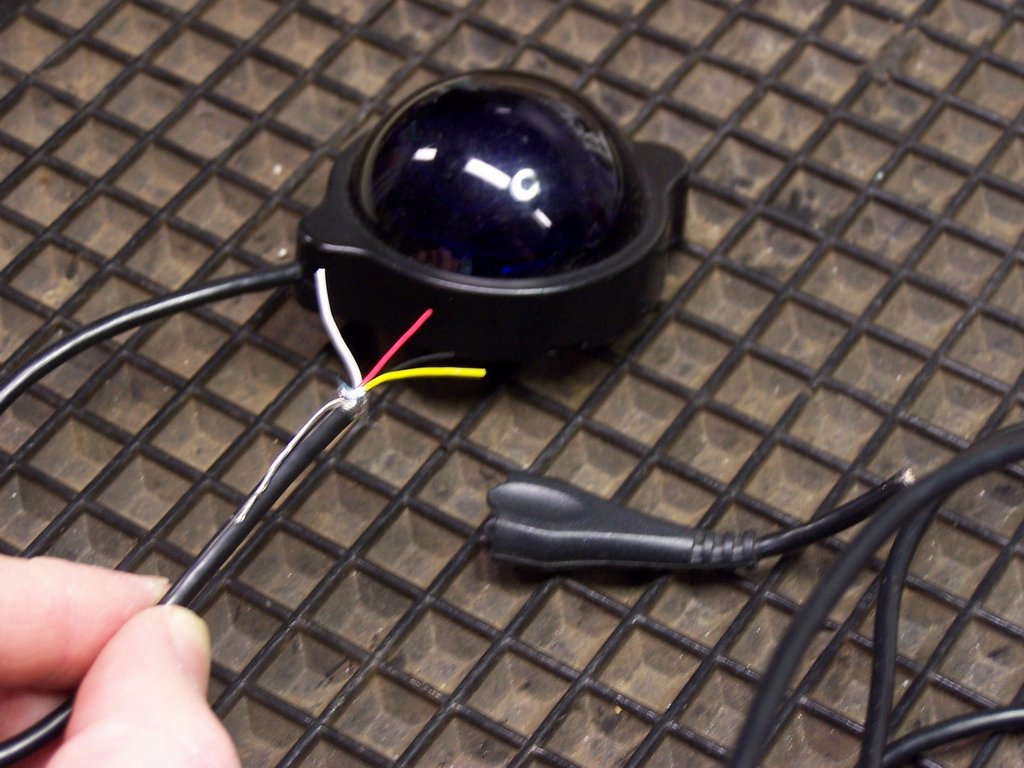
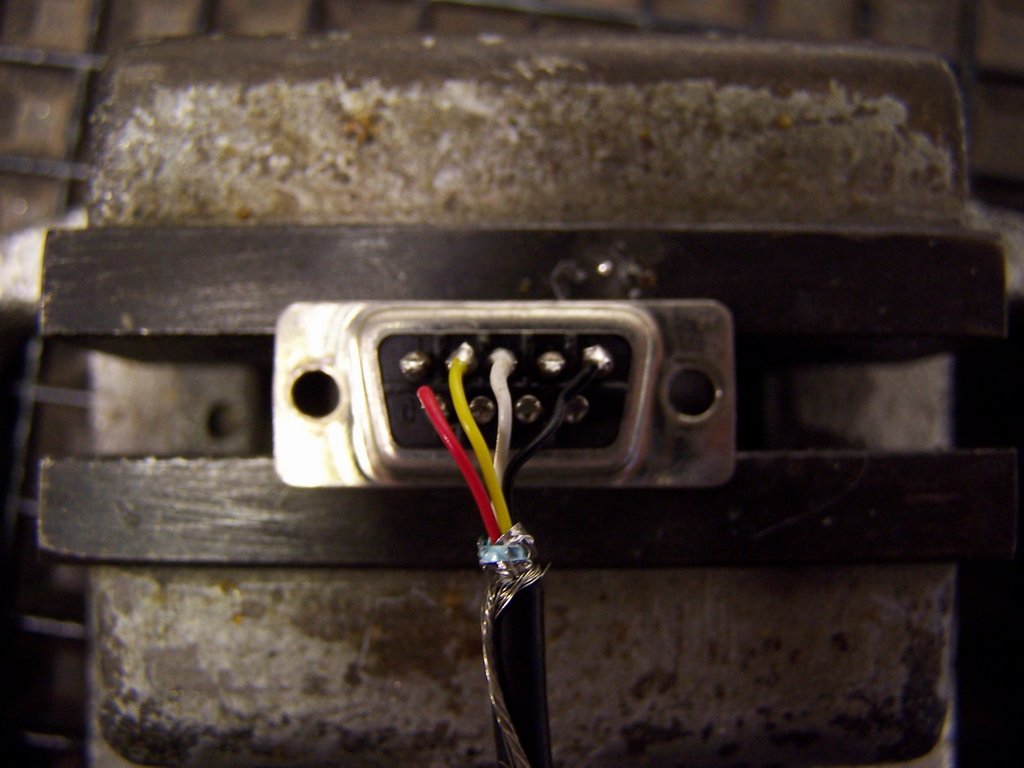
For this project I used an Royaltek RGM 2000 “Bluemouse”. Its an serial Mouse that I choosed mainly because of 3 Points: 1.) Its cheap (14€ I got one), 2.) Its widely available (Aldi did produce one Navigation System with this Mouse and therefor there are many of them on ebay…), 3.) It was the first serial Mouse to find on googeling ;-). So, as the mouse has an proprietary connector, I did cut this down first. You now can see four wires, black (GND, Pin 5), red (5V, Pin 6), yellow (TX, Pin 2), white (RX, Pin 3) - packed into an female RS232 Connector. So the wiring can be found on the picture two (By the way, you will find that the RX is wired to the TX of the PC / Fonera Adaptor and vice versa - thats ok, should be and is an must ;-)).
III. Modding the LaFonera Router (Software) You got two possibilties: I. The Quickinstall with my Installscript II. The Manual Install by Hand (same Standard, describes more details if first does fail)
I. Modding the LaFonera Router (Software) Script/Quickstart:
- Installing OpenWRT
- Download http://downloads.openwrt.org/kamikaze/8.09/atheros/openwrt-atheros-vmlinux.lzma
- Download http://downloads.openwrt.org/kamikaze/8.09/atheros/openwrt-atheros-root.squashfs
- Download Fon Flash http://www.gargoyle-router.com/download.php (and install wpcap Drivers as well, are included in Wireshark)
- Download Prototype Install Script below
prototype_install
#!/bin/sh # Creates inittab, TZ, Rescue Systemecho “Setting Up /etc/inittab for pRoToTyPe…” echo “::sysinit:/etc/init.d/rcS S boot” > /etc/inittab echo “::shutdown:/etc/init.d/rcS K stop” » /etc/inittab echo “#tts/0::askfirst:/bin/ash –login” » /etc/inittab echo “#ttyS0::askfirst:/bin/ash –login” » /etc/inittab echo “#tty1::askfirst:/bin/ash –login” » /etc/inittab
echo “Setting Up TZ for Europe, Berlin…” echo “CET-1CEST,M3.5.0,M10.5.0/3” > /etc/TZ
echo “Setting Up Rescue System:” echo “Creating /etc/hotplug.d/button/30-button-trigger…” mkdir /etc/hotplug.d/button echo “#!/bin/sh” > /etc/hotplug.d/button/30-button-trigger echo ‘if [ “${ACTION}” == “released” ]’ » /etc/hotplug.d/button/30-button-trigger echo “then” » /etc/hotplug.d/button/30-button-trigger echo “/etc/init.d/prototype_reset” » /etc/hotplug.d/button/30-button-trigger echo “fi” » /etc/hotplug.d/button/30-button-trigger
echo “Creating /etc/init.d/prototype_reset…” echo “#!/bin/sh” > /etc/init.d/prototype_reset echo “echo ‘::sysinit:/etc/init.d/rcS S boot’ > /etc/inittab” » /etc/init.d/prototype_reset echo “echo ‘::shutdown:/etc/init.d/rcS K stop’ » /etc/inittab” » /etc/init.d/prototype_reset echo “echo ’tts/0::askfirst:/bin/ash –login’ » /etc/inittab” » /etc/init.d/prototype_reset echo “echo ’ttyS0::askfirst:/bin/ash –login’ » /etc/inittab” » /etc/init.d/prototype_reset echo “echo ‘#tty1::askfirst:/bin/ash –login’ » /etc/inittab” » /etc/init.d/prototype_reset echo “init -q” » /etc/init.d/prototype_reset echo “stty -F /dev/ttyS0 raw speed 9600 -clocal cs8 -parenb -cstopb” » /etc/init.d/prototype_reset echo “rm /etc/rc.d/K15prototype” » /etc/init.d/prototype_reset echo “rm /etc/rc.d/S94prototype” » /etc/init.d/prototype_reset echo “ln -s /etc/init.d/prototype_rebirth /etc/rc.d/S94prototype_rebirth” » /etc/init.d/prototype_reset echo “reboot” » /etc/init.d/prototype_reset chmod +x /etc/init.d/prototype_reset
echo “Creating /etc/init.d/prototype_rebirth…” echo “#!/bin/sh /etc/rc.common” > /etc/init.d/prototype_rebirth echo “# Example script” » /etc/init.d/prototype_rebirth echo “# Copyright (C) 2007 OpenWrt.org” » /etc/init.d/prototype_rebirth echo “START=94” » /etc/init.d/prototype_rebirth echo “start() {” » /etc/init.d/prototype_rebirth echo “ln -s /etc/init.d/prototype /etc/rc.d/K15prototype” » /etc/init.d/prototype_rebirth echo “ln -s /etc/init.d/prototype /etc/rc.d/S94prototype” » /etc/init.d/prototype_rebirth echo “echo ‘::sysinit:/etc/init.d/rcS S boot’ > /etc/inittab” » /etc/init.d/prototype_rebirth echo “echo ‘::shutdown:/etc/init.d/rcS K stop’ » /etc/inittab” » /etc/init.d/prototype_rebirth echo “echo ‘#tts/0::askfirst:/bin/ash –login’ » /etc/inittab” » /etc/init.d/prototype_rebirth echo “echo ‘#ttyS0::askfirst:/bin/ash –login’ » /etc/inittab” » /etc/init.d/prototype_rebirth echo “echo ‘#tty1::askfirst:/bin/ash –login’ » /etc/inittab” » /etc/init.d/prototype_rebirth echo “rm /etc/rc.d/S94prototype_rebirth” » /etc/init.d/prototype_rebirth echo “}” » /etc/init.d/prototype_rebirth chmod +x /etc/init.d/prototype_rebirth
echo “Creating /etc/config/network Config…” echo “# Copyright (C) 2006 OpenWrt.org” > /etc/config/network echo "" » /etc/config/network echo “config interface loopback” » /etc/config/network echo " option ifname lo" » /etc/config/network echo " option proto static" » /etc/config/network echo " option ipaddr 127.0.0.1" » /etc/config/network echo " option netmask 255.0.0.0" » /etc/config/network echo "" » /etc/config/network echo “config interface lan” » /etc/config/network echo " option ifname eth0" » /etc/config/network echo " option type bridge" » /etc/config/network echo " option proto static" » /etc/config/network echo " option ipaddr 192.168.0.2" » /etc/config/network echo " option netmask 255.255.255.0" » /etc/config/network echo " option dns 192.168.0.1" » /etc/config/network echo " option gateway 192.168.0.1" » /etc/config/network
echo “Creating /etc/config/network.ics Config…” echo “# Copyright (C) 2006 OpenWrt.org” > /etc/config/network.ics echo "" » /etc/config/network.ics echo “config interface loopback” » /etc/config/network.ics echo " option ifname lo" » /etc/config/network.ics echo " option proto static" » /etc/config/network.ics echo " option ipaddr 127.0.0.1" » /etc/config/network.ics echo " option netmask 255.0.0.0" » /etc/config/network.ics echo "" » /etc/config/network.ics echo “config interface lan” » /etc/config/network.ics echo " option ifname eth0" » /etc/config/network.ics echo " option type bridge" » /etc/config/network.ics echo " option proto static" » /etc/config/network.ics echo " option ipaddr 192.168.0.2" » /etc/config/network.ics echo " option netmask 255.255.255.0" » /etc/config/network.ics echo " option dns 192.168.0.1" » /etc/config/network.ics echo " option gateway 192.168.0.1" » /etc/config/network.ics
echo “Creating /etc/config/network.home Config…” echo “# Copyright (C) 2006 OpenWrt.org” > /etc/config/network.home echo "" » /etc/config/network.home echo “config interface loopback” » /etc/config/network.home echo " option ifname lo" » /etc/config/network.home echo " option proto static" » /etc/config/network.home echo " option ipaddr 127.0.0.1" » /etc/config/network.home echo " option netmask 255.0.0.0" » /etc/config/network.home echo "" » /etc/config/network.home echo “config interface lan” » /etc/config/network.home echo " option ifname eth0" » /etc/config/network.home echo " option type bridge" » /etc/config/network.home echo " option proto static" » /etc/config/network.home echo " option ipaddr 192.168.2.160" » /etc/config/network.home echo " option netmask 255.255.255.0" » /etc/config/network.home echo " option dns 192.168.2.1" » /etc/config/network.home echo " option gateway 192.168.2.1" » /etc/config/network.home
echo “Creating /etc/config/system Config…” echo "" > /etc/config/system echo “config ‘system’” » /etc/config/system echo " option ‘hostname’ ‘pRoToTyPe’" » /etc/config/system echo " option ‘zonename’ ‘Europe/Berlin’" » /etc/config/system echo " option ’timezone’ ‘CET-1CEST,M3.5.0,M10.5.0/3’" » /etc/config/system echo "" » /etc/config/system echo “config ‘button’” » /etc/config/system echo " option ‘button’ ‘reset’" » /etc/config/system echo " option ‘action’ ‘released’" » /etc/config/system echo " option ‘handler’ ’echo test’" » /etc/config/system echo " option ‘min’ ‘0’" » /etc/config/system echo " option ‘max’ ‘4’" » /etc/config/system echo "" » /etc/config/system echo “config ‘button’” » /etc/config/system echo " option ‘button’ ‘reset’" » /etc/config/system echo " option ‘action’ ‘released’" » /etc/config/system echo " option ‘handler’ ’logger reboot’" » /etc/config/system echo " option ‘min’ ‘4’" » /etc/config/system echo " option ‘max’ ‘8’" » /etc/config/system echo "" » /etc/config/system echo “config ‘button’” » /etc/config/system echo " option ‘button’ ‘reset’" » /etc/config/system echo " option ‘action’ ‘released’" » /etc/config/system echo " option ‘handler’ ’logger factory default’" » /etc/config/system echo " option ‘min’ ‘9’" » /etc/config/system echo " option ‘max’ ‘30’" » /etc/config/system
echo “Creating /etc/config/fstab…” echo "" > /etc/config/fstab echo “config ‘mount’” » /etc/config/fstab echo " option ’enabled’ ‘1’" » /etc/config/fstab echo " option ‘device’ ‘/dev/mmcblk0p1’" » /etc/config/fstab echo " option ‘fstype’ ‘vfat’" » /etc/config/fstab echo " option ’target’ ‘/mnt’" » /etc/config/fstab echo " option ‘options’ ‘defaults’" » /etc/config/fstab echo "" » /etc/config/fstab echo “config ‘swap’” » /etc/config/fstab echo " option ‘device’ ‘/dev/sda2’" » /etc/config/fstab
echo “Creating /etc/init.d/mmc_over_gpio…” echo “#!/bin/sh /etc/rc.common” > /etc/init.d/mmc_over_gpio echo “# Copyright (C) 2008 OpenWrt.org” » /etc/init.d/mmc_over_gpio echo “START=90” » /etc/init.d/mmc_over_gpio echo "" » /etc/init.d/mmc_over_gpio echo ‘CONFIGFS_DIR="/config/gpiommc"’ » /etc/init.d/mmc_over_gpio echo "" » /etc/init.d/mmc_over_gpio echo “# add_device(name, DI_pin, DO_pin, CLK_pin, CS_pin, mode)” » /etc/init.d/mmc_over_gpio echo “add_device() {” » /etc/init.d/mmc_over_gpio echo ’ local dir="$CONFIGFS_DIR/$1"’ » /etc/init.d/mmc_over_gpio echo "" » /etc/init.d/mmc_over_gpio echo ’ mkdir $dir’ » /etc/init.d/mmc_over_gpio echo ’ [ $? -eq 0 ] || return 1’ » /etc/init.d/mmc_over_gpio echo ’ echo $2 > $dir/gpio_data_in’ » /etc/init.d/mmc_over_gpio echo ’ [ $? -eq 0 ] || return 1’ » /etc/init.d/mmc_over_gpio echo ’ echo $3 > $dir/gpio_data_out’ » /etc/init.d/mmc_over_gpio echo ’ [ $? -eq 0 ] || return 1’ » /etc/init.d/mmc_over_gpio echo ’ echo $4 > $dir/gpio_clock’ » /etc/init.d/mmc_over_gpio echo ’ [ $? -eq 0 ] || return 1’ » /etc/init.d/mmc_over_gpio echo ’ echo $5 > $dir/gpio_chipselect’ » /etc/init.d/mmc_over_gpio echo ’ [ $? -eq 0 ] || return 1’ » /etc/init.d/mmc_over_gpio echo ’ echo $6 > $dir/spi_mode’ » /etc/init.d/mmc_over_gpio echo ’ [ $? -eq 0 ] || return 1’ » /etc/init.d/mmc_over_gpio echo " # XXX We have more config options available. Use defaults for now." » /etc/init.d/mmc_over_gpio echo "" » /etc/init.d/mmc_over_gpio echo ’ echo 1 > $dir/register’ » /etc/init.d/mmc_over_gpio echo ’ [ $? -eq 0 ] || return 1’ » /etc/init.d/mmc_over_gpio echo "" » /etc/init.d/mmc_over_gpio echo " return 0" » /etc/init.d/mmc_over_gpio echo “}” » /etc/init.d/mmc_over_gpio echo "" » /etc/init.d/mmc_over_gpio echo “# remove_device(name)” » /etc/init.d/mmc_over_gpio echo “remove_device() {” » /etc/init.d/mmc_over_gpio echo ’ local dir="$CONFIGFS_DIR/$1"’ » /etc/init.d/mmc_over_gpio echo "" » /etc/init.d/mmc_over_gpio echo ’ rmdir $dir’ » /etc/init.d/mmc_over_gpio echo “}” » /etc/init.d/mmc_over_gpio echo "" » /etc/init.d/mmc_over_gpio echo “mount_configfs() {” » /etc/init.d/mmc_over_gpio echo " # FIXME: This should probably be done somewhere else." » /etc/init.d/mmc_over_gpio echo " mount | grep configfs" » /etc/init.d/mmc_over_gpio echo ’ if [ $? -eq 0 ]; then’ » /etc/init.d/mmc_over_gpio echo " # already mounted" » /etc/init.d/mmc_over_gpio echo " return 0" » /etc/init.d/mmc_over_gpio echo " fi" » /etc/init.d/mmc_over_gpio echo " mkdir -p /config" » /etc/init.d/mmc_over_gpio echo ’ [ $? -eq 0 ] || return 1’ » /etc/init.d/mmc_over_gpio echo " mount configfs -t configfs /config" » /etc/init.d/mmc_over_gpio echo ’ [ $? -eq 0 ] || return 1’ » /etc/init.d/mmc_over_gpio echo "" » /etc/init.d/mmc_over_gpio echo " return 0" » /etc/init.d/mmc_over_gpio echo “}” » /etc/init.d/mmc_over_gpio echo "" » /etc/init.d/mmc_over_gpio echo “start() {” » /etc/init.d/mmc_over_gpio echo " # Make sure configfs is mounted" » /etc/init.d/mmc_over_gpio echo " mount_configfs" » /etc/init.d/mmc_over_gpio echo ’ [ $? -eq 0 ] || return 1’ » /etc/init.d/mmc_over_gpio echo "" » /etc/init.d/mmc_over_gpio echo " #FIXME we should use a config file, but I dunno how that parser works." » /etc/init.d/mmc_over_gpio echo ’ #add_device “default” 5 4 3 7 0’ » /etc/init.d/mmc_over_gpio echo " " » /etc/init.d/mmc_over_gpio echo ’ add_device “default” 1 3 4 14 0’ » /etc/init.d/mmc_over_gpio echo " sleep 1" » /etc/init.d/mmc_over_gpio echo ’ remove_device “default”’ » /etc/init.d/mmc_over_gpio echo " sleep 1" » /etc/init.d/mmc_over_gpio echo ’ add_device “default” 1 3 4 7 0’ » /etc/init.d/mmc_over_gpio echo “}” » /etc/init.d/mmc_over_gpio echo "" » /etc/init.d/mmc_over_gpio echo “stop() {” » /etc/init.d/mmc_over_gpio echo ’ remove_device “default”’ » /etc/init.d/mmc_over_gpio echo “}” » /etc/init.d/mmc_over_gpio chmod +x /etc/init.d/mmc_over_gpio
echo “Creating /etc/init.d/prototype…” echo “#!/bin/sh /etc/rc.common” > /etc/init.d/prototype echo “# Example script” » /etc/init.d/prototype echo “# Copyright (C) 2007 OpenWrt.org” » /etc/init.d/prototype echo "" » /etc/init.d/prototype echo “START=94” » /etc/init.d/prototype echo “STOP=15” » /etc/init.d/prototype echo "" » /etc/init.d/prototype echo “start() { " » /etc/init.d/prototype echo " echo ‘Loading pRoToTyPe…’” » /etc/init.d/prototype echo " " » /etc/init.d/prototype echo " # mount sd card" » /etc/init.d/prototype echo " echo ‘Load SD-Card Driver…’" » /etc/init.d/prototype echo " /etc/init.d/mmc_over_gpio stop" » /etc/init.d/prototype echo " /etc/init.d/mmc_over_gpio start" » /etc/init.d/prototype echo " sleep 1" » /etc/init.d/prototype echo " echo ‘Mount SD-Card..’" » /etc/init.d/prototype echo " mount /dev/mmcblk0p1 /mnt" » /etc/init.d/prototype echo " " » /etc/init.d/prototype echo " # setup serial port" » /etc/init.d/prototype echo " echo ‘Setup Serial Port…’" » /etc/init.d/prototype echo " stty -F /dev/ttyS0 raw speed 4800 -clocal cs8 -parenb -cstopb" » /etc/init.d/prototype echo " " » /etc/init.d/prototype echo " # setup gpsd" » /etc/init.d/prototype echo " echo ‘Setup GPSD…’" » /etc/init.d/prototype echo " gpsd /dev/ttyS0 -n # with none wait" » /etc/init.d/prototype echo " " » /etc/init.d/prototype echo " #setup time via gps" » /etc/init.d/prototype echo " i=0;" » /etc/init.d/prototype echo ’ while (i=$(($i+1)) && [ “$i” -lt 5 ]); ’ » /etc/init.d/prototype echo " do" » /etc/init.d/prototype echo " sleep 5" » /etc/init.d/prototype echo " (echo d ; sleep 1; echo d; sleep 1; echo d) | (nc localhost 2947) > /tmp/gps_time &" » /etc/init.d/prototype echo ’ TEST=$!’ » /etc/init.d/prototype echo " sleep 4" » /etc/init.d/prototype echo ’ kill -s SIGINT $TEST’ » /etc/init.d/prototype echo " killall nc" » /etc/init.d/prototype echo ’ date=$
cat /tmp/gps_time | tail -n 1’ » /etc/init.d/prototype echo " year=$(echo $date | sed ’s/.D=([0-9])-./\1/’)" » /etc/init.d/prototype echo ’ [ “$year” -gt 2004 ] && break’ » /etc/init.d/prototype echo " done; " » /etc/init.d/prototype echo ’ echo “slept $i times while waiting gps lock..”’ » /etc/init.d/prototype echo " " » /etc/init.d/prototype echo ’ echo “Setting date $date”’ » /etc/init.d/prototype echo " date -s $(echo $date | sed ’s/GPSD,D=([0-9])(.):./\2\1/’ | sed ’s/[^0-9]//g’)" » /etc/init.d/prototype echo " " » /etc/init.d/prototype echo " # start kismet" » /etc/init.d/prototype echo " echo ‘Start Kismet…’" » /etc/init.d/prototype echo " /usr/bin/kismet_server -f /etc/kismet/kismet.conf &" » /etc/init.d/prototype echo "" » /etc/init.d/prototype echo " # thats it, we rock!" » /etc/init.d/prototype echo " echo ‘pRoToTyPe up and running!’" » /etc/init.d/prototype echo “}” » /etc/init.d/prototype echo "" » /etc/init.d/prototype echo “stop() { " » /etc/init.d/prototype echo " echo ‘Unloading pRoToTyPe…’” » /etc/init.d/prototype echo " # command to kill application" » /etc/init.d/prototype echo " " » /etc/init.d/prototype echo " echo ‘Kill Kismet…’" » /etc/init.d/prototype echo " killall kismet_server" » /etc/init.d/prototype echo " echo ‘Kill GPSD…’" » /etc/init.d/prototype echo " killall gpsd" » /etc/init.d/prototype echo " echo ‘Reset Serial Port…’" » /etc/init.d/prototype echo " stty -F /dev/ttyS0 raw speed 9600 -clocal cs8 -parenb -cstopb" » /etc/init.d/prototype echo " " » /etc/init.d/prototype echo " echo ‘UmountSD-Card…’" » /etc/init.d/prototype echo " umount /mnt" » /etc/init.d/prototype echo " sleep 5" » /etc/init.d/prototype echo " echo ‘Unload SD-Card Driver…’" » /etc/init.d/prototype echo " /etc/init.d/mmc_over_gpio stop" » /etc/init.d/prototype echo “}” » /etc/init.d/prototype chmod +x /etc/init.d/prototypeecho “Creating /etc/kismet/kismet.conf…” mkdir /etc/kismet echo “# Kismet config file” > /etc/kismet/kismet.conf echo “# Most of the “static” configs have been moved to here – the command line” » /etc/kismet/kismet.conf echo “# config was getting way too crowded and cryptic. We want functionality,” » /etc/kismet/kismet.conf echo “# not continually reading –help!” » /etc/kismet/kismet.conf echo "" » /etc/kismet/kismet.conf echo “# Version of Kismet config” » /etc/kismet/kismet.conf echo “version=2005.01.R1” » /etc/kismet/kismet.conf echo "" » /etc/kismet/kismet.conf echo “# Name of server (Purely for organiational purposes)” » /etc/kismet/kismet.conf echo “servername=Kismet” » /etc/kismet/kismet.conf echo "" » /etc/kismet/kismet.conf echo “# User to setid to (should be your normal user)” » /etc/kismet/kismet.conf echo “#suiduser=nobody” » /etc/kismet/kismet.conf echo “suiduser=root” » /etc/kismet/kismet.conf echo "" » /etc/kismet/kismet.conf echo “# Sources are defined as:” » /etc/kismet/kismet.conf echo “# source=cardtype,interface,name[,initialchannel]” » /etc/kismet/kismet.conf echo “# Card types and required drivers are listed in the README.” » /etc/kismet/kismet.conf echo “# The initial channel is optional, if hopping is not enabled it can be used” » /etc/kismet/kismet.conf echo “# to set the channel the interface listens on.” » /etc/kismet/kismet.conf echo “# YOU MUST CHANGE THIS TO BE THE SOURCE YOU WANT TO USE” » /etc/kismet/kismet.conf echo “#source=wrt54g,eth1,wireless” » /etc/kismet/kismet.conf echo “# For v1 hardware uncomment this:” » /etc/kismet/kismet.conf echo “# source=wrt54g,eth2,wireless” » /etc/kismet/kismet.conf echo “source=Madwifi_g,wifi0,wireless” » /etc/kismet/kismet.conf echo "" » /etc/kismet/kismet.conf echo “# Comma-separated list of sources to enable. This is only needed if you defined” » /etc/kismet/kismet.conf echo “# multiple sources and only want to enable some of them. By default, all defined” » /etc/kismet/kismet.conf echo “# sources are enabled.” » /etc/kismet/kismet.conf echo “# For example:” » /etc/kismet/kismet.conf echo “# enablesources=prismsource,ciscosource” » /etc/kismet/kismet.conf echo "" » /etc/kismet/kismet.conf echo “# Do we channelhop?” » /etc/kismet/kismet.conf echo “#channelhop=true” » /etc/kismet/kismet.conf echo “channelhop=false” » /etc/kismet/kismet.conf echo "" » /etc/kismet/kismet.conf echo “# How many channels per second do we hop? (1-10)” » /etc/kismet/kismet.conf echo “channelvelocity=5” » /etc/kismet/kismet.conf echo "" » /etc/kismet/kismet.conf echo “# By setting the dwell time for channel hopping we override the channelvelocity” » /etc/kismet/kismet.conf echo “# setting above and dwell on each channel for the given number of seconds.” » /etc/kismet/kismet.conf echo “#channeldwell=10” » /etc/kismet/kismet.conf echo "" » /etc/kismet/kismet.conf echo “# Do we split channels between cards on the same spectrum? This means if " » /etc/kismet/kismet.conf echo “# multiple 802.11b capture sources are defined, they will be offset to cover” » /etc/kismet/kismet.conf echo “# the most possible spectrum at a given time. This also controls splitting” » /etc/kismet/kismet.conf echo “# fine-tuned sourcechannels lines which cover multiple interfaces (see below)” » /etc/kismet/kismet.conf echo “channelsplit=true” » /etc/kismet/kismet.conf echo "” » /etc/kismet/kismet.conf echo “# Basic channel hopping control:” » /etc/kismet/kismet.conf echo “# These define the channels the cards hop through for various frequency ranges” » /etc/kismet/kismet.conf echo “# supported by Kismet. More finegrain control is available via the " » /etc/kismet/kismet.conf echo “# “sourcechannels” configuration option.” » /etc/kismet/kismet.conf echo “# " » /etc/kismet/kismet.conf echo “# Don’t change the IEEE80211
identifiers or channel hopping won’t work.” » /etc/kismet/kismet.conf echo "” » /etc/kismet/kismet.conf echo “# Users outside the US might want to use this list:” » /etc/kismet/kismet.conf echo “# defaultchannels=IEEE80211b:1,7,13,2,8,3,14,9,4,10,5,11,6,12” » /etc/kismet/kismet.conf echo “defaultchannels=IEEE80211b:1,6,11,2,7,3,8,4,9,5,10” » /etc/kismet/kismet.conf echo "” » /etc/kismet/kismet.conf echo “# 802.11g uses the same channels as 802.11b…” » /etc/kismet/kismet.conf echo “defaultchannels=IEEE80211g:1,6,11,2,7,3,8,4,9,5,10” » /etc/kismet/kismet.conf echo "" » /etc/kismet/kismet.conf echo “# 802.11a channels are non-overlapping so sequential is fine. You may want to” » /etc/kismet/kismet.conf echo “# adjust the list depending on the channels your card actually supports.” » /etc/kismet/kismet.conf echo “# defaultchannels=IEEE80211a:36,40,44,48,52,56,60,64,100,104,108,112,116,120,124,128,132,136,140,149,153,157,161,184,188,192,196,200,204,208,212,216 " » /etc/kismet/kismet.conf echo “defaultchannels=IEEE80211a:36,40,44,48,52,56,60,64” » /etc/kismet/kismet.conf echo "” » /etc/kismet/kismet.conf echo “# Combo cards like Atheros use both ‘a’ and ‘b/g’ channels. Of course, you” » /etc/kismet/kismet.conf echo “# can also explicitly override a given source. You can use the script " » /etc/kismet/kismet.conf echo “# extras/listchan.pl to extract all the channels your card supports.” » /etc/kismet/kismet.conf echo “defaultchannels=IEEE80211ab:1,6,11,2,7,3,8,4,9,5,10,36,40,44,48,52,56,60,64” » /etc/kismet/kismet.conf echo "” » /etc/kismet/kismet.conf echo “# Fine-tuning channel hopping control:” » /etc/kismet/kismet.conf echo “# The sourcechannels option can be used to set the channel hopping for " » /etc/kismet/kismet.conf echo “# specific interfaces, and to control what interfaces share a list of " » /etc/kismet/kismet.conf echo “# channels for split hopping. This can also be used to easily lock” » /etc/kismet/kismet.conf echo “# one card on a single channel while hopping with other cards.” » /etc/kismet/kismet.conf echo “# Any card without a sourcechannel definition will use the standard hopping” » /etc/kismet/kismet.conf echo “# list.” » /etc/kismet/kismet.conf echo “# sourcechannels=sourcename[,sourcename]:ch1,ch2,ch3,…chN” » /etc/kismet/kismet.conf echo "” » /etc/kismet/kismet.conf echo “# ie, for us channels on the source ‘prism2source’ (same as normal channel” » /etc/kismet/kismet.conf echo “# hopping behavior):” » /etc/kismet/kismet.conf echo “# sourcechannels=prism2source:1,6,11,2,7,3,8,4,9,5,10” » /etc/kismet/kismet.conf echo "” » /etc/kismet/kismet.conf echo “# Given two capture sources, “prism2a” and “prism2b”, we want prism2a to stay” » /etc/kismet/kismet.conf echo “# on channel 6 and prism2b to hop normally. By not setting a sourcechannels " » /etc/kismet/kismet.conf echo “# line for prism2b, it will use the standard hopping.” » /etc/kismet/kismet.conf echo “# sourcechannels=prism2a:6” » /etc/kismet/kismet.conf echo "” » /etc/kismet/kismet.conf echo “# To assign the same custom hop channel to multiple sources, or to split the " » /etc/kismet/kismet.conf echo “# same custom hop channel over two sources (if splitchannels is true), list” » /etc/kismet/kismet.conf echo “# them all on the same sourcechannels line:” » /etc/kismet/kismet.conf echo “# sourcechannels=prism2a,prism2b,prism2c:1,6,11” » /etc/kismet/kismet.conf echo "” » /etc/kismet/kismet.conf echo “# Port to serve GUI data” » /etc/kismet/kismet.conf echo “tcpport=2501” » /etc/kismet/kismet.conf echo “# People allowed to connect, comma seperated IP addresses or network/mask” » /etc/kismet/kismet.conf echo “# blocks. Netmasks can be expressed as dotted quad (/255.255.255.0) or as” » /etc/kismet/kismet.conf echo “# numbers (/24)” » /etc/kismet/kismet.conf echo “allowedhosts=127.0.0.1,192.168.2.4,192.168.0.1” » /etc/kismet/kismet.conf echo “# Maximum number of concurrent GUI’s” » /etc/kismet/kismet.conf echo “maxclients=5” » /etc/kismet/kismet.conf echo "" » /etc/kismet/kismet.conf echo “# Do we have a GPS?” » /etc/kismet/kismet.conf echo “#gps=false” » /etc/kismet/kismet.conf echo "" » /etc/kismet/kismet.conf echo “## GPSd” » /etc/kismet/kismet.conf echo “gps=true” » /etc/kismet/kismet.conf echo “#gpstype=gpsd” » /etc/kismet/kismet.conf echo “#gpshost=localhost:2947” » /etc/kismet/kismet.conf echo “#gpsmodelock=false” » /etc/kismet/kismet.conf echo “#gpsreconnect=true” » /etc/kismet/kismet.conf echo "" » /etc/kismet/kismet.conf echo “## GPS Manual” » /etc/kismet/kismet.conf echo “#gps=true” » /etc/kismet/kismet.conf echo “#gpstype=serial” » /etc/kismet/kismet.conf echo “#gpsdevice=/dev/ttyS0” » /etc/kismet/kismet.conf echo “#gpsreconnect=true” » /etc/kismet/kismet.conf echo "" » /etc/kismet/kismet.conf echo “# Host:port that GPSD is running on. This can be localhost OR remote!” » /etc/kismet/kismet.conf echo “gpshost=localhost:2947” » /etc/kismet/kismet.conf echo “# Do we lock the mode? This overrides coordinates of lock “0”, which will” » /etc/kismet/kismet.conf echo “# generate some bad information until you get a GPS lock, but it will " » /etc/kismet/kismet.conf echo “# fix problems with GPS units with broken NMEA that report lock 0” » /etc/kismet/kismet.conf echo “gpsmodelock=false” » /etc/kismet/kismet.conf echo "” » /etc/kismet/kismet.conf echo “# Packet filtering options:” » /etc/kismet/kismet.conf echo “# filter_tracker - Packets filtered from the tracker are not processed or” » /etc/kismet/kismet.conf echo “# recorded in any way.” » /etc/kismet/kismet.conf echo “# filter_dump - Packets filtered at the dump level are tracked, displayed,” » /etc/kismet/kismet.conf echo “# and written to the csv/xml/network/etc files, but not " » /etc/kismet/kismet.conf echo “# recorded in the packet dump” » /etc/kismet/kismet.conf echo “# filter_export - Controls what packets influence the exported CSV, network,” » /etc/kismet/kismet.conf echo “# xml, gps, etc files.” » /etc/kismet/kismet.conf echo “# All filtering options take arguments containing the type of address and” » /etc/kismet/kismet.conf echo “# addresses to be filtered. Valid address types are ‘ANY’, ‘BSSID’,” » /etc/kismet/kismet.conf echo “# ‘SOURCE’, and ‘DEST’. Filtering can be inverted by the use of ‘!’ before” » /etc/kismet/kismet.conf echo “# the address. For example,” » /etc/kismet/kismet.conf echo “# filter_tracker=ANY(!00:00:DE:AD:BE:EF)” » /etc/kismet/kismet.conf echo “# has the same effect as the previous mac_filter config file option.” » /etc/kismet/kismet.conf echo “# filter_tracker=…” » /etc/kismet/kismet.conf echo “# filter_dump=…” » /etc/kismet/kismet.conf echo “# filter_export=…” » /etc/kismet/kismet.conf echo "” » /etc/kismet/kismet.conf echo “# Alerts to be reported and the throttling rates.” » /etc/kismet/kismet.conf echo “# alert=name,throttle/unit,burst” » /etc/kismet/kismet.conf echo “# The throttle/unit describes the number of alerts of this type that are” » /etc/kismet/kismet.conf echo “# sent per time unit. Valid time units are second, minute, hour, and day.” » /etc/kismet/kismet.conf echo “# Burst describes the number of alerts sent before throttling takes place.” » /etc/kismet/kismet.conf echo “# For example:” » /etc/kismet/kismet.conf echo “# alert=FOO,10/min,5” » /etc/kismet/kismet.conf echo “# Would allow 5 alerts through before throttling is enabled, and will then” » /etc/kismet/kismet.conf echo “# limit the number of alerts to 10 per minute.” » /etc/kismet/kismet.conf echo “# A throttle rate of 0 disables throttling of the alert.” » /etc/kismet/kismet.conf echo “# See the README for a list of alert types.” » /etc/kismet/kismet.conf echo “alert=NETSTUMBLER,5/min,2” » /etc/kismet/kismet.conf echo “alert=WELLENREITER,5/min,2” » /etc/kismet/kismet.conf echo “alert=LUCENTTEST,5/min,2” » /etc/kismet/kismet.conf echo “alert=DEAUTHFLOOD,5/min,4” » /etc/kismet/kismet.conf echo “alert=BCASTDISCON,5/min,4” » /etc/kismet/kismet.conf echo “alert=CHANCHANGE,5/min,4” » /etc/kismet/kismet.conf echo “alert=AIRJACKSSID,5/min,2” » /etc/kismet/kismet.conf echo “alert=PROBENOJOIN,5/min,2” » /etc/kismet/kismet.conf echo “alert=DISASSOCTRAFFIC,5/min,2” » /etc/kismet/kismet.conf echo “alert=NULLPROBERESP,5/min,5” » /etc/kismet/kismet.conf echo “alert=BSSTIMESTAMP,5/min,5” » /etc/kismet/kismet.conf echo “alert=MSFBCOMSSID,10/min,1/sec” » /etc/kismet/kismet.conf echo “alert=LONGSSID,10/min,1/sec” » /etc/kismet/kismet.conf echo “alert=MSFDLINKRATE,10/min,1/sec” » /etc/kismet/kismet.conf echo “alert=MSFNETGEARBEACON,10/min,1/sec” » /etc/kismet/kismet.conf echo “alert=DISCONCODEINVALID,10/min,1/sec” » /etc/kismet/kismet.conf echo “alert=DEAUTHCODEINVALID,10/min,1/sec” » /etc/kismet/kismet.conf echo "" » /etc/kismet/kismet.conf echo “# Known WEP keys to decrypt, bssid,hexkey. This is only for networks where” » /etc/kismet/kismet.conf echo “# the keys are already known, and it may impact throughput on slower hardware.” » /etc/kismet/kismet.conf echo “# Multiple wepkey lines may be used for multiple BSSIDs.” » /etc/kismet/kismet.conf echo “# wepkey=00:DE:AD:C0:DE:00,FEEDFACEDEADBEEF01020304050607080900” » /etc/kismet/kismet.conf echo "" » /etc/kismet/kismet.conf echo “# Is transmission of the keys to the client allowed? This may be a security” » /etc/kismet/kismet.conf echo “# risk for some. If you disable this, you will not be able to query keys from” » /etc/kismet/kismet.conf echo “# a client.” » /etc/kismet/kismet.conf echo “allowkeytransmit=true” » /etc/kismet/kismet.conf echo "" » /etc/kismet/kismet.conf echo “# How often (in seconds) do we write all our data files (0 to disable)” » /etc/kismet/kismet.conf echo “#writeinterval=300” » /etc/kismet/kismet.conf echo “writeinterval=60” » /etc/kismet/kismet.conf echo "" » /etc/kismet/kismet.conf echo “# Where do we get our manufacturer fingerprints from? Assumed to be in the” » /etc/kismet/kismet.conf echo “# default config directory if an absolute path is not given.” » /etc/kismet/kismet.conf echo “ap_manuf=ap_manuf” » /etc/kismet/kismet.conf echo “client_manuf=client_manuf” » /etc/kismet/kismet.conf echo "" » /etc/kismet/kismet.conf echo “# Use metric measurements in the output?” » /etc/kismet/kismet.conf echo “metric=false” » /etc/kismet/kismet.conf echo "" » /etc/kismet/kismet.conf echo “# Do we write waypoints for gpsdrive to load? Note: This is NOT related to” » /etc/kismet/kismet.conf echo “# recent versions of GPSDrive’s native support of Kismet.” » /etc/kismet/kismet.conf echo “waypoints=false” » /etc/kismet/kismet.conf echo “# GPSMap waypoint file. This WILL be truncated.” » /etc/kismet/kismet.conf echo “waypointdata=%h/.gpsdrive/way_kismet.txt” » /etc/kismet/kismet.conf echo "" » /etc/kismet/kismet.conf echo “# How many alerts do we backlog for new clients? Only change this if you have” » /etc/kismet/kismet.conf echo “# a -very- low memory system and need those extra bytes, or if you have a high” » /etc/kismet/kismet.conf echo “# memory system and a huge number of alert conditions.” » /etc/kismet/kismet.conf echo “alertbacklog=50” » /etc/kismet/kismet.conf echo "" » /etc/kismet/kismet.conf echo “# File types to log, comma seperated” » /etc/kismet/kismet.conf echo “# dump - raw packet dump” » /etc/kismet/kismet.conf echo “# network - plaintext detected networks” » /etc/kismet/kismet.conf echo “# csv - plaintext detected networks in CSV format” » /etc/kismet/kismet.conf echo “# xml - XML formatted network and cisco log” » /etc/kismet/kismet.conf echo “# weak - weak packets (in airsnort format)” » /etc/kismet/kismet.conf echo “# cisco - cisco equipment CDP broadcasts” » /etc/kismet/kismet.conf echo “# gps - gps coordinates” » /etc/kismet/kismet.conf echo “#logtypes=dump,network,csv,xml,weak,cisco,gps” » /etc/kismet/kismet.conf echo “logtypes=csv,gps” » /etc/kismet/kismet.conf echo "" » /etc/kismet/kismet.conf echo “# Do we track probe responses and merge probe networks into their owners?” » /etc/kismet/kismet.conf echo “# This isn’t always desireable, depending on the type of monitoring you’re” » /etc/kismet/kismet.conf echo “# trying to do.” » /etc/kismet/kismet.conf echo “trackprobenets=true” » /etc/kismet/kismet.conf echo "" » /etc/kismet/kismet.conf echo “# Do we log “noise” packets that we can’t decipher? I tend to not, since " » /etc/kismet/kismet.conf echo “# they don’t have anything interesting at all in them.” » /etc/kismet/kismet.conf echo “noiselog=false” » /etc/kismet/kismet.conf echo "” » /etc/kismet/kismet.conf echo “# Do we log corrupt packets? Corrupt packets have enough header information” » /etc/kismet/kismet.conf echo “# to see what they are, but someting is wrong with them that prevents us from” » /etc/kismet/kismet.conf echo “# completely dissecting them. Logging these is usually not a bad idea.” » /etc/kismet/kismet.conf echo “corruptlog=true” » /etc/kismet/kismet.conf echo "" » /etc/kismet/kismet.conf echo “# Do we log beacon packets or do we filter them out of the dumpfile” » /etc/kismet/kismet.conf echo “beaconlog=true” » /etc/kismet/kismet.conf echo "" » /etc/kismet/kismet.conf echo “# Do we log PHY layer packets or do we filter them out of the dumpfile” » /etc/kismet/kismet.conf echo “phylog=true” » /etc/kismet/kismet.conf echo "" » /etc/kismet/kismet.conf echo “# Do we mangle packets if we can decrypt them or if they’re fuzzy-detected” » /etc/kismet/kismet.conf echo “mangledatalog=true” » /etc/kismet/kismet.conf echo "" » /etc/kismet/kismet.conf echo “# Do we do “fuzzy” crypt detection? (byte-based detection instead of 802.11” » /etc/kismet/kismet.conf echo “# frame headers)” » /etc/kismet/kismet.conf echo “# valid option: Comma seperated list of card types to perform fuzzy detection " » /etc/kismet/kismet.conf echo “# on, or ‘all’” » /etc/kismet/kismet.conf echo “fuzzycrypt=wtapfile,wlanng,wlanng_legacy,wlanng_avs,hostap,wlanng_wext” » /etc/kismet/kismet.conf echo "” » /etc/kismet/kismet.conf echo “# What type of dump do we generate? " » /etc/kismet/kismet.conf echo “# valid option: “wiretap” " » /etc/kismet/kismet.conf echo “dumptype=wiretap” » /etc/kismet/kismet.conf echo “# Do we limit the size of dump logs? Sometimes ethereal can’t handle big ones.” » /etc/kismet/kismet.conf echo “# 0 = No limit” » /etc/kismet/kismet.conf echo “# Anything else = Max number of packets to log to a single file before closing” » /etc/kismet/kismet.conf echo “# and opening a new one.” » /etc/kismet/kismet.conf echo “dumplimit=0” » /etc/kismet/kismet.conf echo "” » /etc/kismet/kismet.conf echo “# Do we write data packets to a FIFO for an external data-IDS (such as Snort)?” » /etc/kismet/kismet.conf echo “# See the docs before enabling this.” » /etc/kismet/kismet.conf echo “#fifo=/tmp/kismet_dump” » /etc/kismet/kismet.conf echo "” » /etc/kismet/kismet.conf echo “# Default log title” » /etc/kismet/kismet.conf echo “logdefault=Kismet” » /etc/kismet/kismet.conf echo "" » /etc/kismet/kismet.conf echo “# logtemplate - Filename logging template.” » /etc/kismet/kismet.conf echo “# This is, at first glance, really nasty and ugly, but you’ll hardly ever” » /etc/kismet/kismet.conf echo “# have to touch it so don’t complain too much.” » /etc/kismet/kismet.conf echo “#” » /etc/kismet/kismet.conf echo “# %n is replaced by the logging instance name” » /etc/kismet/kismet.conf echo “# %d is replaced by the current date as Mon-DD-YYYY” » /etc/kismet/kismet.conf echo “# %D is replaced by the current date as YYYYMMDD” » /etc/kismet/kismet.conf echo “# %t is replaced by the starting log time” » /etc/kismet/kismet.conf echo “# %i is replaced by the increment log in the case of multiple logs” » /etc/kismet/kismet.conf echo “# %l is replaced by the log type (dump, status, crypt, etc)” » /etc/kismet/kismet.conf echo “# %h is replaced by the home directory” » /etc/kismet/kismet.conf echo “# ie, “netlogs/%n-%d-%i.dump” called with a logging name of “Pok” could expand” » /etc/kismet/kismet.conf echo “# to something like “netlogs/Pok-Dec-20-01-1.dump” for the first instance and " » /etc/kismet/kismet.conf echo “# “netlogs/Pok-Dec-20-01-2.%l” for the second logfile generated.” » /etc/kismet/kismet.conf echo “# %h/netlots/%n-%d-%i.dump could expand to” » /etc/kismet/kismet.conf echo “# /home/foo/netlogs/Pok-Dec-20-01-2.dump” » /etc/kismet/kismet.conf echo “#” » /etc/kismet/kismet.conf echo “# Other possibilities: Sorting by directory” » /etc/kismet/kismet.conf echo “# logtemplate=%l/%n-%d-%i” » /etc/kismet/kismet.conf echo “# Would expand to, for example,” » /etc/kismet/kismet.conf echo “# dump/Pok-Dec-20-01-1” » /etc/kismet/kismet.conf echo “# crypt/Pok-Dec-20-01-1” » /etc/kismet/kismet.conf echo “# and so on. The “dump”, “crypt”, etc, dirs must exist before kismet is run” » /etc/kismet/kismet.conf echo “# in this case.” » /etc/kismet/kismet.conf echo “#logtemplate=%n-%d-%i.%l” » /etc/kismet/kismet.conf echo “logtemplate=/mnt/%n-%d-%i.%l” » /etc/kismet/kismet.conf echo "” » /etc/kismet/kismet.conf echo “# Where do we store the pid file of the server?” » /etc/kismet/kismet.conf echo “piddir=/var/run/” » /etc/kismet/kismet.conf echo "" » /etc/kismet/kismet.conf echo “# Where state info, etc, is stored. You shouldnt ever need to change this.” » /etc/kismet/kismet.conf echo “# This is a directory.” » /etc/kismet/kismet.conf echo “configdir=%h/.kismet/” » /etc/kismet/kismet.conf echo "" » /etc/kismet/kismet.conf echo “# cloaked SSID file. You shouldn’t ever need to change this.” » /etc/kismet/kismet.conf echo “ssidmap=ssid_map” » /etc/kismet/kismet.conf echo "" » /etc/kismet/kismet.conf echo “# Group map file. You shouldn’t ever need to change this.” » /etc/kismet/kismet.conf echo “groupmap=group_map” » /etc/kismet/kismet.conf echo "" » /etc/kismet/kismet.conf echo “# IP range map file. You shouldn’t ever need to change this.” » /etc/kismet/kismet.conf echo “ipmap=ip_map” » /etc/kismet/kismet.conf echo "" » /etc/kismet/kismet.conf echo “Creating /etc/kismet/ap_manuf…” echo “00:00:0C:00:00:00/FF:FF:FF:00:00:00 Cisco Unknown 0” > /etc/kismet/ap_manuf echo “00:00:74:00:00:00/FF:FF:FF:00:00:00 Ricoh Unknown 0” » /etc/kismet/ap_manuf echo “00:00:92:00:00:00/FF:FF:FF:00:00:00 Cogent Unknown 0” » /etc/kismet/ap_manuf echo “00:00:AA:00:00:00/FF:FF:FF:00:00:00 Xerox Unknown 0” » /etc/kismet/ap_manuf echo “00:00:C5:00:00:00/FF:FF:FF:00:00:00 FarallonCo Unknown 0” » /etc/kismet/ap_manuf echo “00:00:CE:00:00:00/FF:FF:FF:00:00:00 Megadata Unknown 0” » /etc/kismet/ap_manuf echo “00:00:DE:00:00:00/FF:FF:FF:00:00:00 Unigraph Unknown 0” » /etc/kismet/ap_manuf echo “00:01:03:00:00:00/FF:FF:FF:00:00:00 3Com Unknown 0 " » /etc/kismet/ap_manuf echo “00:01:24:00:00:00/FF:FF:FF:00:00:00 SMC Unknown default 6 192.168.2.1” » /etc/kismet/ap_manuf echo “00:01:24:24:00:00/FF:FF:FF:FF:00:00 SMC SMC7004AWBR default 6 192.168.2.1” » /etc/kismet/ap_manuf echo “00:01:38:00:00:00/FF:FF:FF:00:00:00 XaviTechno Unknown 0” » /etc/kismet/ap_manuf echo “00:01:95:00:00:00/FF:FF:FF:00:00:00 Sena Unknown 0” » /etc/kismet/ap_manuf echo “00:01:E6:00:00:00/FF:FF:FF:00:00:00 Hewlett-Pa Unknown 0” » /etc/kismet/ap_manuf echo “00:01:F4:00:00:00/FF:FF:FF:00:00:00 EnterasysN Unknown 0” » /etc/kismet/ap_manuf echo “00:02:2D:00:00:00/FF:FF:FF:00:00:00 Lucent Unknown 0 " » /etc/kismet/ap_manuf echo “00:02:44:00:00:00/FF:FF:FF:00:00:00 Surecom Unknown 0” » /etc/kismet/ap_manuf echo “00:02:6F:00:00:00/FF:FF:FF:00:00:00 Senao Unknown 0 " » /etc/kismet/ap_manuf echo “00:02:72:00:00:00/FF:FF:FF:00:00:00 Cc&C Unknown 0” » /etc/kismet/ap_manuf echo “00:02:8A:00:00:00/FF:FF:FF:00:00:00 AmbitMicro Unknown 0” » /etc/kismet/ap_manuf echo “00:02:A5:00:00:00/FF:FF:FF:00:00:00 Compaq Unknown 0 " » /etc/kismet/ap_manuf echo “00:02:B3:00:00:00/FF:FF:FF:00:00:00 Intel Unknown 0” » /etc/kismet/ap_manuf echo “00:03:0A:00:00:00/FF:FF:FF:00:00:00 Argus Unknown 0” » /etc/kismet/ap_manuf echo “00:03:2F:00:00:00/FF:FF:FF:00:00:00 Linksys Unknown 0 " » /etc/kismet/ap_manuf echo “00:03:52:00:00:00/FF:FF:FF:00:00:00 Colubris Unknown 0” » /etc/kismet/ap_manuf echo “00:03:93:00:00:00/FF:FF:FF:00:00:00 AppleCompu Unknown 0” » /etc/kismet/ap_manuf echo “00:04:23:00:00:00/FF:FF:FF:00:00:00 Intel Unknown 0” » /etc/kismet/ap_manuf echo “00:04:3A:3A:00:00/FF:FF:FF:FF:00:00 Avaya ad-01444 0 " » /etc/kismet/ap_manuf echo “00:04:5A:00:00:00/FF:FF:FF:00:00:00 Linksys Unknown linksys 6 192.168.1.1” » /etc/kismet/ap_manuf echo “00:04:5A:0E:00:00/FF:FF:FF:FF:00:00 Linksys WAP11 linksys 6 192.168.1.1” » /etc/kismet/ap_manuf echo “00:04:5A:2E:00:00/FF:FF:FF:FF:00:00 Linksys BEFW11S4 linksys 6 192.168.1.1” » /etc/kismet/ap_manuf echo “00:04:5A:5A:00:00/FF:FF:FF:FF:00:00 Linksys BEFW11S4 linksys 6 192.168.1.1” » /etc/kismet/ap_manuf echo “00:04:75:00:00:00/FF:FF:FF:00:00:00 3Com Unknown 0 " » /etc/kismet/ap_manuf echo “00:04:75:75:00:00/FF:FF:FF:FF:00:00 3Com 3CRWE20096A AP2000 Version 1 3Com 0 169.254.0.1” » /etc/kismet/ap_manuf echo “00:04:76:00:00:00/FF:FF:FF:00:00:00 3Com Unknown 0” » /etc/kismet/ap_manuf echo “00:04:DB:00:00:00/FF:FF:FF:00:00:00 TellusGrou Unknown 0” » /etc/kismet/ap_manuf echo “00:04:E2:00:00:00/FF:FF:FF:00:00:00 SMC Unknown 0 " » /etc/kismet/ap_manuf echo “00:04:E2:00:00:00/FF:FF:FF:00:00:00 SMC Unknown SMC 6 192.168.2.1” » /etc/kismet/ap_manuf echo “00:04:E2:E2:00:00/FF:FF:FF:FF:00:00 SMC 7004AWBR default 6 192.168.2.1” » /etc/kismet/ap_manuf echo “00:05:3C:00:00:00/FF:FF:FF:00:00:00 Xircom Unknown 0” » /etc/kismet/ap_manuf echo “00:05:4E:00:00:00/FF:FF:FF:00:00:00 PhilipsCom Unknown 0” » /etc/kismet/ap_manuf echo “00:05:5D:00:00:00/FF:FF:FF:00:00:00 D-Link Unknown default 6 " » /etc/kismet/ap_manuf echo “00:05:5D:5D:00:00/FF:FF:FF:FF:00:00 D-Link DWL-1000AP default 6 " » /etc/kismet/ap_manuf echo “00:05:87:00:00:00/FF:FF:FF:00:00:00 Locus Unknown 0” » /etc/kismet/ap_manuf echo “00:06:25:00:00:00/FF:FF:FF:00:00:00 Linksys Unknown linksys 6 192.168.1.1” » /etc/kismet/ap_manuf echo “00:06:25:00:00:00/FF:FF:FF:00:00:00 Linksys Unknown linksys 6 192.168.1.1” » /etc/kismet/ap_manuf echo “00:06:25:00:00:00/FF:FF:FF:00:00:00 Linksys Unknown linksys-g 6 192.168.1.1” » /etc/kismet/ap_manuf echo “00:06:25:25:00:00/FF:FF:FF:FF:00:00 Linksys BEFW11S4 v2 linksys 6 192.168.1.1” » /etc/kismet/ap_manuf echo “00:06:25:25:00:00/FF:FF:FF:FF:00:00 Linksys WET11 linksys 6 192.168.1.225” » /etc/kismet/ap_manuf echo “00:06:B1:00:00:00/FF:FF:FF:00:00:00 Sonicwall Unknown 0” » /etc/kismet/ap_manuf echo “00:07:0E:00:00:00/FF:FF:FF:00:00:00 Cisco Unknown 0 " » /etc/kismet/ap_manuf echo “00:07:13:00:00:00/FF:FF:FF:00:00:00 IpOne Unknown 0” » /etc/kismet/ap_manuf echo “00:07:40:00:00:00/FF:FF:FF:00:00:00 Melco Unknown 0” » /etc/kismet/ap_manuf echo “00:07:50:00:00:00/FF:FF:FF:00:00:00 Cisco Unknown 0 " » /etc/kismet/ap_manuf echo “00:07:85:00:00:00/FF:FF:FF:00:00:00 Cisco Unknown 0” » /etc/kismet/ap_manuf echo “00:07:EB:00:00:00/FF:FF:FF:00:00:00 Cisco Unknown 0” » /etc/kismet/ap_manuf echo “00:08:21:00:00:00/FF:FF:FF:00:00:00 Cisco Unknown 0 " » /etc/kismet/ap_manuf echo “00:08:A1:00:00:00/FF:FF:FF:00:00:00 CnetTechno Unknown 0” » /etc/kismet/ap_manuf echo “00:09:43:00:00:00/FF:FF:FF:00:00:00 Cisco Unknown 0 " » /etc/kismet/ap_manuf echo “00:09:5B:00:00:00/FF:FF:FF:00:00:00 Netgear Unknown 0 " » /etc/kismet/ap_manuf echo “00:09:5B:00:00:00/FF:FF:FF:00:00:00 Netgear Unknown NETGEAR 11 192.168.0.1” » /etc/kismet/ap_manuf echo “00:09:5B:00:00:00/FF:FF:FF:00:00:00 Netgear Unknown Wireless 11 192.168.0.2” » /etc/kismet/ap_manuf echo “00:09:5B:00:00:00/FF:FF:FF:00:00:00 Netgear Unknown NETGEAR 11 192.168.0.1” » /etc/kismet/ap_manuf echo “00:09:7C:00:00:00/FF:FF:FF:00:00:00 Cisco Unknown 0 " » /etc/kismet/ap_manuf echo “00:09:92:92:00:00/FF:FF:FF:FF:00:00 Sweex LC000010 wireless 11 192.168.0.1” » /etc/kismet/ap_manuf echo “00:09:B7:00:00:00/FF:FF:FF:00:00:00 Cisco Unknown 0” » /etc/kismet/ap_manuf echo “00:09:E8:00:00:00/FF:FF:FF:00:00:00 Cisco Unknown 0 " » /etc/kismet/ap_manuf echo “00:0A:04:00:00:00/FF:FF:FF:00:00:00 3comEurope Unknown 0” » /etc/kismet/ap_manuf echo “00:0A:41:00:00:00/FF:FF:FF:00:00:00 Cisco Unknown 0 " » /etc/kismet/ap_manuf echo “00:0A:8A:00:00:00/FF:FF:FF:00:00:00 Cisco Unknown 0 " » /etc/kismet/ap_manuf echo “00:0A:8A:8A:00:00/FF:FF:FF:FF:00:00 Cisco AIR-AP1200 0 " » /etc/kismet/ap_manuf echo “00:0A:95:00:00:00/FF:FF:FF:00:00:00 AppleCompu Unknown 0” » /etc/kismet/ap_manuf echo “00:0A:B7:00:00:00/FF:FF:FF:00:00:00 Cisco Unknown 0” » /etc/kismet/ap_manuf echo “00:0A:E9:00:00:00/FF:FF:FF:00:00:00 Airvast Unknown 0” » /etc/kismet/ap_manuf echo “00:0B:5F:00:00:00/FF:FF:FF:00:00:00 Cisco Unknown 0” » /etc/kismet/ap_manuf echo “00:0B:6B:00:00:00/FF:FF:FF:00:00:00 WistronNew Unknown 0” » /etc/kismet/ap_manuf echo “00:0B:6C:00:00:00/FF:FF:FF:00:00:00 Sychip Unknown 0” » /etc/kismet/ap_manuf echo “00:0B:7D:00:00:00/FF:FF:FF:00:00:00 SolomonExt Unknown 0” » /etc/kismet/ap_manuf echo “00:0B:85:00:00:00/FF:FF:FF:00:00:00 Airespace Unknown 0” » /etc/kismet/ap_manuf echo “00:0B:86:00:00:00/FF:FF:FF:00:00:00 Aruba Unknown 0” » /etc/kismet/ap_manuf echo “00:0B:AC:00:00:00/FF:FF:FF:00:00:00 3comEurope Unknown 0” » /etc/kismet/ap_manuf echo “00:0B:BE:00:00:00/FF:FF:FF:00:00:00 Cisco Unknown 0” » /etc/kismet/ap_manuf echo “00:0B:CD:00:00:00/FF:FF:FF:00:00:00 CompaqHp Unknown 0” » /etc/kismet/ap_manuf echo “00:0B:FD:00:00:00/FF:FF:FF:00:00:00 Cisco Unknown 0” » /etc/kismet/ap_manuf echo “00:0C:30:00:00:00/FF:FF:FF:00:00:00 Cisco Unknown 0” » /etc/kismet/ap_manuf echo “00:0C:41:00:00:00/FF:FF:FF:00:00:00 Linksys Unknown linksys 6 192.168.1.1” » /etc/kismet/ap_manuf echo “00:0C:85:00:00:00/FF:FF:FF:00:00:00 Cisco Unknown 0” » /etc/kismet/ap_manuf echo “00:0C:CE:00:00:00/FF:FF:FF:00:00:00 Cisco Unknown 0” » /etc/kismet/ap_manuf echo “00:0C:E5:00:00:00/FF:FF:FF:00:00:00 MotorolaBc Unknown 0” » /etc/kismet/ap_manuf echo “00:0C:F1:00:00:00/FF:FF:FF:00:00:00 Intel Unknown 0” » /etc/kismet/ap_manuf echo “00:0D:0B:00:00:00/FF:FF:FF:00:00:00 Melco Unknown 0” » /etc/kismet/ap_manuf echo “00:0D:14:00:00:00/FF:FF:FF:00:00:00 VtechInnov Unknown 0” » /etc/kismet/ap_manuf echo “00:0D:28:00:00:00/FF:FF:FF:00:00:00 Cisco Unknown 0” » /etc/kismet/ap_manuf echo “00:0D:29:00:00:00/FF:FF:FF:00:00:00 Cisco Unknown 0” » /etc/kismet/ap_manuf echo “00:0D:3A:00:00:00/FF:FF:FF:00:00:00 Microsoft Unknown 0” » /etc/kismet/ap_manuf echo “00:0D:54:00:00:00/FF:FF:FF:00:00:00 3comEurope Unknown 0” » /etc/kismet/ap_manuf echo “00:0D:65:00:00:00/FF:FF:FF:00:00:00 Cisco Unknown 0” » /etc/kismet/ap_manuf echo “00:0D:72:00:00:00/FF:FF:FF:00:00:00 2wire Unknown 0” » /etc/kismet/ap_manuf echo “00:0D:88:00:00:00/FF:FF:FF:00:00:00 D-Link Unknown default 6 192.168.0.1” » /etc/kismet/ap_manuf echo “00:0D:93:00:00:00/FF:FF:FF:00:00:00 AppleCompu Unknown 0” » /etc/kismet/ap_manuf echo “00:0D:97:00:00:00/FF:FF:FF:00:00:00 Tropos Unknown 0” » /etc/kismet/ap_manuf echo “00:0D:9D:00:00:00/FF:FF:FF:00:00:00 HewlettPac Unknown 0” » /etc/kismet/ap_manuf echo “00:0D:BD:00:00:00/FF:FF:FF:00:00:00 Cisco Unknown 0” » /etc/kismet/ap_manuf echo “00:0D:ED:00:00:00/FF:FF:FF:00:00:00 Cisco Unknown 0” » /etc/kismet/ap_manuf echo “00:0E:35:00:00:00/FF:FF:FF:00:00:00 Intel Unknown 0” » /etc/kismet/ap_manuf echo “00:0E:38:00:00:00/FF:FF:FF:00:00:00 Cisco Unknown 0” » /etc/kismet/ap_manuf echo “00:0E:3B:00:00:00/FF:FF:FF:00:00:00 HawkingTec Unknown 0” » /etc/kismet/ap_manuf echo “00:0E:58:00:00:00/FF:FF:FF:00:00:00 RinconNetw Unknown 0” » /etc/kismet/ap_manuf echo “00:0E:6A:00:00:00/FF:FF:FF:00:00:00 3comEurope Unknown 0” » /etc/kismet/ap_manuf echo “00:0E:7F:00:00:00/FF:FF:FF:00:00:00 HewlettPac Unknown 0” » /etc/kismet/ap_manuf echo “00:0E:83:00:00:00/FF:FF:FF:00:00:00 Cisco Unknown 0” » /etc/kismet/ap_manuf echo “00:0E:84:00:00:00/FF:FF:FF:00:00:00 Cisco Unknown 0” » /etc/kismet/ap_manuf echo “00:0E:9B:00:00:00/FF:FF:FF:00:00:00 Private Unknown 0” » /etc/kismet/ap_manuf echo “00:0E:A6:00:00:00/FF:FF:FF:00:00:00 AsustekCom Unknown 0” » /etc/kismet/ap_manuf echo “00:0E:D7:00:00:00/FF:FF:FF:00:00:00 Cisco Unknown 0” » /etc/kismet/ap_manuf echo “00:0F:23:00:00:00/FF:FF:FF:00:00:00 Cisco Unknown 0” » /etc/kismet/ap_manuf echo “00:0F:24:00:00:00/FF:FF:FF:00:00:00 Cisco Unknown 0” » /etc/kismet/ap_manuf echo “00:0F:34:00:00:00/FF:FF:FF:00:00:00 Cisco Unknown 0” » /etc/kismet/ap_manuf echo “00:0F:3D:00:00:00/FF:FF:FF:00:00:00 D-Link Unknown default 6 192.168.0.1” » /etc/kismet/ap_manuf echo “00:0F:66:00:00:00/FF:FF:FF:00:00:00 Linksys Unknown linksys 6 192.168.1.1” » /etc/kismet/ap_manuf echo “00:0F:8F:00:00:00/FF:FF:FF:00:00:00 Cisco Unknown 0” » /etc/kismet/ap_manuf echo “00:0F:90:00:00:00/FF:FF:FF:00:00:00 Cisco Unknown 0” » /etc/kismet/ap_manuf echo “00:0F:B5:00:00:00/FF:FF:FF:00:00:00 Netgear Unknown NETGEAR 11 192.168.0.1” » /etc/kismet/ap_manuf echo “00:0F:EA:00:00:00/FF:FF:FF:00:00:00 GigaByte Unknown 0” » /etc/kismet/ap_manuf echo “00:0F:F7:00:00:00/FF:FF:FF:00:00:00 Cisco Unknown 0” » /etc/kismet/ap_manuf echo “00:0F:F8:00:00:00/FF:FF:FF:00:00:00 Cisco Unknown 0” » /etc/kismet/ap_manuf echo “00:10:C6:00:00:00/FF:FF:FF:00:00:00 Usi Unknown 0” » /etc/kismet/ap_manuf echo “00:10:E7:00:00:00/FF:FF:FF:00:00:00 Breezecom Unknown 0” » /etc/kismet/ap_manuf echo “00:11:09:00:00:00/FF:FF:FF:00:00:00 Micro-Star Unknown 0” » /etc/kismet/ap_manuf echo “00:11:0A:00:00:00/FF:FF:FF:00:00:00 HewlettPac Unknown 0” » /etc/kismet/ap_manuf echo “00:11:20:00:00:00/FF:FF:FF:00:00:00 Cisco Unknown 0” » /etc/kismet/ap_manuf echo “00:11:21:00:00:00/FF:FF:FF:00:00:00 Cisco Unknown 0” » /etc/kismet/ap_manuf echo “00:11:24:00:00:00/FF:FF:FF:00:00:00 AppleCompu Unknown 0” » /etc/kismet/ap_manuf echo “00:11:2F:00:00:00/FF:FF:FF:00:00:00 AsustekCom Unknown 0” » /etc/kismet/ap_manuf echo “00:11:50:00:00:00/FF:FF:FF:00:00:00 Belkin Unknown 0” » /etc/kismet/ap_manuf echo “00:17:3F:00:00:00/FF:FF:FF:00:00:00 Belkin54g Unknown 0” » /etc/kismet/ap_manuf echo “00:11:5C:00:00:00/FF:FF:FF:00:00:00 Cisco Unknown 0” » /etc/kismet/ap_manuf echo “00:11:88:00:00:00/FF:FF:FF:00:00:00 Enterasys Unknown 0” » /etc/kismet/ap_manuf echo “00:11:92:00:00:00/FF:FF:FF:00:00:00 Cisco Unknown 0” » /etc/kismet/ap_manuf echo “00:11:93:00:00:00/FF:FF:FF:00:00:00 Cisco Unknown 0” » /etc/kismet/ap_manuf echo “00:11:95:00:00:00/FF:FF:FF:00:00:00 AlphaNetwo Unknown 0” » /etc/kismet/ap_manuf echo “00:11:BB:00:00:00/FF:FF:FF:00:00:00 Cisco Unknown 0” » /etc/kismet/ap_manuf echo “00:11:D8:00:00:00/FF:FF:FF:00:00:00 AsustekCom Unknown 0” » /etc/kismet/ap_manuf echo “00:11:F5:00:00:00/FF:FF:FF:00:00:00 Askey Unknown 0” » /etc/kismet/ap_manuf echo “00:12:00:00:00:00/FF:FF:FF:00:00:00 Cisco Unknown 0” » /etc/kismet/ap_manuf echo “00:12:01:00:00:00/FF:FF:FF:00:00:00 Cisco Unknown 0” » /etc/kismet/ap_manuf echo “00:12:17:00:00:00/FF:FF:FF:00:00:00 Linksys Unknown linksys 6 192.168.1.1” » /etc/kismet/ap_manuf echo “00:12:25:00:00:00/FF:FF:FF:00:00:00 MotorolaBc Unknown 0” » /etc/kismet/ap_manuf echo “00:12:43:00:00:00/FF:FF:FF:00:00:00 Cisco Unknown 0” » /etc/kismet/ap_manuf echo “00:12:7F:00:00:00/FF:FF:FF:00:00:00 Cisco Unknown 0” » /etc/kismet/ap_manuf echo “00:12:80:00:00:00/FF:FF:FF:00:00:00 Cisco Unknown 0” » /etc/kismet/ap_manuf echo “00:12:88:00:00:00/FF:FF:FF:00:00:00 2wire Unknown 0” » /etc/kismet/ap_manuf echo “00:12:D9:00:00:00/FF:FF:FF:00:00:00 Cisco Unknown 0” » /etc/kismet/ap_manuf echo “00:12:DA:00:00:00/FF:FF:FF:00:00:00 Cisco Unknown 0” » /etc/kismet/ap_manuf echo “00:12:F0:00:00:00/FF:FF:FF:00:00:00 IntelCorpo Unknown 0” » /etc/kismet/ap_manuf echo “00:13:10:00:00:00/FF:FF:FF:00:00:00 Linksys Unknown linksys 6 192.168.1.1” » /etc/kismet/ap_manuf echo “00:13:19:00:00:00/FF:FF:FF:00:00:00 Cisco Unknown 0” » /etc/kismet/ap_manuf echo “00:13:1A:00:00:00/FF:FF:FF:00:00:00 Cisco Unknown 0” » /etc/kismet/ap_manuf echo “00:13:46:00:00:00/FF:FF:FF:00:00:00 D-Link Unknown 0” » /etc/kismet/ap_manuf echo “00:13:60:00:00:00/FF:FF:FF:00:00:00 Cisco Unknown 0” » /etc/kismet/ap_manuf echo “00:13:7F:00:00:00/FF:FF:FF:00:00:00 Cisco Unknown 0” » /etc/kismet/ap_manuf echo “00:13:80:00:00:00/FF:FF:FF:00:00:00 Cisco Unknown 0” » /etc/kismet/ap_manuf echo “00:13:C4:00:00:00/FF:FF:FF:00:00:00 Cisco Unknown 0” » /etc/kismet/ap_manuf echo “00:20:00:00:00:00/FF:FF:FF:00:00:00 LexmarkInt Unknown 0” » /etc/kismet/ap_manuf echo “00:20:A6:00:00:00/FF:FF:FF:00:00:00 Proxim Unknown 0” » /etc/kismet/ap_manuf echo “00:20:D8:00:00:00/FF:FF:FF:00:00:00 Nortel Unknown 0” » /etc/kismet/ap_manuf echo “00:20:E0:00:00:00/FF:FF:FF:00:00:00 Actiontec Unknown 0” » /etc/kismet/ap_manuf echo “00:30:1A:00:00:00/FF:FF:FF:00:00:00 Smartbridge Unknown 0” » /etc/kismet/ap_manuf echo “00:30:65:00:00:00/FF:FF:FF:00:00:00 Apple Unknown 0 " » /etc/kismet/ap_manuf echo “00:30:65:65:00:00/FF:FF:FF:FF:00:00 Apple Snow Base Station 1 " » /etc/kismet/ap_manuf echo “00:30:6E:00:00:00/FF:FF:FF:00:00:00 HP Unknown 0” » /etc/kismet/ap_manuf echo “00:30:AB:00:00:00/FF:FF:FF:00:00:00 Netgear Unknown 0 " » /etc/kismet/ap_manuf echo “00:30:AB:AB:00:00/FF:FF:FF:FF:00:00 Netgear MR314NA Wireless 1 192.168.0.1” » /etc/kismet/ap_manuf echo “00:18:4D:00:00:00/FF:FF:FF:00:00:00 Netgear Unknown 0 " » /etc/kismet/ap_manuf echo “00:30:BD:00:00:00/FF:FF:FF:00:00:00 Belkin Unknown 0 " » /etc/kismet/ap_manuf echo “00:30:BD:00:00:00/FF:FF:FF:00:00:00 Belkin Unknown WLAN 11 0.0.0.0” » /etc/kismet/ap_manuf echo “00:30:BD:00:00:00/FF:FF:FF:00:00:00 Belkin Unknown belkin54g 11 0.0.0.0” » /etc/kismet/ap_manuf echo “00:30:BD:BD:00:00/FF:FF:FF:FF:00:00 Belkin F5D6230-3 0 " » /etc/kismet/ap_manuf echo “00:30:F1:00:00:00/FF:FF:FF:00:00:00 AcctonTech Unknown 0” » /etc/kismet/ap_manuf echo “00:40:01:00:00:00/FF:FF:FF:00:00:00 Zyxel Unknown 0” » /etc/kismet/ap_manuf echo “00:40:05:00:00:00/FF:FF:FF:00:00:00 ANI Unknown default 6 192.168.0.1” » /etc/kismet/ap_manuf echo “00:40:05:05:00:00/FF:FF:FF:FF:00:00 D-Link DI-614+ default 6 192.168.0.1” » /etc/kismet/ap_manuf echo “00:40:05:05:00:00/FF:FF:FF:FF:00:00 D-Link DWL-900AP+ default 6 192.168.0.50” » /etc/kismet/ap_manuf echo “00:40:26:00:00:00/FF:FF:FF:00:00:00 Buffalo Unknown 0 " » /etc/kismet/ap_manuf echo “00:40:26:26:00:00/FF:FF:FF:FF:00:00 Buffalo WLAR-L11G-L 0 " » /etc/kismet/ap_manuf echo “00:40:33:00:00:00/FF:FF:FF:00:00:00 Addtron Unknown 0” » /etc/kismet/ap_manuf echo “00:40:36:00:00:00/FF:FF:FF:00:00:00 TribeCompu Unknown 0” » /etc/kismet/ap_manuf echo “00:40:96:00:00:00/FF:FF:FF:00:00:00 Cisco Unknown tsunami 6 " » /etc/kismet/ap_manuf echo “00:40:96:96:00:00/FF:FF:FF:FF:00:00 Cisco AIR-AP342E2R tsunami 6 192.168.1.1” » /etc/kismet/ap_manuf echo “00:40:96:96:00:00/FF:FF:FF:FF:00:00 Cisco AP-350 tsunami 7 " » /etc/kismet/ap_manuf echo “00:40:96:96:00:00/FF:FF:FF:FF:00:00 Cisco Aironet 350 tsunami 6 " » /etc/kismet/ap_manuf echo “00:50:08:00:00:00/FF:FF:FF:00:00:00 Compaq Unknown 0 " » /etc/kismet/ap_manuf echo “00:50:18:00:00:00/FF:FF:FF:00:00:00 Amit Unknown 0” » /etc/kismet/ap_manuf echo “00:50:8B:8B:00:00/FF:FF:FF:FF:00:00 Compaq WL400 - ETSI region compaq 11 " » /etc/kismet/ap_manuf echo “00:50:DA:00:00:00/FF:FF:FF:00:00:00 3Com Unknown 0 " » /etc/kismet/ap_manuf echo “00:50:DA:DA:00:00/FF:FF:FF:FF:00:00 3Com 3CRWE747A 0 " » /etc/kismet/ap_manuf echo “00:50:F2:00:00:00/FF:FF:FF:00:00:00 Microsoft Unknown MSHOME 6 192.168.2.1” » /etc/kismet/ap_manuf echo “00:50:F2:F2:00:00/FF:FF:FF:FF:00:00 Microsoft MN-500 MSHOME 6 192.168.0.1” » /etc/kismet/ap_manuf echo “00:50:FC:00:00:00/FF:FF:FF:00:00:00 Edimax Unknown 0” » /etc/kismet/ap_manuf echo “00:60:01:00:00:00/FF:FF:FF:00:00:00 Lucent Unknown 0 " » /etc/kismet/ap_manuf echo “00:60:1D:00:00:00/FF:FF:FF:00:00:00 Orinoco Unknown 0 " » /etc/kismet/ap_manuf echo “00:60:1D:1D:00:00/FF:FF:FF:FF:00:00 Orinoco RG1000 0 " » /etc/kismet/ap_manuf echo “00:60:6D:00:00:00/FF:FF:FF:00:00:00 Cabletron Unknown 0 " » /etc/kismet/ap_manuf echo “00:60:B3:00:00:00/FF:FF:FF:00:00:00 Proxim Unknown 0 " » /etc/kismet/ap_manuf echo “00:80:37:37:00:00/FF:FF:FF:FF:00:00 Ericsson A11 (AP-4121-105M-ER-EU) 0 " » /etc/kismet/ap_manuf echo “00:80:48:00:00:00/FF:FF:FF:00:00:00 Compex Unknown 0” » /etc/kismet/ap_manuf echo “00:80:C6:00:00:00/FF:FF:FF:00:00:00 SOHOware Unknown " » /etc/kismet/ap_manuf echo “00:80:C6:C6:00:00/FF:FF:FF:FF:00:00 SOHOware NetBlaster II” » /etc/kismet/ap_manuf echo “00:80:C8:00:00:00/FF:FF:FF:00:00:00 D-Link Unknown default 6 192.168.0.1” » /etc/kismet/ap_manuf echo “00:90:0E:00:00:00/FF:FF:FF:00:00:00 Handlink Unknown 0” » /etc/kismet/ap_manuf echo “00:90:4B:4B:00:00/FF:FF:FF:FF:00:00 Linksys BEFW11S4 linksys 6 192.168.1.1” » /etc/kismet/ap_manuf echo “00:90:4B:00:00:00/FF:FF:FF:00:00:00 Motorola Unknown 0” » /etc/kismet/ap_manuf echo “00:90:4C:00:00:00/FF:FF:FF:00:00:00 Netgear Unknown NETGEAR 11 192.168.0.1” » /etc/kismet/ap_manuf echo “00:90:96:00:00:00/FF:FF:FF:00:00:00 Askey Unknown 0” » /etc/kismet/ap_manuf echo “00:90:D1:00:00:00/FF:FF:FF:00:00:00 SMC Unknown WLAN 11 " » /etc/kismet/ap_manuf echo “00:90:D1:D1:00:00/FF:FF:FF:FF:00:00 SMC SMC2652W WLAN 11 " » /etc/kismet/ap_manuf echo “00:90:D1:D1:00:00/FF:FF:FF:FF:00:00 SMC SMC2682W BRIDGE 11 " » /etc/kismet/ap_manuf echo “00:A0:04:00:00:00/FF:FF:FF:00:00:00 3Com Unknown " » /etc/kismet/ap_manuf echo “00:A0:04:04:00:00/FF:FF:FF:FF:00:00 3Com 3CRWE51196” » /etc/kismet/ap_manuf echo “00:A0:C5:00:00:00/FF:FF:FF:00:00:00 Zyxel Unknown 0” » /etc/kismet/ap_manuf echo “00:A0:F8:00:00:00/FF:FF:FF:00:00:00 Symbol Unknown " » /etc/kismet/ap_manuf echo “00:B0:64:00:00:00/FF:FF:FF:00:00:00 Cisco Unknown 0” » /etc/kismet/ap_manuf echo “00:C0:02:00:00:00/FF:FF:FF:00:00:00 Sercomm Unknown 0” » /etc/kismet/ap_manuf echo “00:C0:49:00:00:00/FF:FF:FF:00:00:00 USRobotics Unknown 0” » /etc/kismet/ap_manuf echo “00:D0:59:00:00:00/FF:FF:FF:00:00:00 AmbitMicro Unknown 0” » /etc/kismet/ap_manuf echo “00:E0:00:00:00:00/FF:FF:FF:00:00:00 Fujitsu Unknown 0” » /etc/kismet/ap_manuf echo “00:E0:29:00:00:00/FF:FF:FF:00:00:00 OEM Unknown " » /etc/kismet/ap_manuf echo “00:E0:63:00:00:00/FF:FF:FF:00:00:00 Cabletron Unknown 0” » /etc/kismet/ap_manuf echo “00:E0:98:00:00:00/FF:FF:FF:00:00:00 Trend Unknown 0” » /etc/kismet/ap_manuf echo “00:E0:B8:00:00:00/FF:FF:FF:00:00:00 Gateway2000 Unknown 0” » /etc/kismet/ap_manuf echo “08:00:46:00:00:00/FF:FF:FF:00:00:00 Sony Unknown " » /etc/kismet/ap_manuf echo “00:14:BF:00:00:00/FF:FF:FF:00:00:00 linksys Unknown linksys 6 192.168.1.1” » /etc/kismet/ap_manuf echo “00:14:6C:00:00:00/FF:FF:FF:00:00:00 Netgear Unknown NETGEAR 11 192.168.0.1” » /etc/kismet/ap_manuf echo “00:16:B6:00:00:00/FF:FF:FF:00:00:00 linksys Unknown linksys 6 192.168.1.1” » /etc/kismet/ap_manuf echo “00:18:39:00:00:00/FF:FF:FF:00:00:00 linksys Unknown linksys 6 192.168.1.1” » /etc/kismet/ap_manuf echo “00:18:F8:00:00:00/FF:FF:FF:00:00:00 Linksys Unknown 0 " » /etc/kismet/ap_manuf echo “02:13:CE:00:00:00/FF:FF:FF:00:00:00 hpsetup Unknown 0” » /etc/kismet/ap_manuf echo “00:15:E9:00:00:00/FF:FF:FF:00:00:00 dlink Unknown 0” » /etc/kismet/ap_manuf echo “00:14:51:00:00:00/FF:FF:FF:00:00:00 AppleCompu Unknown 0” » /etc/kismet/ap_manuf echo “00:C0:A8:00:00:00/FF:FF:FF:00:00:00 AMX Unknown 0” » /etc/kismet/ap_manuf echo “00:16:CB:00:00:00/FF:FF:FF:00:00:00 Apple Macbook Pro 0 " » /etc/kismet/ap_manuf
echo “Creating /etc/kismet/client_manuf…” echo “00:00:22:22:00:00/FF:FF:FF:FF:00:00 Lucent Orinoco Silver 0 " > /etc/kismet/client_manuf echo “00:00:8F:8F:00:00/FF:FF:FF:FF:00:00 BreezeCOM Breezenet Pro SA-PC 0 " » /etc/kismet/client_manuf echo “00:01:03:00:00:00/FF:FF:FF:00:00:00 3Com Unknown 0 " » /etc/kismet/client_manuf echo “00:01:03:03:00:00/FF:FF:FF:FF:00:00 3Com 3CRWE62092A” » /etc/kismet/client_manuf echo “00:01:03:03:00:00/FF:FF:FF:FF:00:00 3Com 3CRWE777A 0 " » /etc/kismet/client_manuf echo “00:01:24:00:00:00/FF:FF:FF:00:00:00 SMC Unknown default 6 192.168.2.1” » /etc/kismet/client_manuf echo “00:01:F4:F4:00:00/FF:FF:FF:FF:00:00 Entrasys CSIBD-AB-S Roamabout 0 " » /etc/kismet/client_manuf echo “00:02:2D:00:00:00/FF:FF:FF:00:00:00 Lucent Unknown 0 " » /etc/kismet/client_manuf echo “00:02:2D:2D:00:00/FF:FF:FF:FF:00:00 Agere Orinoco Gold” » /etc/kismet/client_manuf echo “00:02:2D:2D:00:00/FF:FF:FF:FF:00:00 Agere PC24E-H-FC 0 " » /etc/kismet/client_manuf echo “00:02:2D:2D:00:00/FF:FF:FF:FF:00:00 Avaya PC24E-H-ET” » /etc/kismet/client_manuf echo “00:02:2D:2D:00:00/FF:FF:FF:FF:00:00 Avaya PC24E-H-FC 0 " » /etc/kismet/client_manuf echo “00:02:2D:2D:00:00/FF:FF:FF:FF:00:00 Avaya World Card Silver” » /etc/kismet/client_manuf echo “00:02:2D:2D:00:00/FF:FF:FF:FF:00:00 Buffalo WLI-PCM-L11” » /etc/kismet/client_manuf echo “00:02:2D:2D:00:00/FF:FF:FF:FF:00:00 Buffalo WLI-PCM-L11” » /etc/kismet/client_manuf echo “00:02:2D:2D:00:00/FF:FF:FF:FF:00:00 Buffalo WLI-PCM-L11GP 0 " » /etc/kismet/client_manuf echo “00:02:2D:2D:00:00/FF:FF:FF:FF:00:00 Dell TrueMobile 1150” » /etc/kismet/client_manuf echo “00:02:2D:2D:00:00/FF:FF:FF:FF:00:00 Dell TrueMobile 1150 Mini-PCI 0 " » /etc/kismet/client_manuf echo “00:02:2D:2D:00:00/FF:FF:FF:FF:00:00 Dell Truemobile 1150 0 " » /etc/kismet/client_manuf echo “00:02:2D:2D:00:00/FF:FF:FF:FF:00:00 Dell true mobile 1150 0 " » /etc/kismet/client_manuf echo “00:02:2D:2D:00:00/FF:FF:FF:FF:00:00 Lucent Orinoco Gold” » /etc/kismet/client_manuf echo “00:02:2D:2D:00:00/FF:FF:FF:FF:00:00 Lucent Orinoco Silver” » /etc/kismet/client_manuf echo “00:02:2D:2D:00:00/FF:FF:FF:FF:00:00 Lucent Orinoco Silver” » /etc/kismet/client_manuf echo “00:02:2D:2D:00:00/FF:FF:FF:FF:00:00 Lucent Orinoco Silver” » /etc/kismet/client_manuf echo “00:02:2D:2D:00:00/FF:FF:FF:FF:00:00 Lucent Orinoco Silver” » /etc/kismet/client_manuf echo “00:02:2D:2D:00:00/FF:FF:FF:FF:00:00 Lucent PC24E-H-FC 0 " » /etc/kismet/client_manuf echo “00:02:2D:2D:00:00/FF:FF:FF:FF:00:00 Lucent PC24E-H-FC 0 " » /etc/kismet/client_manuf echo “00:02:2D:2D:00:00/FF:FF:FF:FF:00:00 Lucent PC24E-H-FC 0 " » /etc/kismet/client_manuf echo “00:02:2D:2D:00:00/FF:FF:FF:FF:00:00 Lucent WaveLAN Silver 0 " » /etc/kismet/client_manuf echo “00:02:2D:2D:00:00/FF:FF:FF:FF:00:00 Lucent WaveLAN Silver (PC24E-H-FC) 0 " » /etc/kismet/client_manuf echo “00:02:2D:2D:00:00/FF:FF:FF:FF:00:00 Lucent WaveLAN-Silver” » /etc/kismet/client_manuf echo “00:02:2D:2D:00:00/FF:FF:FF:FF:00:00 Lucent WaveLAN/IEEE Version 01.01 0 " » /etc/kismet/client_manuf echo “00:02:2D:2D:00:00/FF:FF:FF:FF:00:00 Orinoco MiniPCI Card (embedded in Sony Laptop) 0 " » /etc/kismet/client_manuf echo “00:02:2D:2D:00:00/FF:FF:FF:FF:00:00 Orinoco Orinoco Gold wireless 3 " » /etc/kismet/client_manuf echo “00:02:2D:2D:00:00/FF:FF:FF:FF:00:00 Orinoco Orinoco Gold” » /etc/kismet/client_manuf echo “00:02:2D:2D:00:00/FF:FF:FF:FF:00:00 Orinoco Orinoco Mini PCI Card 0 " » /etc/kismet/client_manuf echo “00:02:2D:2D:00:00/FF:FF:FF:FF:00:00 Orinoco PC Card T2 Extended ORiNOCO Europe 128RC4 Kit Gold 0 " » /etc/kismet/client_manuf echo “00:02:2D:2D:00:00/FF:FF:FF:FF:00:00 Orinoco PC24E-H-ET” » /etc/kismet/client_manuf echo “00:02:2D:2D:00:00/FF:FF:FF:FF:00:00 Orinoco PC24E-H-FC 0 " » /etc/kismet/client_manuf echo “00:02:2D:2D:00:00/FF:FF:FF:FF:00:00 Orinoco Silver” » /etc/kismet/client_manuf echo “00:02:2D:2D:00:00/FF:FF:FF:FF:00:00 Orinoco Silver” » /etc/kismet/client_manuf echo “00:02:2D:2D:00:00/FF:FF:FF:FF:00:00 Orinoco Silver” » /etc/kismet/client_manuf echo “00:02:2D:2D:00:00/FF:FF:FF:FF:00:00 Orinoco Silver” » /etc/kismet/client_manuf echo “00:02:6F:00:00:00/FF:FF:FF:00:00:00 Senao Unknown 0 " » /etc/kismet/client_manuf echo “00:02:6F:6F:00:00/FF:FF:FF:FF:00:00 Senao SL-2011 CD” » /etc/kismet/client_manuf echo “00:02:6F:6F:00:00/FF:FF:FF:FF:00:00 Senao SL-2011CD 0 " » /etc/kismet/client_manuf echo “00:02:6F:6F:00:00/FF:FF:FF:FF:00:00 Senao SL-2011CD” » /etc/kismet/client_manuf echo “00:02:6F:6F:00:00/FF:FF:FF:FF:00:00 Senao SL-2511CD PLUS EXT2(F200) 0 " » /etc/kismet/client_manuf echo “00:02:A5:00:00:00/FF:FF:FF:00:00:00 Compaq Unknown 0 " » /etc/kismet/client_manuf echo “00:02:A5:A5:00:00/FF:FF:FF:FF:00:00 Compaq WL110” » /etc/kismet/client_manuf echo “00:02:A5:A5:00:00/FF:FF:FF:FF:00:00 Compaq WL110 REV.0A 0 " » /etc/kismet/client_manuf echo “00:02:B3:B3:00:00/FF:FF:FF:FF:00:00 Intel WPC-2011BWW 0 " » /etc/kismet/client_manuf echo “00:03:2F:00:00:00/FF:FF:FF:00:00:00 Linksys Unknown 0 " » /etc/kismet/client_manuf echo “00:03:2F:2F:00:00/FF:FF:FF:FF:00:00 Linksys WPC11 0 " » /etc/kismet/client_manuf echo “00:03:2F:2F:00:00/FF:FF:FF:FF:00:00 Linksys WPC11” » /etc/kismet/client_manuf echo “00:03:2F:2F:00:00/FF:FF:FF:FF:00:00 Repotec GL241101” » /etc/kismet/client_manuf echo “00:04:5A:00:00:00/FF:FF:FF:00:00:00 Linksys Unknown 0 " » /etc/kismet/client_manuf echo “00:04:5A:00:00:00/FF:FF:FF:00:00:00 Linksys Unknown Linksys 6 192.168.1.1” » /etc/kismet/client_manuf echo “00:04:5A:00:00:00/FF:FF:FF:00:00:00 Linksys Unknown linksys 6 192.168.1.1” » /etc/kismet/client_manuf echo “00:04:5A:5A:00:00/FF:FF:FF:FF:00:00 Linksys BEFW11S4 linksys 0 " » /etc/kismet/client_manuf echo “00:04:5A:5A:00:00/FF:FF:FF:FF:00:00 Linksys WPC11” » /etc/kismet/client_manuf echo “00:04:5A:5A:00:00/FF:FF:FF:FF:00:00 Linksys WPC11” » /etc/kismet/client_manuf echo “00:04:5A:5A:00:00/FF:FF:FF:FF:00:00 Linksys WPC11” » /etc/kismet/client_manuf echo “00:04:5A:5A:00:00/FF:FF:FF:FF:00:00 Linksys WUSB11” » /etc/kismet/client_manuf echo “00:04:75:00:00:00/FF:FF:FF:00:00:00 3Com Unknown 0 " » /etc/kismet/client_manuf echo “00:04:75:75:00:00/FF:FF:FF:FF:00:00 3Com 3CRSHPW696 0 " » /etc/kismet/client_manuf echo “00:04:75:75:00:00/FF:FF:FF:FF:00:00 3Com 3CRWE62092B 0 " » /etc/kismet/client_manuf echo “00:04:75:75:00:00/FF:FF:FF:FF:00:00 3Com 3CRWE62092B” » /etc/kismet/client_manuf echo “00:04:DB:DB:00:00/FF:FF:FF:FF:00:00 Tellus TWL-C11 0 " » /etc/kismet/client_manuf echo “00:04:E2:00:00:00/FF:FF:FF:00:00:00 SMC Unknown 0 " » /etc/kismet/client_manuf echo “00:04:E2:E2:00:00/FF:FF:FF:FF:00:00 SMC SMC2632W 0 " » /etc/kismet/client_manuf echo “00:04:E2:E2:00:00/FF:FF:FF:FF:00:00 SMC SMC2632W” » /etc/kismet/client_manuf echo “00:04:E2:E2:00:00/FF:FF:FF:FF:00:00 SMC SMC2632W” » /etc/kismet/client_manuf echo “00:04:E2:E2:00:00/FF:FF:FF:FF:00:00 SMC SMC2632W” » /etc/kismet/client_manuf echo “00:04:E2:E2:00:00/FF:FF:FF:FF:00:00 SMC SMC2632W” » /etc/kismet/client_manuf echo “00:05:3C:3C:00:00/FF:FF:FF:FF:00:00 Intel Intel MiniPCI High Rate Wireless (ISL3874A) 0 " » /etc/kismet/client_manuf echo “00:05:5D:00:00:00/FF:FF:FF:00:00:00 D-Link Unknown 0 " » /etc/kismet/client_manuf echo “00:05:5D:00:00:00/FF:FF:FF:00:00:00 D-Link Unknown default 6 " » /etc/kismet/client_manuf echo “00:05:5D:5D:00:00/FF:FF:FF:FF:00:00 Compaq HNW-100 0 " » /etc/kismet/client_manuf echo “00:05:5D:5D:00:00/FF:FF:FF:FF:00:00 D-Link DCF-650W” » /etc/kismet/client_manuf echo “00:05:5D:5D:00:00/FF:FF:FF:FF:00:00 D-Link DWL-650 0 " » /etc/kismet/client_manuf echo “00:05:5D:5D:00:00/FF:FF:FF:FF:00:00 D-Link DWL-650 0 " » /etc/kismet/client_manuf echo “00:05:5D:5D:00:00/FF:FF:FF:FF:00:00 D-Link DWL-650 0 " » /etc/kismet/client_manuf echo “00:05:5D:5D:00:00/FF:FF:FF:FF:00:00 D-Link DWL-650” » /etc/kismet/client_manuf echo “00:05:5D:5D:00:00/FF:FF:FF:FF:00:00 D-Link DWL-650” » /etc/kismet/client_manuf echo “00:05:5D:5D:00:00/FF:FF:FF:FF:00:00 D-Link DWL-650” » /etc/kismet/client_manuf echo “00:05:5D:5D:00:00/FF:FF:FF:FF:00:00 D-Link DWL-650” » /etc/kismet/client_manuf echo “00:05:5D:5D:00:00/FF:FF:FF:FF:00:00 D-Link DWL-650” » /etc/kismet/client_manuf echo “00:05:5D:5D:00:00/FF:FF:FF:FF:00:00 D-Link DWL-650H” » /etc/kismet/client_manuf echo “00:05:5D:5D:00:00/FF:FF:FF:FF:00:00 D-Link DWL-660 H/W:A1 F/W:4.04 0 " » /etc/kismet/client_manuf echo “00:06:25:00:00:00/FF:FF:FF:00:00:00 Linksys Unknown 0 " » /etc/kismet/client_manuf echo “00:06:25:00:00:00/FF:FF:FF:00:00:00 Linksys Unknown linksys 6 192.168.1.1” » /etc/kismet/client_manuf echo “00:06:25:25:00:00/FF:FF:FF:FF:00:00 Cisco AIR-PCM340 0 " » /etc/kismet/client_manuf echo “00:06:25:25:00:00/FF:FF:FF:FF:00:00 D-Link DCF-650W” » /etc/kismet/client_manuf echo “00:06:25:25:00:00/FF:FF:FF:FF:00:00 Dell True Mobile 1150 6 " » /etc/kismet/client_manuf echo “00:06:25:25:00:00/FF:FF:FF:FF:00:00 Linksys BEFW11S4 v2 linksys 6 192.168.1.1” » /etc/kismet/client_manuf echo “00:06:25:25:00:00/FF:FF:FF:FF:00:00 Linksys WCF11 0 " » /etc/kismet/client_manuf echo “00:06:25:25:00:00/FF:FF:FF:FF:00:00 Linksys WCF11” » /etc/kismet/client_manuf echo “00:06:25:25:00:00/FF:FF:FF:FF:00:00 Linksys WCF12 0 " » /etc/kismet/client_manuf echo “00:06:25:25:00:00/FF:FF:FF:FF:00:00 Linksys WCF12” » /etc/kismet/client_manuf echo “00:06:25:25:00:00/FF:FF:FF:FF:00:00 Linksys WCF12” » /etc/kismet/client_manuf echo “00:06:25:25:00:00/FF:FF:FF:FF:00:00 Linksys WMP11 0 " » /etc/kismet/client_manuf echo “00:06:25:25:00:00/FF:FF:FF:FF:00:00 Linksys WMP11 v2.5 0 " » /etc/kismet/client_manuf echo “00:06:25:25:00:00/FF:FF:FF:FF:00:00 Linksys WPC11 V.3 0 " » /etc/kismet/client_manuf echo “00:06:25:25:00:00/FF:FF:FF:FF:00:00 Linksys WPC11 v2.5” » /etc/kismet/client_manuf echo “00:06:25:25:00:00/FF:FF:FF:FF:00:00 Linksys WPC11 v2.5” » /etc/kismet/client_manuf echo “00:06:25:25:00:00/FF:FF:FF:FF:00:00 Linksys WPC11 v3 0 " » /etc/kismet/client_manuf echo “00:06:25:25:00:00/FF:FF:FF:FF:00:00 Linksys WPC11 v3 0 " » /etc/kismet/client_manuf echo “00:06:25:25:00:00/FF:FF:FF:FF:00:00 Linksys WPC11 v3” » /etc/kismet/client_manuf echo “00:06:25:25:00:00/FF:FF:FF:FF:00:00 Linksys WPC11 v3” » /etc/kismet/client_manuf echo “00:06:25:25:00:00/FF:FF:FF:FF:00:00 Linksys WPC11 v3” » /etc/kismet/client_manuf echo “00:06:25:25:00:00/FF:FF:FF:FF:00:00 Linksys WPC11 v3” » /etc/kismet/client_manuf echo “00:06:25:25:00:00/FF:FF:FF:FF:00:00 Linksys WPC11 v3” » /etc/kismet/client_manuf echo “00:06:25:25:00:00/FF:FF:FF:FF:00:00 Linksys WPC11 v3” » /etc/kismet/client_manuf echo “00:06:25:25:00:00/FF:FF:FF:FF:00:00 Linksys WPC11 v3.0 0 " » /etc/kismet/client_manuf echo “00:06:25:25:00:00/FF:FF:FF:FF:00:00 Linksys WPC11 ver.3 (FCC-ID: PKW-WPC11-V31[suggests V3.1]) 0 " » /etc/kismet/client_manuf echo “00:06:25:25:00:00/FF:FF:FF:FF:00:00 Linksys WUSB11 v2.6 0 " » /etc/kismet/client_manuf echo “00:07:0E:00:00:00/FF:FF:FF:00:00:00 Cisco Unknown 0 " » /etc/kismet/client_manuf echo “00:07:0E:0E:00:00/FF:FF:FF:FF:00:00 Cisco AIR-LMC352” » /etc/kismet/client_manuf echo “00:07:0E:0E:00:00/FF:FF:FF:FF:00:00 Cisco AIR-PCM352” » /etc/kismet/client_manuf echo “00:07:50:00:00:00/FF:FF:FF:00:00:00 Cisco Unknown 0 " » /etc/kismet/client_manuf echo “00:07:50:50:00:00/FF:FF:FF:FF:00:00 Cisco AIR-LMC352” » /etc/kismet/client_manuf echo “00:07:50:50:00:00/FF:FF:FF:FF:00:00 Cisco AIR-PCM350 0 " » /etc/kismet/client_manuf echo “00:08:21:00:00:00/FF:FF:FF:00:00:00 Cisco Unknown 0 " » /etc/kismet/client_manuf echo “00:08:21:21:00:00/FF:FF:FF:FF:00:00 Cisco AIR-LMC352” » /etc/kismet/client_manuf echo “00:08:21:21:00:00/FF:FF:FF:FF:00:00 Cisco AIR-LMC352” » /etc/kismet/client_manuf echo “00:08:21:21:00:00/FF:FF:FF:FF:00:00 Cisco AIR-PCM352” » /etc/kismet/client_manuf echo “00:08:21:21:00:00/FF:FF:FF:FF:00:00 Cisco AIR-PCM352” » /etc/kismet/client_manuf echo “00:09:43:00:00:00/FF:FF:FF:00:00:00 Cisco Unknown 0 " » /etc/kismet/client_manuf echo “00:09:43:43:00:00/FF:FF:FF:FF:00:00 Cisco AIR-LMC352” » /etc/kismet/client_manuf echo “00:09:5B:00:00:00/FF:FF:FF:00:00:00 Netgear Unknown 0 " » /etc/kismet/client_manuf echo “00:09:5B:5B:00:00/FF:FF:FF:FF:00:00 Netgear MA401 0 " » /etc/kismet/client_manuf echo “00:09:5B:5B:00:00/FF:FF:FF:FF:00:00 Netgear MA401RA 0 " » /etc/kismet/client_manuf echo “00:09:5B:5B:00:00/FF:FF:FF:FF:00:00 Netgear MA401RA” » /etc/kismet/client_manuf echo “00:09:5B:5B:00:00/FF:FF:FF:FF:00:00 Netgear MA701 0 " » /etc/kismet/client_manuf echo “00:09:5B:5B:00:00/FF:FF:FF:FF:00:00 Netgear MA701” » /etc/kismet/client_manuf echo “00:09:5B:5B:00:00/FF:FF:FF:FF:00:00 Netgear ma101 0 " » /etc/kismet/client_manuf echo “00:09:5B:5B:00:00/FF:FF:FF:FF:00:00 Netgear wab501 0 " » /etc/kismet/client_manuf echo “00:09:7C:00:00:00/FF:FF:FF:00:00:00 Cisco Unknown 0 " » /etc/kismet/client_manuf echo “00:09:7C:7C:00:00/FF:FF:FF:FF:00:00 Cisco AIR-LMC352” » /etc/kismet/client_manuf echo “00:09:7C:7C:00:00/FF:FF:FF:FF:00:00 Cisco Cisco Aironet 352 802.11b pcmcia card 0 " » /etc/kismet/client_manuf echo “00:09:92:92:00:00/FF:FF:FF:FF:00:00 Sweex LC500010 ATMEL PCMCIA FastVNET (502A-D) 0 " » /etc/kismet/client_manuf echo “00:09:B7:B7:00:00/FF:FF:FF:FF:00:00 Cisco AIR-LMC352 0 " » /etc/kismet/client_manuf echo “00:09:B7:B7:00:00/FF:FF:FF:FF:00:00 Cisco AIR-LMC352 0 " » /etc/kismet/client_manuf echo “00:09:E8:00:00:00/FF:FF:FF:00:00:00 Cisco Unknown 0 " » /etc/kismet/client_manuf echo “00:09:E8:E8:00:00/FF:FF:FF:FF:00:00 Cisco AIR-LMC352” » /etc/kismet/client_manuf echo “00:0A:41:00:00:00/FF:FF:FF:00:00:00 Cisco Unknown 0 " » /etc/kismet/client_manuf echo “00:0A:41:41:00:00/FF:FF:FF:FF:00:00 Cisco AIR-LMC352 0 " » /etc/kismet/client_manuf echo “00:0A:41:41:00:00/FF:FF:FF:FF:00:00 Cisco AIR-PCM352 0 " » /etc/kismet/client_manuf echo “00:0A:41:41:00:00/FF:FF:FF:FF:00:00 Cisco AIR-PCM352 0 " » /etc/kismet/client_manuf echo “00:0A:41:41:00:00/FF:FF:FF:FF:00:00 Cisco AIR-PCM352” » /etc/kismet/client_manuf echo “00:0A:41:41:00:00/FF:FF:FF:FF:00:00 Cisco AIR-PCM352” » /etc/kismet/client_manuf echo “00:0A:8A:00:00:00/FF:FF:FF:00:00:00 Cisco Unknown 0 " » /etc/kismet/client_manuf echo “00:0A:8A:00:00:00/FF:FF:FF:00:00:00 Cisco Unknown 0 " » /etc/kismet/client_manuf echo “00:0A:8A:8A:00:00/FF:FF:FF:FF:00:00 Cisco AIR-PCM352” » /etc/kismet/client_manuf echo “00:0B:5F:5F:00:00/FF:FF:FF:FF:00:00 Cisco AIR-CB20A-A-K9 0 " » /etc/kismet/client_manuf echo “00:20:A6:A6:00:00/FF:FF:FF:FF:00:00 Proxim Symphony (PC Card 4430) 0 " » /etc/kismet/client_manuf echo “00:20:D6:D6:00:00/FF:FF:FF:FF:00:00 BreezeCOM Breezenet Pro.11 SA-PCR 0 " » /etc/kismet/client_manuf echo “00:30:65:00:00:00/FF:FF:FF:00:00:00 Apple Unknown 0 " » /etc/kismet/client_manuf echo “00:30:65:00:00:00/FF:FF:FF:00:00:00 Apple Unknown 0 " » /etc/kismet/client_manuf echo “00:30:65:65:00:00/FF:FF:FF:FF:00:00 Apple Airport Card 2002” » /etc/kismet/client_manuf echo “00:16:CB:00:00:00/FF:FF:FF:00:00:00 Apple Macbook Pro 0 " » /etc/kismet/client_manuf echo “00:30:AB:00:00:00/FF:FF:FF:00:00:00 Netgear Unknown 0 " » /etc/kismet/client_manuf echo “00:30:AB:AB:00:00/FF:FF:FF:FF:00:00 Netgear MA401 0 " » /etc/kismet/client_manuf echo “00:30:AB:AB:00:00/FF:FF:FF:FF:00:00 Netgear MA401” » /etc/kismet/client_manuf echo “00:30:AB:AB:00:00/FF:FF:FF:FF:00:00 Netgear MA401” » /etc/kismet/client_manuf echo “00:30:AB:AB:00:00/FF:FF:FF:FF:00:00 Netgear MA401” » /etc/kismet/client_manuf echo “00:30:AB:AB:00:00/FF:FF:FF:FF:00:00 Netgear MA401” » /etc/kismet/client_manuf echo “00:30:AB:AB:00:00/FF:FF:FF:FF:00:00 Netgear MR314 Wireless 1 192.168.0.1” » /etc/kismet/client_manuf echo “00:30:AB:AB:00:00/FF:FF:FF:FF:00:00 Netgear Netgear ma401 0 " » /etc/kismet/client_manuf echo “00:30:BD:00:00:00/FF:FF:FF:00:00:00 Belkin Unknown 0 " » /etc/kismet/client_manuf echo “00:30:BD:00:00:00/FF:FF:FF:00:00:00 Belkin Unknown 0 " » /etc/kismet/client_manuf echo “00:30:BD:BD:00:00/FF:FF:FF:FF:00:00 Belkin F5D6020 0 " » /etc/kismet/client_manuf echo “00:30:BD:BD:00:00/FF:FF:FF:FF:00:00 Belkin F5D6020 0 " » /etc/kismet/client_manuf echo “00:30:BD:BD:00:00/FF:FF:FF:FF:00:00 Belkin F5D6020” » /etc/kismet/client_manuf echo “00:30:BD:BD:00:00/FF:FF:FF:FF:00:00 Belkin F5D6020” » /etc/kismet/client_manuf echo “00:30:BD:BD:00:00/FF:FF:FF:FF:00:00 Belkin F5D6020 (Version 01.02) 0 " » /etc/kismet/client_manuf echo “00:30:BD:BD:00:00/FF:FF:FF:FF:00:00 Belkin F5D6020u 0 " » /etc/kismet/client_manuf echo “00:40:05:05:00:00/FF:FF:FF:FF:00:00 D-Link DI-614+ default 6 192.168.0.1” » /etc/kismet/client_manuf echo “00:40:05:05:00:00/FF:FF:FF:FF:00:00 D-Link DI-614+ 22Mbps router/AP/switch default 6 192.168.0.1” » /etc/kismet/client_manuf echo “00:40:05:05:00:00/FF:FF:FF:FF:00:00 D-Link DWL-520+ 0 " » /etc/kismet/client_manuf echo “00:40:05:05:00:00/FF:FF:FF:FF:00:00 D-Link DWL-650 0 " » /etc/kismet/client_manuf echo “00:40:05:05:00:00/FF:FF:FF:FF:00:00 D-Link DWL-650 internet 8 " » /etc/kismet/client_manuf echo “00:40:05:05:00:00/FF:FF:FF:FF:00:00 D-Link DWL-650+ wireless 6 192.168.0.1” » /etc/kismet/client_manuf echo “00:40:26:00:00:00/FF:FF:FF:00:00:00 Buffalo Unknown 0 " » /etc/kismet/client_manuf echo “00:40:96:00:00:00/FF:FF:FF:00:00:00 Cisco Unknown 0 " » /etc/kismet/client_manuf echo “00:40:96:00:00:00/FF:FF:FF:00:00:00 Cisco Unknown tsunami 6 " » /etc/kismet/client_manuf echo “00:40:96:96:00:00/FF:FF:FF:FF:00:00 Cisco 350” » /etc/kismet/client_manuf echo “00:40:96:96:00:00/FF:FF:FF:FF:00:00 Cisco AIR-PC4800” » /etc/kismet/client_manuf echo “00:40:96:96:00:00/FF:FF:FF:FF:00:00 Cisco AIR-PCM340 0 " » /etc/kismet/client_manuf echo “00:40:96:96:00:00/FF:FF:FF:FF:00:00 Cisco AIR-PCM340 0 " » /etc/kismet/client_manuf echo “00:40:96:96:00:00/FF:FF:FF:FF:00:00 Cisco AIR-PCM340” » /etc/kismet/client_manuf echo “00:40:96:96:00:00/FF:FF:FF:FF:00:00 Cisco AIR-PCM340” » /etc/kismet/client_manuf echo “00:40:96:96:00:00/FF:FF:FF:FF:00:00 Cisco AIR-PCM340” » /etc/kismet/client_manuf echo “00:40:96:96:00:00/FF:FF:FF:FF:00:00 Cisco AIR-PCM340 (Dell Rebrand) 0 " » /etc/kismet/client_manuf echo “00:40:96:96:00:00/FF:FF:FF:FF:00:00 Cisco AIR-PCM352” » /etc/kismet/client_manuf echo “00:40:96:96:00:00/FF:FF:FF:FF:00:00 Cisco AIR-PCM352” » /etc/kismet/client_manuf echo “00:40:96:96:00:00/FF:FF:FF:FF:00:00 Cisco PC 4800 DS PCI Adapter 0 " » /etc/kismet/client_manuf echo “00:50:08:00:00:00/FF:FF:FF:00:00:00 Compaq Unknown 0 " » /etc/kismet/client_manuf echo “00:50:08:08:00:00/FF:FF:FF:FF:00:00 Compaq WL100 0 " » /etc/kismet/client_manuf echo “00:50:08:08:00:00/FF:FF:FF:FF:00:00 Compaq WL100” » /etc/kismet/client_manuf echo “00:50:8B:8B:00:00/FF:FF:FF:FF:00:00 Compaq Compaq WL100 compaq 0 " » /etc/kismet/client_manuf echo “00:50:8B:8B:00:00/FF:FF:FF:FF:00:00 Compaq WL200 - ETSI region 0 " » /etc/kismet/client_manuf echo “00:50:DA:00:00:00/FF:FF:FF:00:00:00 3Com Unknown 0 " » /etc/kismet/client_manuf echo “00:50:DA:00:00:00/FF:FF:FF:00:00:00 3Com Unknown 0 " » /etc/kismet/client_manuf echo “00:50:DA:DA:00:00/FF:FF:FF:FF:00:00 3Com 3CRWE73796B” » /etc/kismet/client_manuf echo “00:50:F2:F2:00:00/FF:FF:FF:FF:00:00 Microsoft MN-510 0 " » /etc/kismet/client_manuf echo “00:50:F2:F2:00:00/FF:FF:FF:FF:00:00 Microsoft Wireless Notebook Adapter MN-520 0 " » /etc/kismet/client_manuf echo “00:60:01:00:00:00/FF:FF:FF:00:00:00 Lucent Unknown 0 " » /etc/kismet/client_manuf echo “00:60:01:01:00:00/FF:FF:FF:FF:00:00 Lucent WaveLAN Silver” » /etc/kismet/client_manuf echo “00:60:1D:00:00:00/FF:FF:FF:00:00:00 Lucent Unknown 0 " » /etc/kismet/client_manuf echo “00:60:1D:00:00:00/FF:FF:FF:00:00:00 Orinoco Unknown 0 " » /etc/kismet/client_manuf echo “00:60:1D:1D:00:00/FF:FF:FF:FF:00:00 Lucent Lucent WaveLAN Turbo - Bronze, P/N: 011498/A 0 " » /etc/kismet/client_manuf echo “00:60:1D:1D:00:00/FF:FF:FF:FF:00:00 Lucent Orinoco Gold” » /etc/kismet/client_manuf echo “00:60:1D:1D:00:00/FF:FF:FF:FF:00:00 Lucent PC24E-00-FC 0 " » /etc/kismet/client_manuf echo “00:60:1D:1D:00:00/FF:FF:FF:FF:00:00 Lucent Silver” » /etc/kismet/client_manuf echo “00:60:1D:1D:00:00/FF:FF:FF:FF:00:00 Lucent WaveLAN Bronze” » /etc/kismet/client_manuf echo “00:60:1D:1D:00:00/FF:FF:FF:FF:00:00 Lucent WaveLAN Gold” » /etc/kismet/client_manuf echo “00:60:1D:1D:00:00/FF:FF:FF:FF:00:00 Lucent Wavelan Turbo Bronze 0 " » /etc/kismet/client_manuf echo “00:60:6D:00:00:00/FF:FF:FF:00:00:00 Cabletron Unknown 0 " » /etc/kismet/client_manuf echo “00:60:6D:6D:00:00/FF:FF:FF:FF:00:00 Cabletron CSIBB-AA” » /etc/kismet/client_manuf echo “00:60:6D:6D:00:00/FF:FF:FF:FF:00:00 Cabletron CSIBB-AA” » /etc/kismet/client_manuf echo “00:60:6D:6D:00:00/FF:FF:FF:FF:00:00 Cabletron RoamAbout 802.11DS 0 " » /etc/kismet/client_manuf echo “00:60:B3:00:00:00/FF:FF:FF:00:00:00 Proxim Unknown 0 " » /etc/kismet/client_manuf echo “00:60:B3:6F:00:00/FF:FF:FF:FF:00:00 WMATA WashingtonMetroAreaTA 0 " » /etc/kismet/client_manuf echo “00:60:B3:B3:00:00/FF:FF:FF:FF:00:00 3Com XI-815 0 " » /etc/kismet/client_manuf echo “00:60:B3:B3:00:00/FF:FF:FF:FF:00:00 3Com Zcom WL2000D 0 " » /etc/kismet/client_manuf echo “00:60:B3:B3:00:00/FF:FF:FF:FF:00:00 Proxim RangeLAN DS 0 " » /etc/kismet/client_manuf echo “00:60:B3:B3:00:00/FF:FF:FF:FF:00:00 Proxim RangeLan DS 8430” » /etc/kismet/client_manuf echo “00:60:B3:B3:00:00/FF:FF:FF:FF:00:00 SMC SMC2642W” » /etc/kismet/client_manuf echo “00:80:37:37:00:00/FF:FF:FF:FF:00:00 Ericsson C11 (LA-4121-102M-ER-EU) 0 " » /etc/kismet/client_manuf echo “00:80:C6:00:00:00/FF:FF:FF:00:00:00 SOHOware Unknown 0 " » /etc/kismet/client_manuf echo “00:90:4B:4B:00:00/FF:FF:FF:FF:00:00 Dell 1180 True Mobile PCI 0 " » /etc/kismet/client_manuf echo “00:90:96:96:00:00/FF:FF:FF:FF:00:00 Yakumo WLAN PCMCIA Card 11 Mbps 0 " » /etc/kismet/client_manuf echo “00:90:D1:00:00:00/FF:FF:FF:00:00:00 LeArtery Unknown 0 " » /etc/kismet/client_manuf echo “00:90:D1:00:00:00/FF:FF:FF:00:00:00 SMC Unknown WLAN 11 " » /etc/kismet/client_manuf echo “00:90:D1:D1:00:00/FF:FF:FF:FF:00:00 LeArtery SyncByAir LN101” » /etc/kismet/client_manuf echo “00:90:D1:D1:00:00/FF:FF:FF:FF:00:00 SMC 2662W 0 " » /etc/kismet/client_manuf echo “00:90:D1:D1:00:00/FF:FF:FF:FF:00:00 SMC SMC2632W 0 " » /etc/kismet/client_manuf echo “00:A0:04:00:00:00/FF:FF:FF:00:00:00 3Com Unknown 0 " » /etc/kismet/client_manuf echo “00:A0:65:65:00:00/FF:FF:FF:FF:00:00 Nexland Zcom XI-300 0 " » /etc/kismet/client_manuf echo “00:A0:F8:00:00:00/FF:FF:FF:00:00:00 Symbol Unknown 0 " » /etc/kismet/client_manuf echo “00:A0:F8:F8:00:00/FF:FF:FF:FF:00:00 Symbol Spectrum 24 High Rate 11MBps wireless LAN adapter 0 " » /etc/kismet/client_manuf echo “00:A0:F8:F8:00:00/FF:FF:FF:FF:00:00 Symbol Spectrum24” » /etc/kismet/client_manuf echo “00:C0:49:49:00:00/FF:FF:FF:FF:00:00 US Robotics USR1120 0 " » /etc/kismet/client_manuf echo “00:E0:29:00:00:00/FF:FF:FF:00:00:00 OEM Unknown 0 " » /etc/kismet/client_manuf echo “00:E0:29:29:00:00/FF:FF:FF:FF:00:00 OEM OEM” » /etc/kismet/client_manuf echo “00:E0:29:29:00:00/FF:FF:FF:FF:00:00 SMC 2632W 0 " » /etc/kismet/client_manuf echo “00:E0:29:29:00:00/FF:FF:FF:FF:00:00 SMC EZ-Connect Wireless 0 " » /etc/kismet/client_manuf echo “08:00:46:00:00:00/FF:FF:FF:00:00:00 Sony Unknown 0 " » /etc/kismet/client_manuf echo “08:00:46:46:00:00/FF:FF:FF:FF:00:00 Sony PCWA-C100” » /etc/kismet/client_manuf echo “00:00:0C:00:00:00/FF:FF:FF:00:00:00 Cisco Unknown 0” » /etc/kismet/client_manuf echo “00:00:74:00:00:00/FF:FF:FF:00:00:00 Ricoh Unknown 0” » /etc/kismet/client_manuf echo “00:00:92:00:00:00/FF:FF:FF:00:00:00 Cogent Unknown 0” » /etc/kismet/client_manuf echo “00:00:AA:00:00:00/FF:FF:FF:00:00:00 Xerox Unknown 0” » /etc/kismet/client_manuf echo “00:00:C5:00:00:00/FF:FF:FF:00:00:00 FarallonCo Unknown 0” » /etc/kismet/client_manuf echo “00:00:CE:00:00:00/FF:FF:FF:00:00:00 Megadata Unknown 0” » /etc/kismet/client_manuf echo “00:00:DE:00:00:00/FF:FF:FF:00:00:00 Unigraph Unknown 0” » /etc/kismet/client_manuf echo “00:01:03:00:00:00/FF:FF:FF:00:00:00 3Com Unknown 0 " » /etc/kismet/client_manuf echo “00:01:24:00:00:00/FF:FF:FF:00:00:00 SMC Unknown default 6 192.168.2.1” » /etc/kismet/client_manuf echo “00:01:38:00:00:00/FF:FF:FF:00:00:00 XaviTechno Unknown 0” » /etc/kismet/client_manuf echo “00:01:95:00:00:00/FF:FF:FF:00:00:00 Sena Unknown 0” » /etc/kismet/client_manuf echo “00:01:E6:00:00:00/FF:FF:FF:00:00:00 Hewlett-Pa Unknown 0” » /etc/kismet/client_manuf echo “00:01:F4:00:00:00/FF:FF:FF:00:00:00 EnterasysN Unknown 0” » /etc/kismet/client_manuf echo “00:02:2D:00:00:00/FF:FF:FF:00:00:00 Lucent Unknown 0 " » /etc/kismet/client_manuf echo “00:02:44:00:00:00/FF:FF:FF:00:00:00 Surecom Unknown 0” » /etc/kismet/client_manuf echo “00:02:6F:00:00:00/FF:FF:FF:00:00:00 Senao Unknown 0 " » /etc/kismet/client_manuf echo “00:02:72:00:00:00/FF:FF:FF:00:00:00 Cc&C Unknown 0” » /etc/kismet/client_manuf echo “00:02:8A:00:00:00/FF:FF:FF:00:00:00 AmbitMicro Unknown 0” » /etc/kismet/client_manuf echo “00:02:A5:00:00:00/FF:FF:FF:00:00:00 Compaq Unknown 0 " » /etc/kismet/client_manuf echo “00:02:B3:00:00:00/FF:FF:FF:00:00:00 Intel Unknown 0” » /etc/kismet/client_manuf echo “00:03:0A:00:00:00/FF:FF:FF:00:00:00 Argus Unknown 0” » /etc/kismet/client_manuf echo “00:03:2F:00:00:00/FF:FF:FF:00:00:00 Linksys Unknown 0 " » /etc/kismet/client_manuf echo “00:03:52:00:00:00/FF:FF:FF:00:00:00 Colubris Unknown 0” » /etc/kismet/client_manuf echo “00:03:93:00:00:00/FF:FF:FF:00:00:00 AppleCompu Unknown 0” » /etc/kismet/client_manuf echo “00:04:23:00:00:00/FF:FF:FF:00:00:00 Intel Unknown 0” » /etc/kismet/client_manuf echo “00:04:5A:00:00:00/FF:FF:FF:00:00:00 Linksys Unknown linksys 6 192.168.1.1” » /etc/kismet/client_manuf echo “00:04:75:00:00:00/FF:FF:FF:00:00:00 3Com Unknown 0 " » /etc/kismet/client_manuf echo “00:04:76:00:00:00/FF:FF:FF:00:00:00 3Com Unknown 0” » /etc/kismet/client_manuf echo “00:04:DB:00:00:00/FF:FF:FF:00:00:00 TellusGrou Unknown 0” » /etc/kismet/client_manuf echo “00:04:E2:00:00:00/FF:FF:FF:00:00:00 SMC Unknown 0 " » /etc/kismet/client_manuf echo “00:04:E2:00:00:00/FF:FF:FF:00:00:00 SMC Unknown SMC 6 192.168.2.1” » /etc/kismet/client_manuf echo “00:05:3C:00:00:00/FF:FF:FF:00:00:00 Xircom Unknown 0” » /etc/kismet/client_manuf echo “00:05:4E:00:00:00/FF:FF:FF:00:00:00 PhilipsCom Unknown 0” » /etc/kismet/client_manuf echo “00:05:5D:00:00:00/FF:FF:FF:00:00:00 D-Link Unknown default 6 " » /etc/kismet/client_manuf echo “00:05:87:00:00:00/FF:FF:FF:00:00:00 Locus Unknown 0” » /etc/kismet/client_manuf echo “00:06:25:00:00:00/FF:FF:FF:00:00:00 Linksys Unknown linksys 6 192.168.1.1” » /etc/kismet/client_manuf echo “00:06:25:00:00:00/FF:FF:FF:00:00:00 Linksys Unknown linksys 6 192.168.1.1” » /etc/kismet/client_manuf echo “00:06:25:00:00:00/FF:FF:FF:00:00:00 Linksys Unknown linksys-g 6 192.168.1.1” » /etc/kismet/client_manuf echo “00:06:B1:00:00:00/FF:FF:FF:00:00:00 Sonicwall Unknown 0” » /etc/kismet/client_manuf echo “00:07:0E:00:00:00/FF:FF:FF:00:00:00 Cisco Unknown 0 " » /etc/kismet/client_manuf echo “00:07:13:00:00:00/FF:FF:FF:00:00:00 IpOne Unknown 0” » /etc/kismet/client_manuf echo “00:07:40:00:00:00/FF:FF:FF:00:00:00 Melco Unknown 0” » /etc/kismet/client_manuf echo “00:07:50:00:00:00/FF:FF:FF:00:00:00 Cisco Unknown 0 " » /etc/kismet/client_manuf echo “00:07:85:00:00:00/FF:FF:FF:00:00:00 Cisco Unknown 0” » /etc/kismet/client_manuf echo “00:07:EB:00:00:00/FF:FF:FF:00:00:00 Cisco Unknown 0” » /etc/kismet/client_manuf echo “00:08:21:00:00:00/FF:FF:FF:00:00:00 Cisco Unknown 0 " » /etc/kismet/client_manuf echo “00:08:A1:00:00:00/FF:FF:FF:00:00:00 CnetTechno Unknown 0” » /etc/kismet/client_manuf echo “00:09:43:00:00:00/FF:FF:FF:00:00:00 Cisco Unknown 0 " » /etc/kismet/client_manuf echo “00:09:5B:00:00:00/FF:FF:FF:00:00:00 Netgear Unknown 0 " » /etc/kismet/client_manuf echo “00:09:5B:00:00:00/FF:FF:FF:00:00:00 Netgear Unknown NETGEAR 11 192.168.0.1” » /etc/kismet/client_manuf echo “00:09:5B:00:00:00/FF:FF:FF:00:00:00 Netgear Unknown Wireless 11 192.168.0.2” » /etc/kismet/client_manuf echo “00:09:5B:00:00:00/FF:FF:FF:00:00:00 Netgear Unknown NETGEAR 11 192.168.0.1” » /etc/kismet/client_manuf echo “00:09:7C:00:00:00/FF:FF:FF:00:00:00 Cisco Unknown 0 " » /etc/kismet/client_manuf echo “00:09:B7:00:00:00/FF:FF:FF:00:00:00 Cisco Unknown 0” » /etc/kismet/client_manuf echo “00:09:E8:00:00:00/FF:FF:FF:00:00:00 Cisco Unknown 0 " » /etc/kismet/client_manuf echo “00:0A:04:00:00:00/FF:FF:FF:00:00:00 3comEurope Unknown 0” » /etc/kismet/client_manuf echo “00:0A:41:00:00:00/FF:FF:FF:00:00:00 Cisco Unknown 0 " » /etc/kismet/client_manuf echo “00:0A:8A:00:00:00/FF:FF:FF:00:00:00 Cisco Unknown 0 " » /etc/kismet/client_manuf echo “00:0A:95:00:00:00/FF:FF:FF:00:00:00 AppleCompu Unknown 0” » /etc/kismet/client_manuf echo “00:0A:B7:00:00:00/FF:FF:FF:00:00:00 Cisco Unknown 0” » /etc/kismet/client_manuf echo “00:0A:E9:00:00:00/FF:FF:FF:00:00:00 Airvast Unknown 0” » /etc/kismet/client_manuf echo “00:0B:5F:00:00:00/FF:FF:FF:00:00:00 Cisco Unknown 0” » /etc/kismet/client_manuf echo “00:0B:6B:00:00:00/FF:FF:FF:00:00:00 WistronNew Unknown 0” » /etc/kismet/client_manuf echo “00:0B:6C:00:00:00/FF:FF:FF:00:00:00 Sychip Unknown 0” » /etc/kismet/client_manuf echo “00:0B:7D:00:00:00/FF:FF:FF:00:00:00 SolomonExt Unknown 0” » /etc/kismet/client_manuf echo “00:0B:85:00:00:00/FF:FF:FF:00:00:00 Airespace Unknown 0” » /etc/kismet/client_manuf echo “00:0B:86:00:00:00/FF:FF:FF:00:00:00 Aruba Unknown 0” » /etc/kismet/client_manuf echo “00:0B:AC:00:00:00/FF:FF:FF:00:00:00 3comEurope Unknown 0” » /etc/kismet/client_manuf echo “00:0B:BE:00:00:00/FF:FF:FF:00:00:00 Cisco Unknown 0” » /etc/kismet/client_manuf echo “00:0B:CD:00:00:00/FF:FF:FF:00:00:00 CompaqHp Unknown 0” » /etc/kismet/client_manuf echo “00:0B:FD:00:00:00/FF:FF:FF:00:00:00 Cisco Unknown 0” » /etc/kismet/client_manuf echo “00:0C:30:00:00:00/FF:FF:FF:00:00:00 Cisco Unknown 0” » /etc/kismet/client_manuf echo “00:0C:41:00:00:00/FF:FF:FF:00:00:00 Linksys Unknown linksys 6 192.168.1.1” » /etc/kismet/client_manuf echo “00:0C:85:00:00:00/FF:FF:FF:00:00:00 Cisco Unknown 0” » /etc/kismet/client_manuf echo “00:0C:CE:00:00:00/FF:FF:FF:00:00:00 Cisco Unknown 0” » /etc/kismet/client_manuf echo “00:0C:E5:00:00:00/FF:FF:FF:00:00:00 MotorolaBc Unknown 0” » /etc/kismet/client_manuf echo “00:0C:F1:00:00:00/FF:FF:FF:00:00:00 Intel Unknown 0” » /etc/kismet/client_manuf echo “00:0D:0B:00:00:00/FF:FF:FF:00:00:00 Melco Unknown 0” » /etc/kismet/client_manuf echo “00:0D:14:00:00:00/FF:FF:FF:00:00:00 VtechInnov Unknown 0” » /etc/kismet/client_manuf echo “00:0D:28:00:00:00/FF:FF:FF:00:00:00 Cisco Unknown 0” » /etc/kismet/client_manuf echo “00:0D:29:00:00:00/FF:FF:FF:00:00:00 Cisco Unknown 0” » /etc/kismet/client_manuf echo “00:0D:3A:00:00:00/FF:FF:FF:00:00:00 Microsoft Unknown 0” » /etc/kismet/client_manuf echo “00:0D:54:00:00:00/FF:FF:FF:00:00:00 3comEurope Unknown 0” » /etc/kismet/client_manuf echo “00:0D:65:00:00:00/FF:FF:FF:00:00:00 Cisco Unknown 0” » /etc/kismet/client_manuf echo “00:0D:72:00:00:00/FF:FF:FF:00:00:00 2wire Unknown 0” » /etc/kismet/client_manuf echo “00:0D:88:00:00:00/FF:FF:FF:00:00:00 D-Link Unknown default 6 192.168.0.1” » /etc/kismet/client_manuf echo “00:0D:93:00:00:00/FF:FF:FF:00:00:00 AppleCompu Unknown 0” » /etc/kismet/client_manuf echo “00:0D:97:00:00:00/FF:FF:FF:00:00:00 Tropos Unknown 0” » /etc/kismet/client_manuf echo “00:0D:9D:00:00:00/FF:FF:FF:00:00:00 HewlettPac Unknown 0” » /etc/kismet/client_manuf echo “00:0D:BD:00:00:00/FF:FF:FF:00:00:00 Cisco Unknown 0” » /etc/kismet/client_manuf echo “00:0D:ED:00:00:00/FF:FF:FF:00:00:00 Cisco Unknown 0” » /etc/kismet/client_manuf echo “00:0E:35:00:00:00/FF:FF:FF:00:00:00 Intel Unknown 0” » /etc/kismet/client_manuf echo “00:0E:38:00:00:00/FF:FF:FF:00:00:00 Cisco Unknown 0” » /etc/kismet/client_manuf echo “00:0E:3B:00:00:00/FF:FF:FF:00:00:00 HawkingTec Unknown 0” » /etc/kismet/client_manuf echo “00:0E:58:00:00:00/FF:FF:FF:00:00:00 RinconNetw Unknown 0” » /etc/kismet/client_manuf echo “00:0E:6A:00:00:00/FF:FF:FF:00:00:00 3comEurope Unknown 0” » /etc/kismet/client_manuf echo “00:0E:7F:00:00:00/FF:FF:FF:00:00:00 HewlettPac Unknown 0” » /etc/kismet/client_manuf echo “00:0E:83:00:00:00/FF:FF:FF:00:00:00 Cisco Unknown 0” » /etc/kismet/client_manuf echo “00:0E:84:00:00:00/FF:FF:FF:00:00:00 Cisco Unknown 0” » /etc/kismet/client_manuf echo “00:0E:9B:00:00:00/FF:FF:FF:00:00:00 Private Unknown 0” » /etc/kismet/client_manuf echo “00:0E:A6:00:00:00/FF:FF:FF:00:00:00 AsustekCom Unknown 0” » /etc/kismet/client_manuf echo “00:0E:D7:00:00:00/FF:FF:FF:00:00:00 Cisco Unknown 0” » /etc/kismet/client_manuf echo “00:0F:23:00:00:00/FF:FF:FF:00:00:00 Cisco Unknown 0” » /etc/kismet/client_manuf echo “00:0F:24:00:00:00/FF:FF:FF:00:00:00 Cisco Unknown 0” » /etc/kismet/client_manuf echo “00:0F:34:00:00:00/FF:FF:FF:00:00:00 Cisco Unknown 0” » /etc/kismet/client_manuf echo “00:0F:3D:00:00:00/FF:FF:FF:00:00:00 D-Link Unknown default 6 192.168.0.1” » /etc/kismet/client_manuf echo “00:0F:66:00:00:00/FF:FF:FF:00:00:00 Linksys Unknown linksys 6 192.168.1.1” » /etc/kismet/client_manuf echo “00:0F:8F:00:00:00/FF:FF:FF:00:00:00 Cisco Unknown 0” » /etc/kismet/client_manuf echo “00:0F:90:00:00:00/FF:FF:FF:00:00:00 Cisco Unknown 0” » /etc/kismet/client_manuf echo “00:0F:B5:00:00:00/FF:FF:FF:00:00:00 Netgear Unknown NETGEAR 11 192.168.0.1” » /etc/kismet/client_manuf echo “00:0F:EA:00:00:00/FF:FF:FF:00:00:00 GigaByte Unknown 0” » /etc/kismet/client_manuf echo “00:0F:F7:00:00:00/FF:FF:FF:00:00:00 Cisco Unknown 0” » /etc/kismet/client_manuf echo “00:0F:F8:00:00:00/FF:FF:FF:00:00:00 Cisco Unknown 0” » /etc/kismet/client_manuf echo “00:10:C6:00:00:00/FF:FF:FF:00:00:00 Usi Unknown 0” » /etc/kismet/client_manuf echo “00:10:E7:00:00:00/FF:FF:FF:00:00:00 Breezecom Unknown 0” » /etc/kismet/client_manuf echo “00:11:09:00:00:00/FF:FF:FF:00:00:00 Micro-Star Unknown 0” » /etc/kismet/client_manuf echo “00:11:0A:00:00:00/FF:FF:FF:00:00:00 HewlettPac Unknown 0” » /etc/kismet/client_manuf echo “00:11:20:00:00:00/FF:FF:FF:00:00:00 Cisco Unknown 0” » /etc/kismet/client_manuf echo “00:11:21:00:00:00/FF:FF:FF:00:00:00 Cisco Unknown 0” » /etc/kismet/client_manuf echo “00:11:24:00:00:00/FF:FF:FF:00:00:00 AppleCompu Unknown 0” » /etc/kismet/client_manuf echo “00:11:2F:00:00:00/FF:FF:FF:00:00:00 AsustekCom Unknown 0” » /etc/kismet/client_manuf echo “00:11:50:00:00:00/FF:FF:FF:00:00:00 Belkin Unknown 0” » /etc/kismet/client_manuf echo “00:11:5C:00:00:00/FF:FF:FF:00:00:00 Cisco Unknown 0” » /etc/kismet/client_manuf echo “00:11:88:00:00:00/FF:FF:FF:00:00:00 Enterasys Unknown 0” » /etc/kismet/client_manuf echo “00:11:92:00:00:00/FF:FF:FF:00:00:00 Cisco Unknown 0” » /etc/kismet/client_manuf echo “00:11:93:00:00:00/FF:FF:FF:00:00:00 Cisco Unknown 0” » /etc/kismet/client_manuf echo “00:11:95:00:00:00/FF:FF:FF:00:00:00 AlphaNetwo Unknown 0” » /etc/kismet/client_manuf echo “00:11:BB:00:00:00/FF:FF:FF:00:00:00 Cisco Unknown 0” » /etc/kismet/client_manuf echo “00:11:D8:00:00:00/FF:FF:FF:00:00:00 AsustekCom Unknown 0” » /etc/kismet/client_manuf echo “00:11:F5:00:00:00/FF:FF:FF:00:00:00 Askey Unknown 0” » /etc/kismet/client_manuf echo “00:12:00:00:00:00/FF:FF:FF:00:00:00 Cisco Unknown 0” » /etc/kismet/client_manuf echo “00:12:01:00:00:00/FF:FF:FF:00:00:00 Cisco Unknown 0” » /etc/kismet/client_manuf echo “00:12:17:00:00:00/FF:FF:FF:00:00:00 Linksys Unknown linksys 6 192.168.1.1” » /etc/kismet/client_manuf echo “00:12:25:00:00:00/FF:FF:FF:00:00:00 MotorolaBc Unknown 0” » /etc/kismet/client_manuf echo “00:12:43:00:00:00/FF:FF:FF:00:00:00 Cisco Unknown 0” » /etc/kismet/client_manuf echo “00:12:7F:00:00:00/FF:FF:FF:00:00:00 Cisco Unknown 0” » /etc/kismet/client_manuf echo “00:12:80:00:00:00/FF:FF:FF:00:00:00 Cisco Unknown 0” » /etc/kismet/client_manuf echo “00:12:88:00:00:00/FF:FF:FF:00:00:00 2wire Unknown 0” » /etc/kismet/client_manuf echo “00:12:D9:00:00:00/FF:FF:FF:00:00:00 Cisco Unknown 0” » /etc/kismet/client_manuf echo “00:12:DA:00:00:00/FF:FF:FF:00:00:00 Cisco Unknown 0” » /etc/kismet/client_manuf echo “00:12:F0:00:00:00/FF:FF:FF:00:00:00 IntelCorpo Unknown 0” » /etc/kismet/client_manuf echo “00:13:10:00:00:00/FF:FF:FF:00:00:00 Linksys Unknown linksys 6 192.168.1.1” » /etc/kismet/client_manuf echo “00:13:19:00:00:00/FF:FF:FF:00:00:00 Cisco Unknown 0” » /etc/kismet/client_manuf echo “00:13:1A:00:00:00/FF:FF:FF:00:00:00 Cisco Unknown 0” » /etc/kismet/client_manuf echo “00:13:46:00:00:00/FF:FF:FF:00:00:00 D-Link Unknown 0” » /etc/kismet/client_manuf echo “00:13:60:00:00:00/FF:FF:FF:00:00:00 Cisco Unknown 0” » /etc/kismet/client_manuf echo “00:13:7F:00:00:00/FF:FF:FF:00:00:00 Cisco Unknown 0” » /etc/kismet/client_manuf echo “00:13:80:00:00:00/FF:FF:FF:00:00:00 Cisco Unknown 0” » /etc/kismet/client_manuf echo “00:13:C4:00:00:00/FF:FF:FF:00:00:00 Cisco Unknown 0” » /etc/kismet/client_manuf echo “00:20:00:00:00:00/FF:FF:FF:00:00:00 LexmarkInt Unknown 0” » /etc/kismet/client_manuf echo “00:20:A6:00:00:00/FF:FF:FF:00:00:00 Proxim Unknown 0” » /etc/kismet/client_manuf echo “00:20:D8:00:00:00/FF:FF:FF:00:00:00 Nortel Unknown 0” » /etc/kismet/client_manuf echo “00:20:E0:00:00:00/FF:FF:FF:00:00:00 Actiontec Unknown 0” » /etc/kismet/client_manuf echo “00:30:1A:00:00:00/FF:FF:FF:00:00:00 Smartbridge Unknown 0” » /etc/kismet/client_manuf echo “00:30:65:00:00:00/FF:FF:FF:00:00:00 Apple Unknown 0 " » /etc/kismet/client_manuf echo “00:30:6E:00:00:00/FF:FF:FF:00:00:00 HP Unknown 0” » /etc/kismet/client_manuf echo “00:30:AB:00:00:00/FF:FF:FF:00:00:00 Netgear Unknown 0 " » /etc/kismet/client_manuf echo “00:30:BD:00:00:00/FF:FF:FF:00:00:00 Belkin Unknown 0 " » /etc/kismet/client_manuf echo “00:30:BD:00:00:00/FF:FF:FF:00:00:00 Belkin Unknown WLAN 11 0.0.0.0” » /etc/kismet/client_manuf echo “00:30:BD:00:00:00/FF:FF:FF:00:00:00 Belkin Unknown belkin54g 11 0.0.0.0” » /etc/kismet/client_manuf echo “00:30:F1:00:00:00/FF:FF:FF:00:00:00 AcctonTech Unknown 0” » /etc/kismet/client_manuf echo “00:40:01:00:00:00/FF:FF:FF:00:00:00 Zyxel Unknown 0” » /etc/kismet/client_manuf echo “00:40:05:00:00:00/FF:FF:FF:00:00:00 ANI Unknown default 6 192.168.0.1” » /etc/kismet/client_manuf echo “00:40:26:00:00:00/FF:FF:FF:00:00:00 Buffalo Unknown 0 " » /etc/kismet/client_manuf echo “00:40:33:00:00:00/FF:FF:FF:00:00:00 Addtron Unknown 0” » /etc/kismet/client_manuf echo “00:40:36:00:00:00/FF:FF:FF:00:00:00 TribeCompu Unknown 0” » /etc/kismet/client_manuf echo “00:40:96:00:00:00/FF:FF:FF:00:00:00 Cisco Unknown tsunami 6 " » /etc/kismet/client_manuf echo “00:50:08:00:00:00/FF:FF:FF:00:00:00 Compaq Unknown 0 " » /etc/kismet/client_manuf echo “00:50:18:00:00:00/FF:FF:FF:00:00:00 Amit Unknown 0” » /etc/kismet/client_manuf echo “00:50:DA:00:00:00/FF:FF:FF:00:00:00 3Com Unknown 0 " » /etc/kismet/client_manuf echo “00:50:F2:00:00:00/FF:FF:FF:00:00:00 Microsoft Unknown MSHOME 6 192.168.2.1” » /etc/kismet/client_manuf echo “00:50:FC:00:00:00/FF:FF:FF:00:00:00 Edimax Unknown 0” » /etc/kismet/client_manuf echo “00:60:01:00:00:00/FF:FF:FF:00:00:00 Lucent Unknown 0 " » /etc/kismet/client_manuf echo “00:60:1D:00:00:00/FF:FF:FF:00:00:00 Orinoco Unknown 0 " » /etc/kismet/client_manuf echo “00:60:6D:00:00:00/FF:FF:FF:00:00:00 Cabletron Unknown 0 " » /etc/kismet/client_manuf echo “00:60:B3:00:00:00/FF:FF:FF:00:00:00 Proxim Unknown 0 " » /etc/kismet/client_manuf echo “00:80:48:00:00:00/FF:FF:FF:00:00:00 Compex Unknown 0” » /etc/kismet/client_manuf echo “00:80:C6:00:00:00/FF:FF:FF:00:00:00 SOHOware Unknown " » /etc/kismet/client_manuf echo “00:80:C8:00:00:00/FF:FF:FF:00:00:00 D-Link Unknown default 6 192.168.0.1” » /etc/kismet/client_manuf echo “00:90:0E:00:00:00/FF:FF:FF:00:00:00 Handlink Unknown 0” » /etc/kismet/client_manuf echo “00:90:4C:00:00:00/FF:FF:FF:00:00:00 Netgear/Epigram Unknown NETGEAR 11 192.168.0.1” » /etc/kismet/client_manuf echo “00:90:96:00:00:00/FF:FF:FF:00:00:00 Askey Unknown 0” » /etc/kismet/client_manuf echo “00:90:D1:00:00:00/FF:FF:FF:00:00:00 SMC Unknown WLAN 11 " » /etc/kismet/client_manuf echo “00:A0:04:00:00:00/FF:FF:FF:00:00:00 3Com Unknown " » /etc/kismet/client_manuf echo “00:A0:C5:00:00:00/FF:FF:FF:00:00:00 Zyxel Unknown 0” » /etc/kismet/client_manuf echo “00:A0:F8:00:00:00/FF:FF:FF:00:00:00 Symbol Unknown " » /etc/kismet/client_manuf echo “00:B0:64:00:00:00/FF:FF:FF:00:00:00 Cisco Unknown 0” » /etc/kismet/client_manuf echo “00:C0:02:00:00:00/FF:FF:FF:00:00:00 Sercomm Unknown 0” » /etc/kismet/client_manuf echo “00:C0:49:00:00:00/FF:FF:FF:00:00:00 USRobotics Unknown 0” » /etc/kismet/client_manuf echo “00:D0:59:00:00:00/FF:FF:FF:00:00:00 AmbitMicro Unknown 0” » /etc/kismet/client_manuf echo “00:E0:00:00:00:00/FF:FF:FF:00:00:00 Fujitsu Unknown 0” » /etc/kismet/client_manuf echo “00:E0:29:00:00:00/FF:FF:FF:00:00:00 OEM Unknown " » /etc/kismet/client_manuf echo “00:E0:63:00:00:00/FF:FF:FF:00:00:00 Cabletron Unknown 0” » /etc/kismet/client_manuf echo “00:E0:98:00:00:00/FF:FF:FF:00:00:00 Trend Unknown 0” » /etc/kismet/client_manuf echo “00:E0:B8:00:00:00/FF:FF:FF:00:00:00 Gateway2000 Unknown 0” » /etc/kismet/client_manuf echo “08:00:46:00:00:00/FF:FF:FF:00:00:00 Sony Unknown " » /etc/kismet/client_manuf echo “00:14:BF:00:00:00/FF:FF:FF:00:00:00 linksys Unknown 0” » /etc/kismet/client_manuf echo “00:14:6C:00:00:00/FF:FF:FF:00:00:00 NETGEAR Unknown 0” » /etc/kismet/client_manuf echo “00:16:B6:00:00:00/FF:FF:FF:00:00:00 linksys Unknown linksys 6 192.168.1.1” » /etc/kismet/client_manuf echo “02:12:F0:00:00:00/FF:FF:FF:00:00:00 hpsetup Unknown 0” » /etc/kismet/client_manuf echo “02:13:CE:00:00:00/FF:FF:FF:00:00:00 hpsetup Unknown 0” » /etc/kismet/client_manuf echo “00:15:E9:00:00:00/FF:FF:FF:00:00:00 dlink Unknown 0” » /etc/kismet/client_manuf echo “00:17:9A:00:00:00/FF:FF:FF:00:00:00 dlink Unknown 0” » /etc/kismet/client_manuf echo “00:13:F7:00:00:00/FF:FF:FF:00:00:00 SMC Unknown 0” » /etc/kismet/client_manuf
ln -s /etc/init.d/prototype /etc/rc.d/K15prototype ln -s /etc/init.d/prototype /etc/rc.d/S94prototype
echo “pRoToTyPe installed! Lets rock!”
#reload
a) via Fon Flash:
- Start FonFlash
- Select your Network Interface Card
- Select Rootfs (openwrt-atheros-root.squashfs)
- Select Kernel (openwrt-atheros-vmlinux.lzma)
- Press Flash Router now and Power Up the Fonera.
- Takes approx. 20 Minutes
b) via Serial Port and Tftp Server:
- Extract the two Firmware Files onto an reachable tftp Server
- Connect the Lan Port to your Network
- Connect to Serial (9600 baud, 8 Bit Data, 1 Stop Bit, No Software/Hardware Flow Control)
- Power Up the Fonera and Press CTRL+C (within 2 Seconds) You end up in RedBoot>
Enter these Commands:
// First IP is the Fonera IP/Subnet, Second is the TFTPServer
ip_address -l 192.168.1.254/24 -h 192.168.1.1
// Complete Kill of the Fonera Software:
fis init -f
// Download the Firmware Header and Root (fis can take about 20 Minutes!)
load -r -b %{FREEMEMLO} openwrt-atheros-vmlinux.lzma
fis create -e 0×80041000 -r 0×80041000 vmlinux.bin.l7
// Read Out Free Space
fis free  ( Output like 0xA80F0000 .. 0xA87E0000 )
// Calculate on another Linux System the free Space with bc
bc
obase=16
ibase=16
A87E0000 – A80F0000
6F0000 -> 0xlength
// Download the Firmware Root
load -r -b %{FREEMEMLO} openwrt-atheros-root.squashfs
// Create Root on the next free Space that you calulcated (0xANDWHATYOUGOT)
fis create -l 0×6F0000 rootfs
// Configure Bootup, enter:
fconfig
// Enter Bootup Script, enter these two lines and press Enter a third time
fis load -l vmlinux.bin.l7
exec

// The complete Config should look like that (nothing else changed as the Bootup Script!)
RedBoot> fconfig
Run script at boot: true
Boot script:
.. fis load -l vmlinux.bin.l7
.. exec
Enter script, terminate with empty line
>> fis load -l vmlinux.bin.l7
>> exec
>>
Boot script timeout (1000ms resolution): 1
Use BOOTP for network configuration: false
Gateway IP address:
Local IP address: 192.168.1.254
Local IP address mask: 255.255.255.0
Default server IP address: 192.168.1.1
Console baud rate: 9600
GDB connection port: 9000
Force console for special debug messages: false
Network debug at boot time: false
Update RedBoot non-volatile configuration - continue (y/n)? y
... Erase from 0xa87e0000-0xa87f0000: .
... Program from 0x80ff0000-0x81000000 at 0xa87e0000: .
RedBoot>
// Reboot, you’re done with flashing!
reset
- Configure OpenWRT vi /etc/config/network
config interface loopback
option ifname    lo
option proto    static
option ipaddr    127.0.0.1
option netmask    255.0.0.0

config interface lan
option ifname   eth0
option type     bridge
option proto    dhcp
- Installing Software
opkg update
opkg install luci-app-mmc_over_gpio
opkg install kmod-nls-base
opkg install kmod-nls-cp437
opkg install kmod-nls-iso8859-1
opkg install kmod-fs-vfat
opkg install kmod-mmc-over-gpio --force_reinstall
opkg install luci-app-mmc_over_gpio --force_reinstall
opkg install kismet-server
opkg install gpsd
opkg install netcat
opkg install hotplug2
reboot
- Configure Set password with passwd Connect with WinSCP to the Box Upload prototype_install to /tmp
chmod +x /tmp/prototype_install
./tmp/prototype_install
reboot
./etc/init.d/mmc_over_gpio start
./etc/init.d/mmc_over_gpio stop
./etc/init.d/mmc_over_gpio start
mount /dev/mmcblk0p1 /mnt
reboot
Done
II. Modding the LaFonera Router (Software) Manual:
- Installing OpenWRT
Download http://downloads.openwrt.org/kamikaze/8.09/atheros/openwrt-atheros-vmlinux.lzma Download http://downloads.openwrt.org/kamikaze/8.09/atheros/openwrt-atheros-root.squashfs Download Fon Flash http://www.gargoyle-router.com/download.php (and install wpcap Drivers as well, are included in Wireshark)
a) via Fon Flash:
- Start FonFlash
- Select your Network Interface Card
- Select Rootfs (openwrt-atheros-root.squashfs)
- Select Kernel (openwrt-atheros-vmlinux.lzma)
- Press Flash Router now and Power Up the Fonera.
- Takes approx. 20 Minutes
b) via Serial Port and Tftp Server:
- Extract the two Firmware Files onto an reachable tftp Server
- Connect the Lan Port to your Network
- Connect to Serial (9600 baud, 8 Bit Data, 1 Stop Bit, No Software/Hardware Flow Control)
- Power Up the Fonera and Press CTRL+C (within 2 Seconds) You end up in RedBoot>
Enter these Commands:
// First IP is the Fonera IP/Subnet, Second is the TFTPServer
ip_address -l 192.168.1.254/24 -h 192.168.1.1
// Complete Kill of the Fonera Software:
fis init -f
// Download the Firmware Header and Root (fis can take about 20 Minutes!)
load -r -b %{FREEMEMLO} openwrt-atheros-vmlinux.lzma
fis create -e 0x80041000 -r 0x80041000 vmlinux.bin.l7
// Read Out Free Space
fis free  ( Output like 0xA80F0000 .. 0xA87E0000 )
// Calculate on another Linux System the free Space with bc
bc
obase=16
ibase=16
A87E0000 - A80F0000
6F0000 -> 0xlength
// Download the Firmware Root
load -r -b %{FREEMEMLO} openwrt-atheros-root.squashfs
// Create Root on the next free Space that you calulcated (0xANDWHATYOUGOT)
fis create -l 0x6F0000 rootfs
// Configure Bootup, enter:
fconfig
// Enter Bootup Script, enter these two lines and press Enter a third time
fis load -l vmlinux.bin.17
exec

// The complete Config should look like that (nothing else changed as the Bootup Script!)
RedBoot> fconfig
Run script at boot: true
Boot script:
Enter script, terminate with empty line
>> fis load -l vmlinux.bin.l7
>> exec
>>
Boot script timeout (1000ms resolution): 2
Use BOOTP for network configuration: false
Gateway IP address:
Local IP address: 192.168.1.1
Local IP address mask: 255.255.255.0
Default server IP address: 192.168.1.254
Console baud rate: 9600
GDB connection port: 9000
Force console for special debug messages: false
Network debug at boot time: false
Update RedBoot non-volatile configuration – continue (y/n)? y
… Erase from 0xa87e0000-0xa87f0000: .
… Program from 0×80ff0000-0×81000000 at 0xa87e0000: .
RedBoot>
// Reboot, you’re done with flashing!
reset
- Configure OpenWRT
Change the Network Settings to whatever you want. I personally did use my Laptop with ICS as “Router” to Connect the LaFonera to my Work Network. The configuration of the file was within /etc/config/network:
config interface loopback
option ifname    lo
option proto    static
option ipaddr    127.0.0.1
option netmask    255.0.0.0

config interface lan
option ifname    eth0
option type     bridge
option proto    static
option ipaddr    192.168.0.2
option netmask    255.255.255.0
option dns    192.168.0.1
option gateway    192.168.0.1
Or use dhcp:
config interface loopback
option ifname    lo
option proto    static
option ipaddr    127.0.0.1
option netmask    255.0.0.0

config interface lan
option ifname   eth0
option type     bridge
option proto    dhcp
Than I did also set the correct Timezone for the LaFonera. In my case that was GMT+1. You set it with:
echo GMT+1 > /etc/TZ
OR COMPLETE /etc/TZ for Europe, Berlin:
echo CET-1CEST,M3.5.0,M10.5.0/3 > /etc/TZ
- Installing SD-Card Mod
Basically it breaks down to the commands “opkg update” and “opkg install luci-app-mmc_over_gpio” but, there were many errors on my trial as it did install program parts in an wrong order and needed dependencys which weren’t installed at that point. So I do attach my install log to the end of this How to - maybe that will help you. After you installed it without errors, you need to configure the mmc drivers to the Fonera standards ( These steps were taken from http://www.dd-wrt.com/wiki/index.php/LaFonera_Hardware_SD-Card#OpenWRT_Kamikaze_8.09 )
vi /etc/init.d/mmc_over_gpio
edit:
add_device "default" 5 4 3 7 0
to:
add_device "default" 1 3 4 14 0
sleep 1
remove_device "default"
sleep 1
add_device "default" 1 3 4 7 0
then start with
/etc/init.d/mmc_over_gpio start
you should see:
configfs on /config type configfs (rw)
gpio-mmc: Failed to request mmc_spi module.
mmc_spi spi32761.0: SD/MMC host mmc0, no DMA, no WP, no poweroff
gpio-mmc: MMC-Card "default" attached to GPIO pins di=1, do=3, clk=4, cs=7
mmc_spi spi32761.0: can't change chip-select polarity
root@OpenWrt:~# mmc0: new SD card on SPI
mmcblk0: mmc0:0000 SD01G 1006080KiB
mmcblk0: p1
then create an dir where you want to mount the sd-card:
mkdir /mnt/mmc
and mount the sd-card:
mount /dev/mmcblk0p1 /mnt/mmc
you should also change the /etc/config/fstab according to your setup:
config 'mount'
option 'enabled' '1'
option 'device' '/dev/mmcblk0p1'
option 'fstype' 'vfat'
option 'target' '/mnt'
option 'options' 'defaults'

config 'swap'
option 'device' '/dev/sda2'
COMPLETE /etc/init.d/mmc_over_gpio at the end
- Installing Kismet-Server
Installing the Kismet-Server to make your Wardrive is easy. Just enter
opkg update
opkg install kismet-server
To configure the Kismet-Server you need to make some basic changes. From the OpenWRT Forum this quote:
I found the way to launch the ksimet server. The Fonera with Atheros AR2315 with Kamikaze 7.09 edit /etc/kismet/kismet.conf and configure source as
source=Madwifi_g,wifi0,wireless
run kismet server as
kismet_server -f /etc/kismet/kismet.conf
COMPLETE /etc/kismet/kismet.conf at the end
- Installing gpsd
GPSD is the gps Daemon for Linux which does get the signals from the GPS Mouse and does send them to Kismet - or an remote Network Source. Netcat is an tool to use network sessions like telnet with pipes. In our case we do use netcat to connect to the gpsd and try to grab an valid time signal from it. An valid time signal has two meanings: a) We do use it to set the inside clock of the Fon to the current time, b) We know that we have an valid GPS Lock and can go on and fire up kismet.
opkg update
opkg install gpsd
opkg install netcat
Install Log at the End
- Installing the pRoToTyPe Script create the prototype file in /etc/init.d and give it chmod +x:
#!/bin/sh /etc/rc.common
# Example script
# Copyright (C) 2007 OpenWrt.org

START=94
STOP=15

start() {
echo "Loading pRoToTyPe..."

# mount sd card
echo "Load SD-Card Driver..."
/etc/init.d/mmc_over_gpio stop
/etc/init.d/mmc_over_gpio start
sleep 1
echo "Mount SD-Card.."
mount /dev/mmcblk0p1 /mnt

# setup serial port
echo "Setup Serial Port..."
stty -F /dev/ttyS0 raw speed 4800 -clocal cs8 -parenb -cstopb

# setup gpsd
echo "Setup GPSD..."
gpsd /dev/ttyS0 -n # with none wait

#setup time via gps
i=0;
while (i=$(($i+1)) && [ "$i" -lt 5 ]);
do
sleep 5
(echo d ; sleep 1; echo d; sleep 1; echo d) | (nc localhost 2947) > /tmp/gps_time &
TEST=$!
sleep 4
kill -s SIGINT $TEST
killall nc
date=$`cat /tmp/gps_time | tail -n 1`
year=$(echo $date | sed 's/.*D=\([0-9]*\)-.*/\1/')
[ "$year" -gt 2004 ] && break
done;
echo "slept $i times while waiting gps lock.."

echo "Setting date $date"
date -s $(echo $date | sed 's/GPSD,D=\([0-9]*\)\(.*\):.*/\2\1/' | sed 's/[^0-9]//g')

# start kismet
echo "Start Kismet..."
/usr/bin/kismet_server -f /etc/kismet/kismet.conf &

# thats it, we rock!
echo "Prototype up and running!"
}

stop() {
echo "Unloading pRoToTyPe..."
# command to kill application

echo "Kill Kismet..."
killall kismet_server
echo "Kill GPSD..."
killall gpsd
echo "Reset Serial Port..."
stty -F /dev/ttyS0 raw speed 9600 -clocal cs8 -parenb -cstopb

echo "UmountSD-Card..."
umount /mnt
sleep 5
echo "Unload SD-Card Driver..."
/etc/init.d/mmc_over_gpio stop
}
Then you should symlink this file so that it get executed at lunch and shutdown;
ln -s /etc/init.d/prototype /etc/rc.d/K15prototype
ln -s /etc/init.d/prototype /etc/rc.d/S94prototype
- Installing Rescue System
If something with the Ethernet Console goes wrong and you need to access the pRoToTyPe via Serial Port, you’re in trouble: On normal boot, the pRoToTyPe System does change the console settings and does use it for gpsd. With this Rescue System, you’re in the boat again: Just press and release the Reset Button for one second, the Rescue System will kick in, overwrite the inittab with console Settings, Reset the Serial Port to 9600, Remove pRoToTyPe Autostart and Plant an “Rebirth” System. Then it will reboot the box. After the boot, you can access it via Serial Port and work on it. The Rebirth System does automatically set back the Inittab and pRoToTyPe Autostart - so on the next boot, pRoToTyPe will automatically be in working order again! Great, ain’t it? And easy to realize!
opkg install hotplug2

vi /etc/hotplug.d/button/30-button-trigger

#!/bin/sh
if [ "${ACTION}" == "released" ]
then
/etc/init.d/prototype_reset
fi

vi /etc/init.d/prototype_reset

#!/bin/sh
echo '::sysinit:/etc/init.d/rcS S boot' > /etc/inittab
echo '::shutdown:/etc/init.d/rcS K stop' >> /etc/inittab
echo 'tts/0::askfirst:/bin/ash --login' >> /etc/inittab
echo 'ttyS0::askfirst:/bin/ash --login' >> /etc/inittab
echo '#tty1::askfirst:/bin/ash --login' >> /etc/inittab
init -q
stty -F /dev/ttyS0 raw speed 9600 -clocal cs8 -parenb -cstopb
rm /etc/rc.d/K15prototype
rm /etc/rc.d/S94prototype
ln -s /etc/init.d/prototype_rebirth /etc/rc.d/S94prototype_rebirth
reboot

chmod +x /etc/init.d/prototype_reset

vi /etc/init.d/prototype_rebirth

#!/bin/sh /etc/rc.common
# Example script
# Copyright (C) 2007 OpenWrt.org
START=94
start() {
ln -s /etc/init.d/prototype /etc/rc.d/K15prototype
ln -s /etc/init.d/prototype /etc/rc.d/S94prototype
echo '::sysinit:/etc/init.d/rcS S boot' > /etc/inittab
echo '::shutdown:/etc/init.d/rcS K stop' >> /etc/inittab
echo '#tts/0::askfirst:/bin/ash --login' >> /etc/inittab
echo '#ttyS0::askfirst:/bin/ash --login' >> /etc/inittab
echo '#tty1::askfirst:/bin/ash --login' >> /etc/inittab
rm /etc/rc.d/S94prototype_rebirth
}

chmod +x /etc/init.d/prototype_rebirth
What does these files do?
30-button-trigger: Setting Up the File to determine what it shall do upon an Button Press (1 sec) and Release. (Trigger prototype_reset)
prototype_reset: Reset the Inittab to Console, Reset the Serial Port, Erase Autostart of pRoToType, Set Rebirth System (prototype_rebirth) and reboot
prototype_rebirth: After the ResetReboot the Rebirth System does set the Autostart of the pRoToTyPe System again and removes the Rebirth System
Attachment Quickinstall Log:
BusyBox v1.11.2 (2009-01-05 06:34:55 CET) built-in shell (ash)
Enter 'help' for a list of built-in commands.

_______                     ________        __
|       |.-----.-----.-----.|  |  |  |.----.|  |_
|   -   ||  _  |  -__|     ||  |  |  ||   _||   _|
|_______||   __|_____|__|__||________||__|  |____|
|__| W I R E L E S S   F R E E D O M
KAMIKAZE (8.09, r14511) ----------------------------
* 10 oz Vodka       Shake well with ice and strain
* 10 oz Triple sec  mixture into 10 shot glasses.
* 10 oz lime juice  Salute!
---------------------------------------------------
root@OpenWrt:/# opkg    ifconfig
br-lan    Link encap:Ethernet  HWaddr
inet addr:134.96.74.122  Bcast:134.96.74.127  Mask:255.255.255.240
UP BROADCAST RUNNING MULTICAST  MTU:1500  Metric:1
RX packets:47 errors:0 dropped:0 overruns:0 frame:0
TX packets:2 errors:0 dropped:0 overruns:0 carrier:0
collisions:0 txqueuelen:0
RX bytes:3694 (3.6 KiB)  TX bytes:812 (812.0 B)

eth0      Link encap:Ethernet  HWaddr
UP BROADCAST RUNNING MULTICAST  MTU:1500  Metric:1
RX packets:60 errors:0 dropped:0 overruns:0 frame:0
TX packets:3 errors:0 dropped:0 overruns:0 carrier:0
collisions:0 txqueuelen:1000
RX bytes:5288 (5.1 KiB)  TX bytes:1855 (1.8 KiB)
Interrupt:4 Base address:0x1000

lo        Link encap:Local Loopback
inet addr:127.0.0.1  Mask:255.0.0.0
UP LOOPBACK RUNNING  MTU:16436  Metric:1
RX packets:0 errors:0 dropped:0 overruns:0 frame:0
TX packets:0 errors:0 dropped:0 overruns:0 carrier:0
collisions:0 txqueuelen:0
RX bytes:0 (0.0 B)  TX bytes:0 (0.0 B)

root@OpenWrt:/# opg kg update
Downloading http://downloads.openwrt.org/kamikaze/8.09/atheros/packages/Packages.gz
Connecting to downloads.openwrt.org (78.24.191.177:80)
Packages.gz            0% |                               |     0  --:--:-- ETAPackages.gz          100% |*******************************|   143k --:--:-- ETA
Inflating http://downloads.openwrt.org/kamikaze/8.09/atheros/packages/Packages.gz
Updated list of available packages in /var/opkg-lists/snapshots
root@OpenWrt:/# opkg install luci-app-mmc_over_gpio
Installing luci-app-mmc_over_gpio (0.8.6-1) to root...
Downloading http://downloads.openwrt.org/kamikaze/8.09/atheros/packages/./luci-app-mmc_over_gpio_0.8.6-1_mips.ipk
Connecting to downloads.openwrt.org (78.24.191.177:80)
luci-app-mmc_over_gp   0% |                               |     0  --:--:-- ETAluci-app-mmc_over_gp 100% |*******************************|  2061  --:--:-- ETA
Installing kmod-mmc-over-gpio (2.6.26.5-atheros-2) to root...
Downloading http://downloads.openwrt.org/kamikaze/8.09/atheros/packages/./kmod-mmc-over-gpio_2.6.26.5-atheros-2_mips.ipk
Connecting to downloads.openwrt.org (78.24.191.177:80)
kmod-mmc-over-gpio_2   0% |                               |     0  --:--:-- ETAkmod-mmc-over-gpio_2 100% |*******************************|  5565  --:--:-- ETA
Installing kmod-mmc-spi (2.6.26.5-atheros-1) to root...
Downloading http://downloads.openwrt.org/kamikaze/8.09/atheros/packages/./kmod-mmc-spi_2.6.26.5-atheros-1_mips.ipk
Connecting to downloads.openwrt.org (78.24.191.177:80)
kmod-mmc-spi_2.6.26.   0% |                               |     0  --:--:-- ETAkmod-mmc-spi_2.6.26. 100% |*******************************|  7219  --:--:-- ETA
Installing kmod-mmc (2.6.26.5-atheros-1) to root...
Downloading http://downloads.openwrt.org/kamikaze/8.09/atheros/packages/./kmod-mmc_2.6.26.5-atheros-1_mips.ipk
Connecting to downloads.openwrt.org (78.24.191.177:80)
kmod-mmc_2.6.26.5-at   0% |                               |     0  --:--:-- ETAkmod-mmc_2.6.26.5-at 100% |*******************************| 28898  --:--:-- ETA
Installing kmod-crc-itu-t (2.6.26.5-atheros-1) to root...
Downloading http://downloads.openwrt.org/kamikaze/8.09/atheros/packages/./kmod-crc-itu-t_2.6.26.5-atheros-1_mips.ipk
Connecting to downloads.openwrt.org (78.24.191.177:80)
kmod-crc-itu-t_2.6.2   0% |                               |     0  --:--:-- ETAkmod-crc-itu-t_2.6.2 100% |*******************************|  2269  --:--:-- ETA
Installing kmod-crc7 (2.6.26.5-atheros-1) to root...
Downloading http://downloads.openwrt.org/kamikaze/8.09/atheros/packages/./kmod-crc7_2.6.26.5-atheros-1_mips.ipk
Connecting to downloads.openwrt.org (78.24.191.177:80)
kmod-crc7_2.6.26.5-a   0% |                               |     0  --:--:-- ETAkmod-crc7_2.6.26.5-a 100% |*******************************|  1911  --:--:-- ETA
Installing kmod-spi-gpio (2.6.26.5-atheros-1) to root...
Downloading http://downloads.openwrt.org/kamikaze/8.09/atheros/packages/./kmod-spi-gpio_2.6.26.5-atheros-1_mips.ipk
Connecting to downloads.openwrt.org (78.24.191.177:80)
kmod-spi-gpio_2.6.26   0% |                               |     0  --:--:-- ETAkmod-spi-gpio_2.6.26 100% |*******************************|  3945  --:--:-- ETA
Installing kmod-spi-bitbang (2.6.26.5-atheros-1) to root...
Downloading http://downloads.openwrt.org/kamikaze/8.09/atheros/packages/./kmod-spi-bitbang_2.6.26.5-atheros-1_mips.ipk
Connecting to downloads.openwrt.org (78.24.191.177:80)
kmod-spi-bitbang_2.6   0% |                               |     0  --:--:-- ETAkmod-spi-bitbang_2.6 100% |*******************************|  3580  --:--:-- ETA
Configuring kmod-crc-itu-t
Configuring kmod-crc7
Configuring kmod-mmc
Configuring kmod-mmc-over-gpio
spi_gpio: Unknown symbol spi_bitbang_stop
spi_gpio: Unknown symbol spi_bitbang_start
gpiommc: Unknown symbol spi_gpio_next_id
Configuring kmod-mmc-spi
Configuring kmod-spi-bitbang
Configuring kmod-spi-gpio
Configuring luci-app-mmc_over_gpio
cfg24c30b
root@OpenWrt:/# opkg install kmod-nls-base
Installing kmod-nls-base (2.6.26.5-atheros-1) to root...
Downloading http://downloads.openwrt.org/kamikaze/8.09/atheros/packages/./kmod-nls-base_2.6.26.5-atheros-1_mips.ipk
Connecting to downloads.openwrt.org (78.24.191.177:80)
kmod-nls-base_2.6.26   0% |                               |     0  --:--:-- ETAkmod-nls-base_2.6.26 100% |*******************************|  3724  --:--:-- ETA
Configuring kmod-nls-base
root@OpenWrt:/# opkg install kmod-nls-cp437
Installing kmod-nls-cp437 (2.6.26.5-atheros-1) to root...
Downloading http://downloads.openwrt.org/kamikaze/8.09/atheros/packages/./kmod-nls-cp437_2.6.26.5-atheros-1_mips.ipk
Connecting to downloads.openwrt.org (78.24.191.177:80)
kmod-nls-cp437_2.6.2   0% |                               |     0  --:--:-- ETAkmod-nls-cp437_2.6.2 100% |*******************************|  2977  --:--:-- ETA
Configuring kmod-nls-cp437
root@OpenWrt:/# opkg install kmod-nls-iso8859-1
Installing kmod-nls-iso8859-1 (2.6.26.5-atheros-1) to root...
Downloading http://downloads.openwrt.org/kamikaze/8.09/atheros/packages/./kmod-nls-iso8859-1_2.6.26.5-atheros-1_mips.ipk
Connecting to downloads.openwrt.org (78.24.191.177:80)
kmod-nls-iso8859-1_2   0% |                               |     0  --:--:-- ETAkmod-nls-iso8859-1_2 100% |*******************************|  2650  --:--:-- ETA
Configuring kmod-nls-iso8859-1
root@OpenWrt:/# opkg install kmod-fs-vfat
Installing kmod-fs-vfat (2.6.26.5-atheros-1) to root...
Downloading http://downloads.openwrt.org/kamikaze/8.09/atheros/packages/./kmod-fs-vfat_2.6.26.5-atheros-1_mips.ipk
Connecting to downloads.openwrt.org (78.24.191.177:80)
kmod-fs-vfat_2.6.26.   0% |                               |     0  --:--:-- ETAkmod-fs-vfat_2.6.26. 100% |*******************************| 37664  --:--:-- ETA
Configuring kmod-fs-vfat
root@OpenWrt:/# opkg install kmod-mmc-over-gpio --force_reinstall
Reinstalling kmod-mmc-over-gpio (2.6.26.5-atheros-2) on root...
Downloading http://downloads.openwrt.org/kamikaze/8.09/atheros/packages/./kmod-mmc-over-gpio_2.6.26.5-atheros-2_mips.ipk
Connecting to downloads.openwrt.org (78.24.191.177:80)
kmod-mmc-over-gpio_2   0% |                               |     0  --:--:-- ETAkmod-mmc-over-gpio_2 100% |*******************************|  5565  --:--:-- ETA
Configuring kmod-mmc-over-gpio
root@OpenWrt:/#
root@OpenWrt:/# opkg install luci-app-mmc_over_gpio -f -force_reinstall
Reinstalling luci-app-mmc_over_gpio (0.8.6-1) on root...
Downloading http://downloads.openwrt.org/kamikaze/8.09/atheros/packages/./luci-app-mmc_over_gpio_0.8.6-1_mips.ipk
Connecting to downloads.openwrt.org (78.24.191.177:80)
luci-app-mmc_over_gp   0% |                               |     0  --:--:-- ETAluci-app-mmc_over_gp 100% |*******************************|  2061  --:--:-- ETA
Configuring luci-app-mmc_over_gpio
cfg26c30b
^Copkg: interrupted. writing out status database
root@OpenWrt:/# root@OpenWrt:/# opkg install luci-app-mmc_over_gpio --force_reinstall
Reinstalling luci-app-mmc_over_gpio (0.8.6-1) on root...
Downloading http://downloads.openwrt.org/kamikaze/8.09/atheros/packages/./luci-app-mmc_over_gpio_0.8.6-1_mips.ipk
Connecting to downloads.openwrt.org (78.24.191.177:80)
luci-app-mmc_over_gp   0% |                               |     0  --:--:-- ETAluci-app-mmc_over_gp 100% |*******************************|  2061  --:--:-- ETA
Configuring luci-app-mmc_over_gpio
cfg28c30b
root@OpenWrt:/#
root@OpenWrt:/# opkg install kismet-server
Installing kismet-server (2008-05-R1-1) to root...
Downloading http://downloads.openwrt.org/kamikaze/8.09/atheros/packages/./kismet-server_2008-05-R1-1_mips.ipk
Connecting to downloads.openwrt.org (78.24.191.177:80)
kismet-server_2008-0   0% |                               |     0  --:--:-- ETAkismet-server_2008-0 100% |*******************************|   214k --:--:-- ETA
Installing uclibcxx (0.2.2-1) to root...
Downloading http://downloads.openwrt.org/kamikaze/8.09/atheros/packages/./uclibcxx_0.2.2-1_mips.ipk
Connecting to downloads.openwrt.org (78.24.191.177:80)
uclibcxx_0.2.2-1_mip   0% |                               |     0  --:--:-- ETAuclibcxx_0.2.2-1_mip 100% |*******************************| 60685  --:--:-- ETA
Installing libpcap (0.9.8-1) to root...
Downloading http://downloads.openwrt.org/kamikaze/8.09/atheros/packages/./libpcap_0.9.8-1_mips.ipk
Connecting to downloads.openwrt.org (78.24.191.177:80)
libpcap_0.9.8-1_mips   0% |                               |     0  --:--:-- ETAlibpcap_0.9.8-1_mips 100% |*******************************| 67504  --:--:-- ETA
Installing dbus (1.2.3-2) to root...
Downloading http://downloads.openwrt.org/kamikaze/8.09/atheros/packages/./dbus_1.2.3-2_mips.ipk
Connecting to downloads.openwrt.org (78.24.191.177:80)
dbus_1.2.3-2_mips.ip   0% |                               |     0  --:--:-- ETAdbus_1.2.3-2_mips.ip 100% |*******************************|   220k --:--:-- ETA
Installing libexpat (1.95.8-1) to root...
Downloading http://downloads.openwrt.org/kamikaze/8.09/atheros/packages/./libexpat_1.95.8-1_mips.ipk
Connecting to downloads.openwrt.org (78.24.191.177:80)
libexpat_1.95.8-1_mi   0% |                               |     0  --:--:-- ETAlibexpat_1.95.8-1_mi 100% |*******************************| 50640  --:--:-- ETA
Configuring dbus
Configuring kismet-server
Configuring libexpat
Configuring libpcap
Configuring uclibcxx
root@OpenWrt:/# opkg install gpsd
Installing gpsd (2.37-3) to root...
Downloading http://downloads.openwrt.org/kamikaze/8.09/atheros/packages/./gpsd_2.37-3_mips.ipk
Connecting to downloads.openwrt.org (78.24.191.177:80)
gpsd_2.37-3_mips.ipk   0% |                               |     0  --:--:-- ETAgpsd_2.37-3_mips.ipk 100% |*******************************| 39945  00:00:00 ETA
Installing libpthread (0.9.29-14) to root...
Downloading http://downloads.openwrt.org/kamikaze/8.09/atheros/packages/./libpthread_0.9.29-14_mips.ipk
Connecting to downloads.openwrt.org (78.24.191.177:80)
libpthread_0.9.29-14   0% |                               |     0  --:--:-- ETAlibpthread_0.9.29-14 100% |*******************************| 19159  --:--:-- ETA
Installing libstdcpp (4.1.2-14) to root...
Downloading http://downloads.openwrt.org/kamikaze/8.09/atheros/packages/./libstdcpp_4.1.2-14_mips.ipk
Connecting to downloads.openwrt.org (78.24.191.177:80)
libstdcpp_4.1.2-14_m   0% |                               |     0  --:--:-- ETAlibstdcpp_4.1.2-14_m 100% |*******************************|   232k --:--:-- ETA
Configuring gpsd
Configuring libpthread
Configuring libstdcpp
root@OpenWrt:/# opkg install netcat
Installing netcat (0.7.1-1) to root...
Downloading http://downloads.openwrt.org/kamikaze/8.09/atheros/packages/./netcat_0.7.1-1_mips.ipk
Connecting to downloads.openwrt.org (78.24.191.177:80)
netcat_0.7.1-1_mips.   0% |                               |     0  --:--:-- ETAnetcat_0.7.1-1_mips. 100% |*******************************| 16579  --:--:-- ETA
Configuring netcat
root@OpenWrt:/# opkg install hotplug2
Package hotplug2 (0.9+r102-2) installed in root is up to date.
root@OpenWrt:/# cd /
root@OpenWrt:/# ls
bin   etc   jffs  mnt   rom   sbin  tmp   var
dev   home  lib   proc  root  sys   usr   www
root@OpenWrt:/# reboot      reboot
root@OpenWrt:/# Restarting system.


BusyBox v1.11.2 (2009-01-05 06:34:55 CET) built-in shell (ash)
Enter 'help' for a list of built-in commands.

_______                     ________        __
|       |.-----.-----.-----.|  |  |  |.----.|  |_
|   -   ||  _  |  -__|     ||  |  |  ||   _||   _|
|_______||   __|_____|__|__||________||__|  |____|
|__| W I R E L E S S   F R E E D O M
KAMIKAZE (8.09, r14511) ----------------------------
* 10 oz Vodka       Shake well with ice and strain
* 10 oz Triple sec  mixture into 10 shot glasses.
* 10 oz lime juice  Salute!
---------------------------------------------------
root@OpenWrt:/#
root@OpenWrt:/# passwd
Changing password for root
New password:
Bad password: too short
Retype password:
Password for root changed by root
root@OpenWrt:/# ifconfig
br-lan    Link encap:Ethernet  HWaddr
inet addr:134.96.74.122  Bcast:134.96.74.127  Mask:255.255.255.240
UP BROADCAST RUNNING MULTICAST  MTU:1500  Metric:1
RX packets:43 errors:0 dropped:0 overruns:0 frame:0
TX packets:2 errors:0 dropped:0 overruns:0 carrier:0
collisions:0 txqueuelen:0
RX bytes:3552 (3.4 KiB)  TX bytes:812 (812.0 B)

eth0      Link encap:Ethernet  HWaddr
UP BROADCAST RUNNING MULTICAST  MTU:1500  Metric:1
RX packets:53 errors:0 dropped:0 overruns:0 frame:0
TX packets:3 errors:0 dropped:0 overruns:0 carrier:0
collisions:0 txqueuelen:1000
RX bytes:4754 (4.6 KiB)  TX bytes:1855 (1.8 KiB)
Interrupt:4 Base address:0x1000

lo        Link encap:Local Loopback
inet addr:127.0.0.1  Mask:255.0.0.0
UP LOOPBACK RUNNING  MTU:16436  Metric:1
RX packets:0 errors:0 dropped:0 overruns:0 frame:0
TX packets:0 errors:0 dropped:0 overruns:0 carrier:0
collisions:0 txqueuelen:0
RX bytes:0 (0.0 B)  TX bytes:0 (0.0 B)

root@OpenWrt:/# chmod +x /tmp/prototype_install
root@OpenWrt:/# ./tmp/prototype_install
Setting Up /etc/inittab for pRoToTyPe...
Setting Up TZ for Europe, Berlin...
Setting Up Rescue System:
Creating /etc/hotplug.d/button/30-button-trigger...
mkdir: cannot create directory '/etc/hotplug.d/button': File exists
Creating /etc/init.d/prototype_reset...
Creating /etc/init.d/prototype_rebirth...
Creating /etc/config/network Config...
Creating /etc/config/network.ics Config...
Creating /etc/config/network.home Config...
Creating /etc/config/system Config...
Creating /etc/config/fstab...
Creating /etc/init.d/mmc_over_gpio...
Creating /etc/init.d/prototype...
Creating /etc/kismet/kismet.conf...
mkdir: cannot create directory '/etc/kismet': File exists
Creating /etc/kismet/ap_manuf...
Creating /etc/kismet/client_manuf...
pRoToTyPe installed! Lets rock!
root@OpenWrt:/# reboot
root@OpenWrt:/# Restarting system.

root@pRoToTyPe:/etc/init.d# ./mmc_over_gpio start
configfs on /config type configfs (rw)
mkdir: cannot create directory '/config/gpiommc/default': File exists
root@pRoToTyPe:/etc/init.d# ./mmc_over_gpio stop
root@pRoToTyPe:/etc/init.d# ./mmc_over_gpio start
configfs on /config type configfs (rw)
root@pRoToTyPe:/# mount /dev/mmcblk0p1 /mnt
root@pRoToTyPe:/# df -h
Filesystem                Size      Used Available Use% Mounted on
rootfs                    1.5M      1.5M         0 100% /
/dev/root                 1.5M      1.5M         0 100% /rom
tmpfs                     6.7M     48.0k      6.6M   1% /tmp
tmpfs                   512.0k         0    512.0k   0% /dev
/dev/mtdblock3            5.4M      1.7M      3.7M  31% /jffs
mini_fo:/jffs             1.5M      1.5M         0 100% /
/dev/mmcblk0p1            6.5M         0      6.5M   0% /mnt
root@pRoToTyPe:/#
root@pRoToTyPe:/# reboot
Attachment Manual Install:
- Install Log GPSD
root@OpenWrt:/# opkg update
Downloading http://downloads.openwrt.org/kamikaze/8.09.2-RC2/atheros/packages/Packages.gz
Connecting to downloads.openwrt.org (78.24.191.177:80)
Packages.gz          100% |*******************************|   141k --:--:-- ETA
Inflating http://downloads.openwrt.org/kamikaze/8.09.2-RC2/atheros/packages/Packages.gz
Updated list of available packages in /var/opkg-lists/snapshots
root@OpenWrt:/# opkg list | fgrep gps
gpsd - 2.37-3 - An interface daemon for GPS receivers
root@OpenWrt:/# opkg install gpsd
Installing gpsd (2.37-3) to root...
Downloading http://downloads.openwrt.org/kamikaze/8.09.2-RC2/atheros/packages/gpsd_2.37-3_mips.ipk
Connecting to downloads.openwrt.org (78.24.191.177:80)
gpsd_2.37-3_mips.ipk 100% |*******************************| 39956  --:--:-- ETA
Installing libpthread (0.9.29-14.6) to root...
Downloading http://downloads.openwrt.org/kamikaze/8.09.2-RC2/atheros/packages/libpthread_0.9.29-14.6_mips.ipk
Connecting to downloads.openwrt.org (78.24.191.177:80)
libpthread_0.9.29-14 100% |*******************************| 19161  --:--:-- ETA
Installing libstdcpp (4.1.2-14.6) to root...
Downloading http://downloads.openwrt.org/kamikaze/8.09.2-RC2/atheros/packages/libstdcpp_4.1.2-14.6_mips.ipk
Connecting to downloads.openwrt.org (78.24.191.177:80)
libstdcpp_4.1.2-14.6 100% |*******************************|   232k --:--:-- ETA
Configuring gpsd
Configuring libpthread
Configuring libstdcpp
root@OpenWrt:/#
- /etc/init.d/mmc_over_gpio
#!/bin/sh /etc/rc.common
# Copyright (C) 2008 OpenWrt.org
START=90

CONFIGFS_DIR="/config/gpiommc"

# add_device(name, DI_pin, DO_pin, CLK_pin, CS_pin, mode)
add_device() {
local dir="$CONFIGFS_DIR/$1"

mkdir $dir
[ $? -eq 0 ] || return 1
echo $2 > $dir/gpio_data_in
[ $? -eq 0 ] || return 1
echo $3 > $dir/gpio_data_out
[ $? -eq 0 ] || return 1
echo $4 > $dir/gpio_clock
[ $? -eq 0 ] || return 1
echo $5 > $dir/gpio_chipselect
[ $? -eq 0 ] || return 1
echo $6 > $dir/spi_mode
[ $? -eq 0 ] || return 1
# XXX We have more config options available. Use defaults for now.

echo 1 > $dir/register
[ $? -eq 0 ] || return 1

return 0
}

# remove_device(name)
remove_device() {
local dir="$CONFIGFS_DIR/$1"

rmdir $dir
}

mount_configfs() {
# FIXME: This should probably be done somewhere else.
mount | grep configfs
if [ $? -eq 0 ]; then
# already mounted
return 0
fi
mkdir -p /config
[ $? -eq 0 ] || return 1
mount configfs -t configfs /config
[ $? -eq 0 ] || return 1

return 0
}

start() {
# Make sure configfs is mounted
mount_configfs
[ $? -eq 0 ] || return 1

#FIXME we should use a config file, but I dunno how that parser works.
#add_device "default" 5 4 3 7 0

add_device "default" 1 3 4 14 0
sleep 1
remove_device "default"
sleep 1
add_device "default" 1 3 4 7 0
}

stop() {
remove_device "default"
}
- /etc/kismet/kismet.conf
# Kismet config file
# Most of the "static" configs have been moved to here -- the command line
# config was getting way too crowded and cryptic.  We want functionality,
# not continually reading --help!

# Version of Kismet config
version=2005.01.R1

# Name of server (Purely for organiational purposes)
servername=Kismet

# User to setid to (should be your normal user)
#suiduser=nobody
suiduser=root

# Sources are defined as:
# source=cardtype,interface,name[,initialchannel]
# Card types and required drivers are listed in the README.
# The initial channel is optional, if hopping is not enabled it can be used
# to set the channel the interface listens on.
# YOU MUST CHANGE THIS TO BE THE SOURCE YOU WANT TO USE
#source=wrt54g,eth1,wireless
# For v1 hardware uncomment this:
# source=wrt54g,eth2,wireless
source=Madwifi_g,wifi0,wireless

# Comma-separated list of sources to enable.  This is only needed if you defined
# multiple sources and only want to enable some of them.  By default, all defined
# sources are enabled.
# For example:
# enablesources=prismsource,ciscosource

# Do we channelhop?
#channelhop=true
channelhop=false

# How many channels per second do we hop?  (1-10)
channelvelocity=5

# By setting the dwell time for channel hopping we override the channelvelocity
# setting above and dwell on each channel for the given number of seconds.
#channeldwell=10

# Do we split channels between cards on the same spectrum?  This means if
# multiple 802.11b capture sources are defined, they will be offset to cover
# the most possible spectrum at a given time.  This also controls splitting
# fine-tuned sourcechannels lines which cover multiple interfaces (see below)
channelsplit=true

# Basic channel hopping control:
# These define the channels the cards hop through for various frequency ranges
# supported by Kismet.   More finegrain control is available via the
# "sourcechannels" configuration option.
#
# Don't change the IEEE80211<x> identifiers or channel hopping won't work.

# Users outside the US might want to use this list:
# defaultchannels=IEEE80211b:1,7,13,2,8,3,14,9,4,10,5,11,6,12
defaultchannels=IEEE80211b:1,6,11,2,7,3,8,4,9,5,10

# 802.11g uses the same channels as 802.11b...
defaultchannels=IEEE80211g:1,6,11,2,7,3,8,4,9,5,10

# 802.11a channels are non-overlapping so sequential is fine.  You may want to
# adjust the list depending on the channels your card actually supports.
# defaultchannels=IEEE80211a:36,40,44,48,52,56,60,64,100,104,108,112,116,120,124,128,132,136,140,149,153,157,161,184,188,192,196,200,204,208,212,216
defaultchannels=IEEE80211a:36,40,44,48,52,56,60,64

# Combo cards like Atheros use both 'a' and 'b/g' channels.  Of course, you
# can also explicitly override a given source.  You can use the script
# extras/listchan.pl to extract all the channels your card supports.
defaultchannels=IEEE80211ab:1,6,11,2,7,3,8,4,9,5,10,36,40,44,48,52,56,60,64

# Fine-tuning channel hopping control:
# The sourcechannels option can be used to set the channel hopping for
# specific interfaces, and to control what interfaces share a list of
# channels for split hopping.  This can also be used to easily lock
# one card on a single channel while hopping with other cards.
# Any card without a sourcechannel definition will use the standard hopping
# list.
# sourcechannels=sourcename[,sourcename]:ch1,ch2,ch3,...chN

# ie, for us channels on the source 'prism2source' (same as normal channel
# hopping behavior):
# sourcechannels=prism2source:1,6,11,2,7,3,8,4,9,5,10

# Given two capture sources, "prism2a" and "prism2b", we want prism2a to stay
# on channel 6 and prism2b to hop normally.  By not setting a sourcechannels
# line for prism2b, it will use the standard hopping.
# sourcechannels=prism2a:6

# To assign the same custom hop channel to multiple sources, or to split the
# same custom hop channel over two sources (if splitchannels is true), list
# them all on the same sourcechannels line:
# sourcechannels=prism2a,prism2b,prism2c:1,6,11

# Port to serve GUI data
tcpport=2501
# People allowed to connect, comma seperated IP addresses or network/mask
# blocks.  Netmasks can be expressed as dotted quad (/255.255.255.0) or as
# numbers (/24)
allowedhosts=127.0.0.1,192.168.2.4,192.168.0.1
# Maximum number of concurrent GUI's
maxclients=5

# Do we have a GPS?
#gps=false

## GPSd
gps=true
#gpstype=gpsd
#gpshost=localhost:2947
#gpsmodelock=false
#gpsreconnect=true

## GPS Manual
#gps=true
#gpstype=serial
#gpsdevice=/dev/ttyS0
#gpsreconnect=true

# Host:port that GPSD is running on.  This can be localhost OR remote!
gpshost=localhost:2947
# Do we lock the mode?  This overrides coordinates of lock "0", which will
# generate some bad information until you get a GPS lock, but it will
# fix problems with GPS units with broken NMEA that report lock 0
gpsmodelock=false

# Packet filtering options:
# filter_tracker - Packets filtered from the tracker are not processed or
#                  recorded in any way.
# filter_dump    - Packets filtered at the dump level are tracked, displayed,
#                  and written to the csv/xml/network/etc files, but not
#                  recorded in the packet dump
# filter_export  - Controls what packets influence the exported CSV, network,
#                  xml, gps, etc files.
# All filtering options take arguments containing the type of address and
# addresses to be filtered.  Valid address types are 'ANY', 'BSSID',
# 'SOURCE', and 'DEST'.  Filtering can be inverted by the use of '!' before
# the address.  For example,
# filter_tracker=ANY(!00:00:DE:AD:BE:EF)
# has the same effect as the previous mac_filter config file option.
# filter_tracker=...
# filter_dump=...
# filter_export=...

# Alerts to be reported and the throttling rates.
# alert=name,throttle/unit,burst
# The throttle/unit describes the number of alerts of this type that are
# sent per time unit.  Valid time units are second, minute, hour, and day.
# Burst describes the number of alerts sent before throttling takes place.
# For example:
# alert=FOO,10/min,5
# Would allow 5 alerts through before throttling is enabled, and will then
# limit the number of alerts to 10 per minute.
# A throttle rate of 0 disables throttling of the alert.
# See the README for a list of alert types.
alert=NETSTUMBLER,5/min,2
alert=WELLENREITER,5/min,2
alert=LUCENTTEST,5/min,2
alert=DEAUTHFLOOD,5/min,4
alert=BCASTDISCON,5/min,4
alert=CHANCHANGE,5/min,4
alert=AIRJACKSSID,5/min,2
alert=PROBENOJOIN,5/min,2
alert=DISASSOCTRAFFIC,5/min,2
alert=NULLPROBERESP,5/min,5
alert=BSSTIMESTAMP,5/min,5
alert=MSFBCOMSSID,10/min,1/sec
alert=LONGSSID,10/min,1/sec
alert=MSFDLINKRATE,10/min,1/sec
alert=MSFNETGEARBEACON,10/min,1/sec
alert=DISCONCODEINVALID,10/min,1/sec
alert=DEAUTHCODEINVALID,10/min,1/sec

# Known WEP keys to decrypt, bssid,hexkey.  This is only for networks where
# the keys are already known, and it may impact throughput on slower hardware.
# Multiple wepkey lines may be used for multiple BSSIDs.
# wepkey=00:DE:AD:C0:DE:00,FEEDFACEDEADBEEF01020304050607080900

# Is transmission of the keys to the client allowed?  This may be a security
# risk for some.  If you disable this, you will not be able to query keys from
# a client.
allowkeytransmit=true

# How often (in seconds) do we write all our data files (0 to disable)
#writeinterval=300
writeinterval=60

# Where do we get our manufacturer fingerprints from?  Assumed to be in the
# default config directory if an absolute path is not given.
ap_manuf=ap_manuf
client_manuf=client_manuf

# Use metric measurements in the output?
metric=false

# Do we write waypoints for gpsdrive to load?  Note:  This is NOT related to
# recent versions of GPSDrive's native support of Kismet.
waypoints=false
# GPSMap waypoint file.  This WILL be truncated.
waypointdata=%h/.gpsdrive/way_kismet.txt

# How many alerts do we backlog for new clients?  Only change this if you have
# a -very- low memory system and need those extra bytes, or if you have a high
# memory system and a huge number of alert conditions.
alertbacklog=50

# File types to log, comma seperated
# dump    - raw packet dump
# network - plaintext detected networks
# csv     - plaintext detected networks in CSV format
# xml     - XML formatted network and cisco log
# weak    - weak packets (in airsnort format)
# cisco   - cisco equipment CDP broadcasts
# gps     - gps coordinates
#logtypes=dump,network,csv,xml,weak,cisco,gps
logtypes=csv,gps

# Do we track probe responses and merge probe networks into their owners?
# This isn't always desireable, depending on the type of monitoring you're
# trying to do.
trackprobenets=true

# Do we log "noise" packets that we can't decipher?  I tend to not, since
# they don't have anything interesting at all in them.
noiselog=false

# Do we log corrupt packets?  Corrupt packets have enough header information
# to see what they are, but someting is wrong with them that prevents us from
# completely dissecting them.  Logging these is usually not a bad idea.
corruptlog=true

# Do we log beacon packets or do we filter them out of the dumpfile
beaconlog=true

# Do we log PHY layer packets or do we filter them out of the dumpfile
phylog=true

# Do we mangle packets if we can decrypt them or if they're fuzzy-detected
mangledatalog=true

# Do we do "fuzzy" crypt detection?  (byte-based detection instead of 802.11
# frame headers)
# valid option: Comma seperated list of card types to perform fuzzy detection
#  on, or 'all'
fuzzycrypt=wtapfile,wlanng,wlanng_legacy,wlanng_avs,hostap,wlanng_wext

# What type of dump do we generate?
# valid option: "wiretap"
dumptype=wiretap
# Do we limit the size of dump logs?  Sometimes ethereal can't handle big ones.
# 0 = No limit
# Anything else = Max number of packets to log to a single file before closing
# and opening a new one.
dumplimit=0

# Do we write data packets to a FIFO for an external data-IDS (such as Snort)?
# See the docs before enabling this.
#fifo=/tmp/kismet_dump

# Default log title
logdefault=Kismet

# logtemplate - Filename logging template.
# This is, at first glance, really nasty and ugly, but you'll hardly ever
# have to touch it so don't complain too much.
#
# %n is replaced by the logging instance name
# %d is replaced by the current date as Mon-DD-YYYY
# %D is replaced by the current date as YYYYMMDD
# %t is replaced by the starting log time
# %i is replaced by the increment log in the case of multiple logs
# %l is replaced by the log type (dump, status, crypt, etc)
# %h is replaced by the home directory
# ie, "netlogs/%n-%d-%i.dump" called with a logging name of "Pok" could expand
# to something like "netlogs/Pok-Dec-20-01-1.dump" for the first instance and
# "netlogs/Pok-Dec-20-01-2.%l" for the second logfile generated.
# %h/netlots/%n-%d-%i.dump could expand to
# /home/foo/netlogs/Pok-Dec-20-01-2.dump
#
# Other possibilities:  Sorting by directory
# logtemplate=%l/%n-%d-%i
# Would expand to, for example,
# dump/Pok-Dec-20-01-1
# crypt/Pok-Dec-20-01-1
# and so on.  The "dump", "crypt", etc, dirs must exist before kismet is run
# in this case.
#logtemplate=%n-%d-%i.%l
logtemplate=/mnt/%n-%d-%i.%l

# Where do we store the pid file of the server?
piddir=/var/run/

# Where state info, etc, is stored.  You shouldnt ever need to change this.
# This is a directory.
configdir=%h/.kismet/

# cloaked SSID file.  You shouldn't ever need to change this.
ssidmap=ssid_map

# Group map file.  You shouldn't ever need to change this.
groupmap=group_map

# IP range map file.  You shouldn't ever need to change this.
ipmap=ip_map
Comments are disabled until you accept functional cookies.