The about: Addresses in Firefox are powerful parameters to change the behaviour of Firefox or watch stats. Therefore:
about:config - Configuration Stuff
about:memory - Memory Consumption
about:robots - Easter Egg
IT Systemelektroniker & Master of Science, IT Security, Networks, Embedded Systems, Docker Campus Ambassador and Raspberry Pi Geek
The about: Addresses in Firefox are powerful parameters to change the behaviour of Firefox or watch stats. Therefore:
about:config - Configuration Stuff
about:memory - Memory Consumption
about:robots - Easter Egg
IPv6.
Everyone is talking about it.
And not too soon, ppl will need it.
As my corporation needs to switch to v6 soon, I'll started to work into this hexadecimal notated nightmare ;-).
I'll got some basic stuff written down already - but I'm not feeling like starting off IPv6 in my blog with too much boring theory.
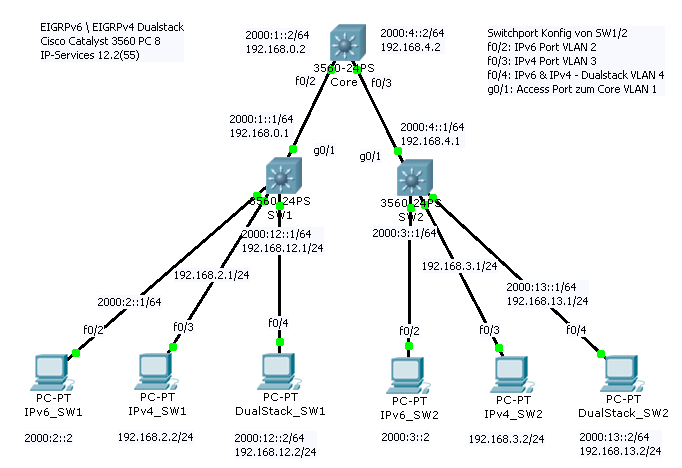
So lets jump into a full blown network! ^^
Tada!
Well - its not too "full blown" - but a working network at last: We got our Routers, Switches, PCs and EIGRP - and an Application thats driven by IPv4 and IPv6 called "ping" and "ping6" - thats something, ain't it?
But first: What is Dual Stack? Well. Thats an easy one: Running your network on Dual Stack does mean using IPv4 and IPv6 in co-existence. Nothing more and nothing less. Your normal Ethernet Switch does Switch IPv4 and IPv6 the same - as Layer 2 does not differ between both. Layer 2 is MAC, IPv4/6 do come in mind on Layer 3 - to the Routers mind, so to say.
Sadly, I don't had any Cisco 1841 or similar machines for this project - and I did wanted to test these settings in an rather small Lab before jumping to our "spare" Cisco VSS Team and hacking that thing to kingdom come. Therefore, I used serval Catalyst 3560 PC 8, which are small Cisco Layer3+ Switches and could replace the routers.
To get the Switches to become IPv6 Routers, we need to install an new IOS with IP-Services Feature Set or higher. You can do that be erasing the Switch flash and download an new IOS by using the archive sw command from an tftp ( archive download-sw /allow-feature-upgrade /reload tftp://IP/c3560-ipservicesk9-tar.122-55.SE.tar ). As you see, I did use the 12.2(55)SE Firmware, as the new 58 got some really nasty changes in Terms of Smartport Features.
After our Switch(es) did reload, we need to configure an new SDM Template. The Switching Database Manager is not some piece of software, in truth its more some kind of ressource template. By changing this SDM Template, you change the way how the Ternary Content Addressable Memory (TCAM) is seperated. The TCAM is an very small but fast piece of RAM which does save Information like MAC Addresses, Routes, VLANs and so on. If you change the SDM Template, you change the amount of space which is avaiable for an Information. i.e. VLANs. If you choose the "Routing" Template - your Switch will put more memory onto Routes, if you choose the "VLAN" Template, your switch will support more VLANs but disable routing - and if you choose "Default", you get an mix of both. So, SDM Templates can be mission critical. And, they are fixed! You can't change the amount or divison of memory - only which template is used. As we want to use our Switch not only as Layer 2 Device, but DualStack Router, we need to change to an DualStack Routing SDM template - to really support IPv6 and Routing.
int vlan 3
ip address 192.168.2.1 255.255.255.0
no shut
int f0/3
switchport access vlan 3
spanning-tree portfast
no shut
end

Feedback is always important, especially if its about working with other people.
For our little (now over 10 year lasting) monthly meeting we wanted an Mailaccount to which people could send ideas and other stuff - but before the Mail would be forwared to the "heads" accounts, we wanted an function to strip off the senders email address - as we wanted to give them the freedom of sending anonymous feedback with their current Mailaccounts (yeah, we won't be able to answer because of that - but its ok!).
So I came up with that little .procmailrc File. It will copy the mail, strip off the sender and replace it with its own and send it to the mail@domain.com Account.
I used ( http://www.uibk.ac.at/zid/systeme/mail/procmail/extend_procmail.html#Weiterleiten3 ) to get to that point. Thanks guys for writing down that infos!
LOGFILE=$HOME/.procmailrc.log
VERBOSE=no
:0 cw
* ^Subject:.*
| formail -k \
-I "To: mail@domain.com" -X "To:" \
-X "Subject:" \
| $SENDMAIL $SENDMAILFLAGS -t
Good News Everyone,
I'm finally back to work. I managed to complete my apprenticeship as "IT Systemelektroniker" successfully and am still working at my old place.
At the moment, I'm diving into IPv6 and Cisco IPv6 Worlds and already got an Lab up and running - so maybe you get some fresh files and stuff soon.
Thanks for your patience!
Nico
Hi there,
some of you might have been wondering why there weren't that much updates in the last weeks.
Reasons are simple:
1.) I'm going to write my finals on 4 of May.
2.) My Convention Managment System JCTixx, which has been in Development for about 10 Months and 1000 Manhours, is going through its Final Live Test on 7. - 8. of May in Ludwigshafen on the Hanami. I'm looking forward to serval 1000 to 10000s of Scans and Transactions. So... I pray for the T-Com to keep their systems up and running!
After that and some vacation, business as usual - at least I hope so.
For the time beeing, I recommend you some Portal 2 ;-).
Have fun!
Yours sincerly,
Nico
To install wget and curl onto pfSense,
use /usr/sbin/pkg_add -r wget and /usr/sbin/pkg_add -r curl
After that, use the command rehash
Alternative to wget is fetch avaible and installed
If you need to access your pfSense with WinSCP (i.e.), activate SSH in pfSense first.
After that, you can log in with the Account root (!!!) and your Webconfiguration password.
Yeah, that saved my day after hours of trying to... "work-around".
I needed to connect an UMTS Stick (O2 Surfstick) to an VM Machine which should serve as "Router".
No problem - ESXi does support "USB Direct Through" - so you can easily connect an USB Stick to your VM...
At least, thats "normally" the Case:
With UMTS Sticks, this feature doesn't work.
Why?
UMTS Sticks start up with an U3 Partition with all that needed, nice connection software....
And therefor, ESXi does see an CD Rom - which doesn't show up within USB.
And... how to solve that?
Luckily I found this post: https://forum.openwrt.org/viewtopic.php?id=26045
Which does contain the secret sauce:
Just connect your USB Stick to an already installed System... (your Laptop with the Connection Software and Drivers i.e.)
Look up your UMTS Stick within the Device Manager, get the COM Port.
Open Putty (9600 Baud worked for me, the Original Author does think of: 115200 kbps, 8 data bits, parity none, stop bits 1, Flow control None) with that Com Port.
Type in: AT+ZOPRT=5 and AT+ZCDRUN=8
Thats it!
Now the U3 doesn't show up anymore, and it works!!
To reenable the feature, enter AT+ZCDRUN=9
For Huawei E160G / T-Mobile Surfstick V / Essential:
CD – Rom Funktion deaktivieren at^u2diag=0
CD – Rom Funktion aktivieren at^u2diag=1
Additional Links:
http://3g-modem.wetpaint.com/page/ZTE+AT-commands
http://3g-modem.wetpaint.com/page/Huawei+AT-commands
Finally, I got it working.
Its quite easy with these two Tutorials:
http://wiki.ip-phone-forum.de/telefone:snom:konfiguration?&#mass_deployment_-_schritt_fuer_schritt
But Things you should really know about:
- If you use an Unix TFTP Server for autoprov. do write the Filename of your phonesettings which does contains your Phones MAC in UPPER LETTERS!... i.e. settings-0023456700AE - otherwise it could fail
- Set right permissions for your settings
And if you would love to upgrade your Snom 360 Phones to Firmware 8, upgrade it from 6 to 6.5, 6.5 to 7 and from 7 to 8.
I got the vmware virtualcenter server error 1000 odbc error on bootup of my Windows Server 2003 (64bit) which did serve my vCenter Server.
In fact this did mean in my case: The MSSQL Server didn't boot / or too slow, so that vCenter Server came up - couldn't access the DB and shutdown - "great!".
Luckily, there is an solution, pointed to by this ( http://communities.vmware.com/message/1247357 ) and this Website ( http://blogs.egroup-us.com/?p=1821 )
In the end I solved my problem following:
cmdline:
sc config vpxd depend= rpcSs/lanmanworkstation/MSSQL$SQLEXP_VIM/ADAM_VMwareVCMSDS
With these new dependencies, vCenter should boot up on boot... at least it did that last time... ^^'.